The PingOne Postman collections
You can get the PingOne Verify API Postman collection by following either of these methods for retrieving a Postman collection into your workspace:
-
Fork the collection into your workspace. Postman retains an association between the source and your fork. If we update the source collection, you can pull those changes into the fork in your workspace.
-
Import the collection into your workspace. This is a one-time transfer and retains no association to the source collection.
To retrieve a collection
Refer to The PingOne Verify API collections on this page.
-
Click the collection’s Run In Postman button.
-
At the prompt, click Fork Collection at the bottom of the dialog or click import a copy near the bottom of the dialog.
You need to be logged in to your Postman account to retrieve the collection. 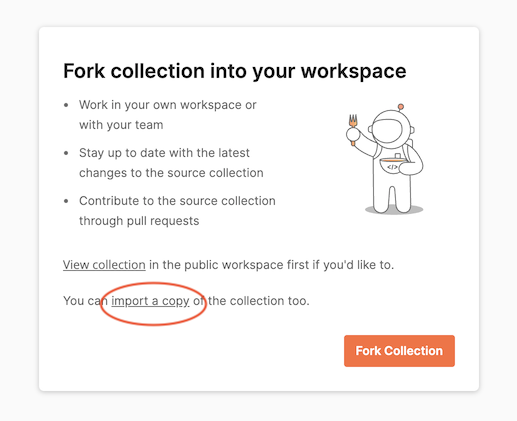
-
Follow the on-screen instructions to fork or import the collection. You’re prompted to select a Postman workspace for the retrieved collection.
When you fork a Postman collection, you create a copy of it in a selected workspace. Forking a collection creates a linked version that synchronizes with its source collection. This synchronization is apparent when you click the three dots icon on the forked collection - you’ll see Pull changes on the context menu. When you click Pull changes, Postman compares the fork to the source collection. If changes are available, you can pull those changes into your fork. If you also elect to watch the collection, you’ll receive notifications when the source changes.
If you import a collection, a copy is created in the selected workspace with no link back to the source. The collection is static. This might be desirable for some use cases. For example, if you intend to keep and use only some requests in a collection, a link back to the source is not needed.
You’re not limited to choosing one method or the other. You can fork a copy to track the source and import a copy for experimentation, if you like.
The PingOne Verify API collections
These Postman collections include requests for all create, read, update, and delete (CRUD) operations for the PingOne Verify APIs.
The collection without documentation is intended for developers who want to get started quickly. It has no collection folders without requests and no example responses to reduce the collection to only what you need for testing. Furthermore, when you clone or import this collection, Postman also adds a Postman environment with every variable used by the collection.
The collection with documentation is intended for developers who want to understand the request and response details. Every folder and every request includes a Markdown version of the topic found on the API documentation site and a link to that topic. Example responses include the request used to create the example in the originalRequest property of the example response.
| Collection | Description | Retrieve |
|---|---|---|
PingOne Verify |
Postman requests for the PingOne Verify API. Includes all environment variables. No example responses to make it easy to get started. |
|
PingOne Verify |
Postman requests for the PingOne Verify API. Includes all PingOne Platform APIs documentation and example responses. No environment variables are included. |
For more information about the Postman environment variables included when you download or fork one of our Postman collections, refer to The PingOne Postman environment template.