OIDC session management
You can manage user sessions per spec with OpenID Connect Session Management 1.0. This solution allows applications in background tabs to detect a change due to inactivity or a sign-off from a foreground tab and react accordingly.
After a successful authentication, a PingOne OpenID Provider (OP) session is created. The session state changes because of one of the following:
-
The user signs off as a result of a
/as/signoffrequest or a SAML SLO request -
The session times out
Applications in the same browser context can check user sessions regularly, and PingOne returns unchanged, changed, or error.
Requirements
-
The environment must be configured with a custom domain with applications accessible under the same main domain. For example, if the custom domain in PingOne is
sso.example.local, applications must be in an accessible subdomain such asapps.example.localorwww.example.com/app1. -
Because the default idle timeout for a PingOne user session is 30 days, a DaVinci flow is required for a shorter timeout period.
-
A session that’s purged by the system or deleted as a result of a PingOne session API request will not trigger a changed response.
Application configuration
To enable OIDC session management, set the opSessionCheckEnabled property of an OIDC application to true. When enabled, PingOne includes the session_state parameter in the authorization response, which is an opaque value PingOne returns to the application to represent the user’s login state. For example, when using the authorization code grant type with query response mode, the authorization response contains <redirect_uri>?session_state=<sessionState>&code=<code>.
|
Note: Although the |
To return the session state, the application invokes the https://<customDomain>/as/checksession endpoint as the src property of the OP iframe.
<iframe id="op" src="https://auth.mydomain.com/as/checksession" width="0" height="0" frameborder="0"></iframe>.
The iframe returns changed if the value doesn’t match what’s passed from the relying party (RP), otherwise it returns unchanged. If no ST or OPUAS cookies are found, the iframe returns error.
DaVinci flow
To implement this capability, build a DaVinci flow and assign it to the relevant applications. Use the Return Success Response (Redirect Flows) node from the PingOne Authentication connector to return to PingOne. The following image demonstrates a sample flow.
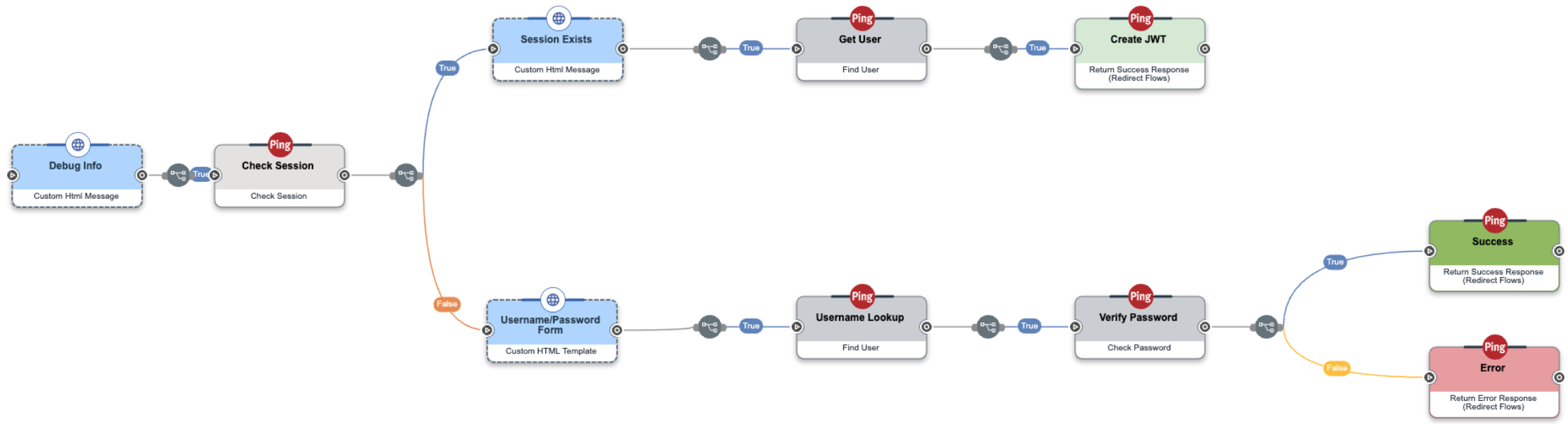
This flow checks whether a session exists. If so, it returns to PingOne. Otherwise, it prompts the user for authentication and returns to PingOne.
Typically, all Return Success Response nodes in the flow should use the same Idle Timeout value so that end users experience consistent sign-on and session behavior.