API requests
Public endpoints
This section discusses making requests to public endpoints using geographic domains in your PingOne environment. If you use the Postman environment template retrieved when you Download the PingOne Postman collections, set the value of {{tld}} to the top level domain (TLD) appropriate to your region. Refer to PingOne API domains in the PingOne Platform APIs for more information. When you set {{tld}}, the {{…Path}} variables are also set to the appropriate region.
PingOne offers separate services that each require all its API requests go to an exclusive domain. Use the tables below to determine the service endpoint and top level domain {{tld}} value of the geography appropriate for your environment:
| Region | Code | Top level domain |
|---|---|---|
North America geography (excluding Canada) |
NA |
|
Canada region |
CA |
|
European Union region |
EU |
|
Australia region |
AU |
|
Singapore region |
SG |
|
Asia-Pacific region |
AP |
|
|
An organization can define and manage environments in only one geographic domain at this time. |
| Service | Postman variable | Endpoint | Description |
|---|---|---|---|
Environments |
|
|
PingOne API services for environments. |
Authentication |
|
|
PingOne API services for authentication. |
DaVinci |
|
|
PingOne API services for DaVinci Management. |
SCIM |
|
|
PingOne API services for Cross-domain Identity Management (SCIM). |
Authorization
To make a call to the PingOne API, you’ll need an OAuth 2.0 access token for API authentication. The access token (a JSON Web Token) is accepted per RFC 6750 most commonly through the Authorization HTTP request header. In the code samples in this document, the access token is expressed in the request header as Authorization: Bearer accessToken, where accessToken is a full base64url-encoded JSON web token generated by the authentication service.
HTTP methods
The PingOne API supports the following HTTP methods. Note that a resource may not support all listed methods below. When a method is not supported, the platform returns a 405 METHOD NOT ALLOWED error in the response.
-
POSTCreates a new resource in the collection. If a specific resource is identified, it performs an operation on that resource.
-
PUTUpdates a resource in the collection. If a specific resource is identified, it updates all attribute values of the resource.
-
PATCHUpdates the attributes on an object or a partial update for the specified attributes.
-
GETLists or queries a collection of resources. If a specific resource is identified, it returns the attribute values for the specific resource.
-
DELETEDeletes or unlinks a resource from the collection.
A resource supports updating either by replacing the resource (PUT) or partially updating the resource (PATCH).
Replacing a resource
A PUT request is a replace operation. Requests submitted using PUT will replace attribute values specified in the request and clear any attribute values that aren’t specified.
A null value is represented in a resource by omitting the property, although you can specify null to explicitly clear the value.
Partial updates to a resource
A PATCH operation performs partial updates of a resource. The body of a PATCH operation is similar to that of a PUT operation. However, omitting an attribute in a PATCH operation results in the attribute being ignored.
You can use a value of null to explicitly clear the value.
Supported data exchange formats
The PingOne API supports JSON as the data exchange format with UTF-8 character encoding required for request body content. For PUT, POST, and PATCH operations, the Content-type request header identifies the format of the request body. A Content-type request header value of application/json specifies the data exchange format as JSON, which, by default, sets the character encoding to UTF-8. Here is a sample:
curl -vX PUT "https://api.pingone.com/v1/environments/{{envID}}/populations/{{popID}}" \
-H "Content-type: application/json" \
-H "Authorization: Bearer accessToken" \
-d "{
  "name" : "Finance",
  "description" : "Finance and accounting group"
}"
Endpoint example variations
For clarity of request variations, we present the example requests in our documentation as though they’re separate endpoints.
For example, the POST Create Application operation has several request variations. Rather than showing multiple examples, we break this down into multiple reference pages.
Data models
PingOne data models list the possible properties in a request or response body for each endpoint at a high level. The data models have five columns, described below.
-
Property
The name of the property.
-
Type
The valid data type for the property value. Possible options include: String, Integer, Boolean, Array.
-
Required
Whether the property is required for creating, updating, or otherwise modifying or acting upon a resource.
-
Mutable
Whether the property can be changed after its initial setting. The possible options are:
-
Mutable - Values that can be provided as input when creating, updating, or otherwise modifying or acting upon a resource.
-
Read-only - Values provided in the response resource only and not used/ignored for input.
-
Immutable - Values provided in the input when creating a resource, but otherwise treated as read-only for subsequent operations.
-
-
Description
A more detailed definition of the property. This could include a list of accepted values, the default value when left blank, circumstances in which the property is required or optional, or just an example value.
UUIDs for resource identification
Resources in PingOne are identified by their associated UUID (universally unique identifier). API requests use UUIDs in the request URL to specify the resources involved in the operation. For clarity, the code samples in this API Reference use descriptive variables such as {{envID}}, {{userID}}, {{appID}}, and {{deviceID}} to represent the UUIDs assigned to PingOne resources.
For example, the following sample request URL specifies a unique device associated with a unique user in a unique environment. The resource ID variables represent specific UUIDs for PingOne resources.
curl -X "GET" "https://api.pingone.com/v1/environments/{{envID}}/users/{{userID}}/devices/{{deviceID}}"The actual request URL with UUIDs looks like this:
curl -X "GET" "https://api.pingone.com/v1/environments/5caa81af-ec05-41ff-a709-c7378007a99c/users/8ce55f02-2077-4493-9a6d-0385df1f0772/devices/4ca9eb79-be29-4a1f-9a23-b29d58606e18"There are a few exceptions to this convention. Notifications template names in PingOne are identified by the template name {{templateName}} rather than by a UUID. For example, the following request URL returns information about a specific template:
curl -X "GET" "https://api.pingone.com/v1/environments/5caa81af-ec05-41ff-a709-c7378007a99c/templates/{{templateName}}The {{templateName}} variable is replaced by one of the pre-defined notifications template names in PingOne. The actual request URL that uses a defined notifications template called strong_authentication looks like this:
curl -X "GET" "https://api.pingone.com/v1/environments/5caa81af-ec05-41ff-a709-c7378007a99c/templates/strong_authenticationPlaceholder syntax
Some requests use placeholder syntax to reference platform resource entities as variables. When placeholder syntax is required, the PingOne resource used as a variable is expressed in placeholder syntax format as ${attribute}. For example, when mapping a SAML name attribute to the PingOne username attribute, the value of the PingOne attribute in the POST request body is expressed as ${user.username}. In most cases where placeholder syntax is required, the placeholder references attributes in the PingOne user schema. The variable is written as a path to the value: ${user.path.to.value}. For example, to reference the name.family user attribute, the variable is written as ${user.name.family}.
Placeholder syntax is also used to express sign-on policy condition variables. For example, a condition variable to specify the last completed time the password authenticator was used for sign on is expressed as ${session.lastSignOn.withAuthenticator.pwd.at}.
Placeholders in sign-on policy conditions often specify a value or range of values to meet the sign-on condition. For example, the sign-on policy associated with the following condition prevents sign-on from devices that contain the remote IP address value specified by the variable ${flow.request.http.remoteIp} in the specified IP address ranges.
"condition": {
   "not": {
        "ipRange": [
            "10.1.1.1/8",
            "10.0.0.0/8"
        ],
        "contains": "${flow.request.http.remoteIp}"
    }
}
Placeholders are also used to specify external identity provider attributes. For example, to specify a Facebook attribute that is mapped to a PingOne attribute, the Facebook attribute is expressed as ${providerAttributes.<Facebook attribute name>}. For example, the following expression maps the PingOne username attribute to the Facebook email attribute.
{
    "name": "username",
    "value": "${providerAttributes.email}"
    "update": "EMPTY_ONLY",
}
The following table shows the PingOne resources that use Placeholder syntax in POST requests.
| PingOn resource | Placeholder example |
|---|---|
|
|
|
|
|
|
|
|
|
Request model and query parameter expandable sections
Request model and query parameters expandable sections are included in our API documentation when applicable.
For an example of each, refer to the expandable Request model and Query parameters sections in Create Application (OIDC Protocol - Worker App).
Link expansion
You can optimize the information returned by a request through link expansion. Link expansion is helpful when you need the query to return detailed information from an additional resource in the response data. You can identify a resource to expand using the expand query string parameter in the request.
Here is a sample that requests data for a specific user and expands the passwordPolicy attribute to show the password policy’s attribute data.
curl -X GET "https://api.pingone.com/v1/environments/{{envID}}/users/{{userID}}/password?expand=passwordPolicy" \
-H "Authorization: Bearer accessToken"
When using the expand parameter in the request, the returned JSON includes an embedded passwordPolicy resource to show the details of the password policy associated with this user:
{
    "_links": {
        "self": {
            "href": "https://api.pingone.com/v1/environments/5caa81af-ec05-41ff-a709-c7378007a99c/users/b94f4977-0d52-4c9d-a5da-e7d42a82f613/password"
        },
        "environment": {
            "href": "https://api.pingone.com/v1/environments/5caa81af-ec05-41ff-a709-c7378007a99c"
        },
        "user": {
            "href": "https://api.pingone.com/v1/environments/5caa81af-ec05-41ff-a709-c7378007a99c/users/b94f4977-0d52-4c9d-a5da-e7d42a82f613"
        },
        "passwordPolicy": {
            "href": "https://api.pingone.com/v1/environments/5caa81af-ec05-41ff-a709-c7378007a99c/passwordPolicies/9ad15e9e-3ac6-43f7-86d3-01018f6ef0ad"
        },
        "password.check": {
            "href": "https://api.pingone.com/v1/environments/5caa81af-ec05-41ff-a709-c7378007a99c/users/b94f4977-0d52-4c9d-a5da-e7d42a82f613/password"
        },
        "password.reset": {
            "href": "https://api.pingone.com/v1/environments/5caa81af-ec05-41ff-a709-c7378007a99c/users/b94f4977-0d52-4c9d-a5da-e7d42a82f613/password"
        },
        "password.set": {
            "href": "https://api.pingone.com/v1/environments/5caa81af-ec05-41ff-a709-c7378007a99c/users/b94f4977-0d52-4c9d-a5da-e7d42a82f613/password"
        },
        "password.recover": {
            "href": "https://api.pingone.com/v1/environments/5caa81af-ec05-41ff-a709-c7378007a99c/users/b94f4977-0d52-4c9d-a5da-e7d42a82f613/password"
        }
    },
    "environment": {
        "id": "5caa81af-ec05-41ff-a709-c7378007a99c"
    },
    "user": {
        "id": "b94f4977-0d52-4c9d-a5da-e7d42a82f613"
    },
    "passwordPolicy": {
        "id": "9ad15e9e-3ac6-43f7-86d3-01018f6ef0ad"
    },
    "status": "NO_PASSWORD",
    "lastChangedAt": "2019-05-21T18:01:07.413Z",
    "_embedded": {
        "passwordPolicy": {
            "_links": {
                "self": {
                    "href": "https://api.pingone.com/v1/environments/5caa81af-ec05-41ff-a709-c7378007a99c/passwordPolicies/9ad15e9e-3ac6-43f7-86d3-01018f6ef0ad"
                },
                "environment": {
                    "href": "https://api.pingone.com/v1/environments/5caa81af-ec05-41ff-a709-c7378007a99c"
                }
            },
            "id": "9ad15e9e-3ac6-43f7-86d3-01018f6ef0ad",
            "environment": {
                "id": "5caa81af-ec05-41ff-a709-c7378007a99c"
            },
            "name": "Standard",
            "description": "A standard policy that incorporates industry best practices",
            "excludesProfileData": true,
            "notSimilarToCurrent": true,
            "excludesCommonlyUsed": true,
            "maxAgeDays": 182,
            "minAgeDays": 1,
            "maxRepeatedCharacters": 2,
            "minUniqueCharacters": 5,
            "history": {
                "count": 6,
                "retentionDays": 365
            },
            "lockout": {
                "failureCount": 5,
                "durationSeconds": 900
            },
            "length": {
                "min": 8,
                "max": 255
            },
            "minCharacters": {
                "1234567890": 1,
                "abcdefghijklmnopqrstuvwxyz": 1,
                "ABCDEFGHIJKLMNOPQRSTUVWXYZ": 1,
                "~!@#$%^&*()-_=+[]{}|;:,.<>/?": 1
            },
            "default": true
        }
    }
}
Try a Request
Our documentation includes an interactive Try a Request feature. The Try a Request feature enables you to configure and send a PingOne API request and get a response from within the documentation. This is a quick way to interactively test a PingOne API request without needing to use either Postman or the command line.
The Try a Request option is shown at the end of each API reference page. For an example, try the Try a Request button in Create User.
Changing example request language
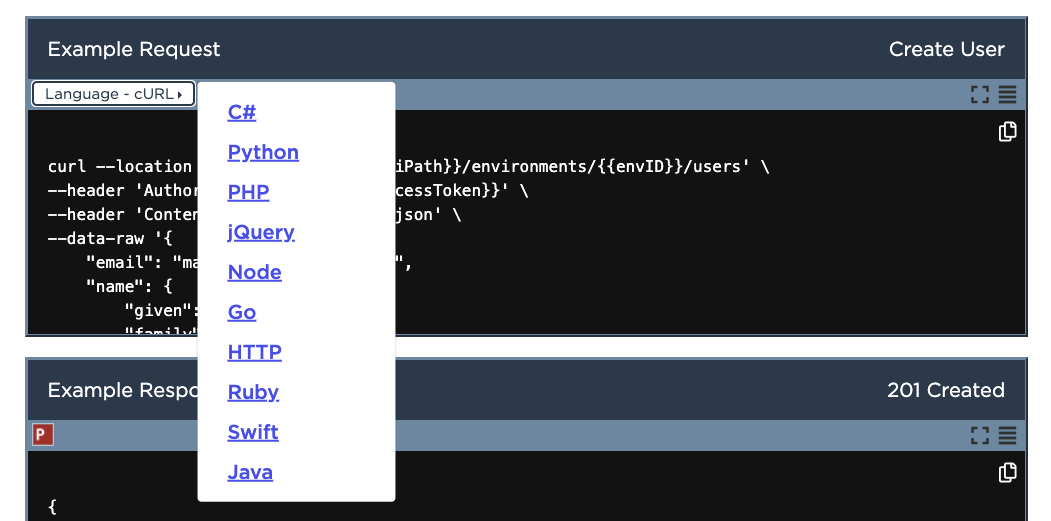
PingOne API documentation includes example requests for each operation. By default, the request is shown in cURL, however, the programming language can be changed by selecting the Language drop-down.
The image below shows the Language drop-down in the example request in Create User.
Cross-origin resource sharing
PingOne supports cross-origin resource sharing (CORS), which gives applications running at different domains permission to access resources on PingOne servers. For example, an application at https://myapp.com that uses PingOne to authenticate users needs to request permission to access resources at https://auth.pingone.com before authentication operations are executed. In this case, a request is made to the resource owner (auth.pingone.com) from the requestor (myapp.com) using CORS headers to ask for access privileges. The response from auth.pingone.com returns the CORS Access-Control-Allow-Origin header with a value that confirms the requestor’s access rights.
PingOne servers are configured to trust all origins when using access tokens. However, when requesting sensitive resources that use PingOne session cookies for authentication, only specified origins will be trusted. The following endpoints require session cookies for authentication, and only the origins specified in the application’s corsSettings property will be trusted when calling these endpoints:
/{envId}/saml20/idp/sso
/{envId}/saml20/idp/startsso
/{envId}/saml20/resume
/{envId}/saml20/idp/slo
/{envId}/as/authorize
/{envId}/as/resume
/{envId}/as/signoff
/{envId}/wsf/sts/{appId}
/{envId}/wsf/mex/{appId}
/{envId}/wsf/prp/{appId}
/{envId}/wsf/prp/resume
When using session cookies for authentication, no origins will be trusted when calling these endpoints:
/{envId}/rp/authenticate/{envId}/rp/callback/{callbackId}
/{envId}/saml20/sp/sso
/{envId}/saml20/sp/acs
/{envId}/saml20/sp/jwtacs
/{envId}/as/txs
Consequently, when defining an application’s connection to PingOne, you generally do not need to add your application’s domain to a list of trusted origins. Cross-origin requests that use HTTP methods to modify the resource, such as PUT, PATCH, POST, and DELETE, trigger a preflight request to ensure that the initial request can be sent. The browser initiates a preflight HTTP OPTIONS request to verify that the HTTP method used in the actual request is allowed. In these cases, the response from auth.pingone.com to the preflight request returns a response with the CORS Access-Control-Allow-Methods header to specify the allowed methods.
When making CORS requests, only these headers can be used:
-
Accept -
Accept-Language -
Content-Language -
Content-Type -
Range -
Authorization -
Content-Length -
Cookie -
Correlation-Id -
Origin -
Origin-Cookies -
RefererorReferrer -
X-Amz-Date -
X-Amz-Security-Token -
X-Api-Key -
X-client-version -
X-Content-Type-Options
When accessing CORS responses, you’re restricted to reading only the Correlation-Id header (as well as the request body).
Attempting to submit or access headers that are not listed above may prevent you from making CORS requests or reading the responses.
Forced type conversion of floating point numbers in requests
PingOne truncates a float value submitted in the JSON request body to a matching int value for services other than flow orchestration. For example, in the following request body JSON, the minAgeDays value can be submitted with a value of 1.5.
{
  "name": "Standard",
  "description": "A standard policy that incorporates industry best practices",
  "excludesProfileData": true,
  "notSimilarToCurrent": true,
  "excludesCommonlyUsed": true,
  "maxAgeDays": 182,
  "minAgeDays": 1.5,
  "maxRepeatedCharacters": 2,
  "minUniqueCharacters": 5,
  "history": {
    "count": 6,
    "retentionDays": 365
  },
  "lockout": {
    "failureCount": 5,
    "durationSeconds": 900
  },
  "length": {
    "min": 8,
    "max": 255
  },
  "minCharacters": {
    "~!@#$%^&*()-_=+[]{}|;:,.<>/?": 1,
    "0123456789": 1,
    "ABCDEFGHIJKLMNOPQRSTUVWXYZ": 1,
    "abcdefghijklmnopqrstuvwxyz": 1
  },
  "default": true
}
The request will execute. However, the response shows that the minAgeDays value is converted automatically to an int value:
{
  "_links": {
    "self": {
      "href": "https://api.pingone.com/v1/environments/5caa81af-ec05-41ff-a709-c7378007a99c/passwordPolicies/ad53ea0b-28b3-413f-a762-46eaf929ab78"
    },
    "environment": {
      "href": "https://api.pingone.com/v1/environments/5caa81af-ec05-41ff-a709-c7378007a99c"
    }
  },
  "id": "ad53ea0b-28b3-413f-a762-46eaf929ab78",
  "environment": {
    "id": "5caa81af-ec05-41ff-a709-c7378007a99c"
  },
  "name": "Standard",
  "description": "A standard policy that incorporates industry best practices",
  "excludesProfileData": true,
  "notSimilarToCurrent": true,
  "excludesCommonlyUsed": true,
  "maxAgeDays": 182,
  "minAgeDays": 1,
  "maxRepeatedCharacters": 2,
  "minUniqueCharacters": 5,
  "history": {
    "count": 6,
    "retentionDays": 365
  },
  "lockout": {
    "failureCount": 5,
    "durationSeconds": 900
  },
  "length": {
    "min": 8,
    "max": 255
  },
  "minCharacters": {
    "~!@#$%^&*()-_=+[]{}|;:,.<>/?": 1,
    "0123456789": 1,
    "ABCDEFGHIJKLMNOPQRSTUVWXYZ": 1,
    "abcdefghijklmnopqrstuvwxyz": 1
  },
  "default": true
}
Note that the value of the floating point number is not rounded. It is trimmed by removing the decimal portion of the value.
For flow orchestration services such as sign-on policy actions, float values submitted in the JSON request body generate an INVALID_VALUE error. For example, the following request body with a priority attribute value of 1.5 generates an error:
{
    "priority": 1.5,
    "type": "MULTI_FACTOR_AUTHENTICATION",
    "recovery": {
    	"enabled": false
    },
    "sms": {
        "enabled": true
    },
    "voice": {
        "enabled": true
    },
    "email": {
        "enabled": true
    },
    "applications": [
        {
            "id": "5e81bba1-1234-457c-926a-aae0e9876543",
            "autoEnrollment":{"enabled":true}
        }
    ]
}
The response error looks like this:
{
  "id": "15051F81-2500-4BBB-BE4A-0AF31DD50205",
  "code": "INVALID_REQUEST",
  "message": "The request could not be completed. The request was malformed or invalid.",
  "details": [
    {
      "code": "INVALID_VALUE",
      "target": "priority",
      "message": "Invalid value for attribute."
    }
  ]
}