DaVinci Flow Executions
The flow execution APIs called to initiate a DaVinci flow depend on whether the flow is a PingOne flow or a DaVinci (non-PingOne) flow. PingOne flows use the PingOne authorize endpoint /as/authorize to initiate the authentication workflow. DaVinci flows use the /policy/{{davinciFlowPolicyID}}/start endpoint to initiate the flow.
The PingOne initiated flows provide these configuration options that determine the data structure of the responses:
-
JSON responses in flow execution
The authorize request and flow endpoints return concise and trimmed JSON responses with only functional details. Flow execution results in a valid session.
-
Detailed responses in flow execution
The authorize request and the flow endpoints return verbose responses that include properties such as the frontend HTML and scripts to build the interface forms. Like the scenario above, the flow execution results in a valid session.
-
External identity provider option
The sign-on screen from the PingOne authorization server presents users with an option to choose an external identity provider that uses a DaVinci flow to authenticate the user.
Refer to PingOne Initiated Flows for configuration details.
DaVinci native flows do not use the PingOne authorize request to start the flow.
-
Direct flow executions using DaVinci APIs
Direct flow executions use the DaVinci
/startrequest to initiate the flow. This scenario is often used for flows that do not require user interactive steps. It supports use cases where you need flexibility in sending custom JSON responses to the client, whether flow execution succeeds or fails. For these flows, successful flow execution may not require obtaining a valid session as a result.Refer to DaVinci Direct Flow Executions for configuration details.
DaVinci flow settings configuration
DaVinci flows invoked using a PingOne authorize request require special configuration. In DaVinci, when you create your flow, on the flow’s Settings screen, you must toggle on the PingOne Flow property located on the General tab.
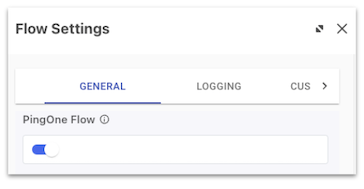
Setting this property indicates that the flow is a PingOne flow, enabling it to be included in PingOne flow policies and launched directly from PingOne. The JSON responses and Detailed responses PingOne initiated workflows require the PingOne Flow designation. DaVinci flows initiated through PingOne as an external identity provider do not need to be set as a PingOne Flow.