Exchanging custom JSON with DaVinci flows using the Orchestration SDK Connector
PingOne Android iOS JavaScript
DaVinci flows can pause and exchange arbitrary JSON with your application using the Orchestration SDK Connector.
Overview of Orchestration SDK Connector data exchange
The Orchestration SDK Connector pauses a DaVinci flow and exchanges arbitrary JSON with your application.
When the flow reaches the connector node, DaVinci evaluates the JSON configured in the connector’s Custom Metadata (JSON) field and pauses the flow:
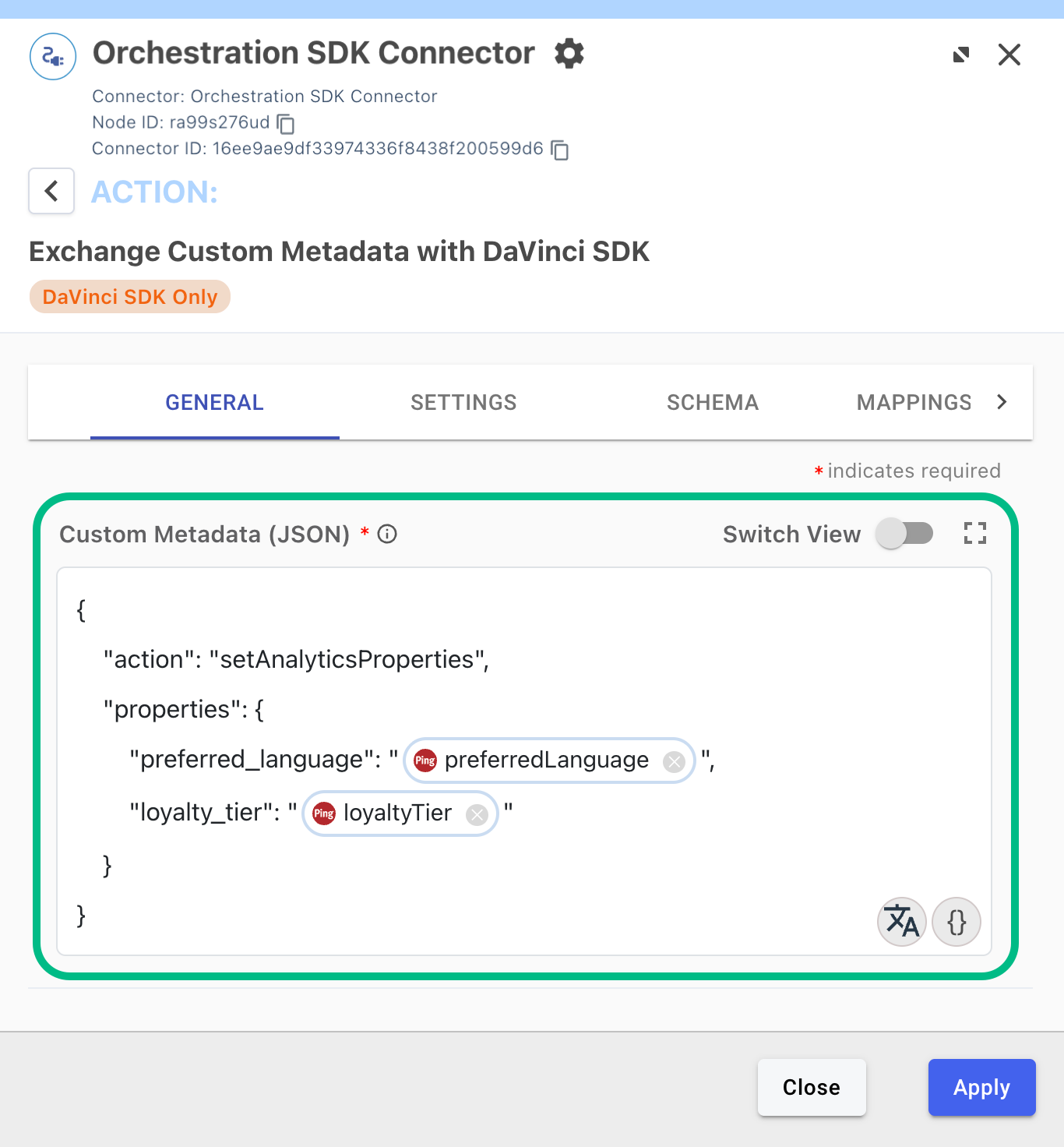
In an application using the Orchestration SDK, the step is delivered as a MetadataCollector, which exposes the configured JSON to your application.
Your application reads the JSON, performs any on-device work it needs to, and returns a JSON result to the flow. The DaVinci flow then resumes, and the returned JSON is available to subsequent nodes in the flow.
The exchange is therefore a pause and resume pattern:
-
The flow sends your application a JSON payload and pauses.
-
Your application acts on the payload using any SDK or logic available on the device.
-
Your application returns a JSON result, or a structured error.
-
The flow resumes and branches on the result.
The Orchestration SDK does not inspect or validate the JSON in either direction. The shape of the payload is an agreement between the flow builder and the application developer.
The payload sent to your application
The flow builder configures the JSON that the connector sends, and can include DaVinci variables that are resolved at runtime, for example values from the user’s PingOne profile, or from other connectors in the flow:
{
  "action": "setAnalyticsProperties",
  "properties": {
    "preferred_language": "en-uk",
    "loyalty_tier": "gold"
  }
}
Your application receives this object through the collector:
-
On the Android and iOS Orchestration SDK, the payload is exposed as the collector’s
metadata. -
In the JavaScript Orchestration SDK, the payload is exposed as the collector’s
output.config, on the collector object returned fromgetCollectors().
The result returned to the flow
After your application finishes its on-device work, it sets a JSON result on the collector before continuing the flow. The Orchestration SDK posts the result back to DaVinci, where the connector exposes it to the rest of the flow through its output schema. The result is also arbitrary JSON; return whatever the flow needs to act on.
{
  "status": "success",
  "propertiesSet": ["preferred_language", "loyalty_tier"]
}
The flow builder can then reference these values in subsequent nodes, for example output.status or output.propertiesSet, and branch on them.
If the application cannot complete the work, it can set a structured error instead. Unlike the result, this envelope is fixed: the Orchestration SDK always posts an error object containing your code and message values.
{
  "error": {
    "code": "FIREBASE_UNAVAILABLE",
    "message": "Firebase Analytics is not initialized"
  }
}
The Orchestration SDK provides a dedicated method for building this error envelope on every platform, and DaVinci routes the flow through the connector’s error output when it receives one.
How the flow can branch on the result
The connector does not add branching logic of its own. Once the result is returned, the values inside it are ordinary DaVinci variables, and any decision node in the flow can compare them like any other value.
This means the flow can react to what your application reports. For example:
-
The flow can branch on the outcome. If the application sets an error, the flow follows the connector’s error branch, for example to retry, log the failure, or continue the flow without the result.
-
The flow can branch on the data your application returns. If the application reports that it only set some of the requested properties, for example because a consent preference on the device prevented one of them, the flow can route to another node to resolve the gap, such as a PingOne Form connector that asks the user for consent, and then route back through the connector a second time.
-
The flow can act on richer results. For use cases such as device risk scoring or identity verification, the application returns values such as a risk score or a verification status, and the flow branches on them in the same way.
The pattern is always the same: the flow decides what data matters and what happens next, and the application only implements the on-device work and reports back what happened.
Example JSON data exchange use case
This example use case demonstrates the pattern of exchanging custom JSON data between DaVinci and the Orchestration SDK by leveraging Google Analytics for Firebase:
-
A DaVinci flow reads attributes from the user’s PingOne profile and creates JSON to send to the client.
-
The application sets them as Firebase Analytics user properties for audience segmentation, and the application reports the outcome so the flow can react.
Firebase Analytics is used as the example because it is widely known and available on every platform, not because the connector is limited to it. The exchange pattern is identical for richer round trips: an on-device risk SDK returns a risk score, or an identity verification SDK returns a verification status, and the application sets those values as the result so the flow can branch on them.
Select your platform to implement the use case: