Step 4. Authenticating with external IdPs
PingOne React Native
With your providers configured, you’re ready to wire up social sign-on in your React Native app.
When a user reaches the social sign-on part of a DaVinci flow, the flow returns a ContinueNode containing one IdpCollector for each external identity provider you configured in Configuring social sign-on in PingOne.
To support this flow, your app needs to:
-
Create an
ExternalIdpClientinstance. -
Render a sign-in button for each
IdpCollectorin the node. -
Call
authorizeForDaVinciwhen the user chooses a provider, then advance the flow withdaVinci.next({ collectors: [] }).
The sections below cover each step, followed by error handling.
Creating a client
Create an ExternalIdpClient instance using the createExternalIdpClient function.
Provide a redirectUri that matches the URI scheme you registered in Step 2. Handling URI schemes.
The client is reusable, so create it once and share it across your components, for example with a useMemo hook:
import { createExternalIdpClient } from '@ping-identity/rn-external-idp';

const externalIdp = createExternalIdpClient({
  redirectUri: 'myapp://callback',
});

// The client is reusable. For example, inside a component:
// const externalIdp = useMemo(
//   () => createExternalIdpClient({ redirectUri: 'myapp://callback' }),
//   [],
// );|
On Android, when you omit the |
Rendering the social sign-on buttons
Render one sign-in button for each IdpCollector in the node, so users can choose how to authenticate:
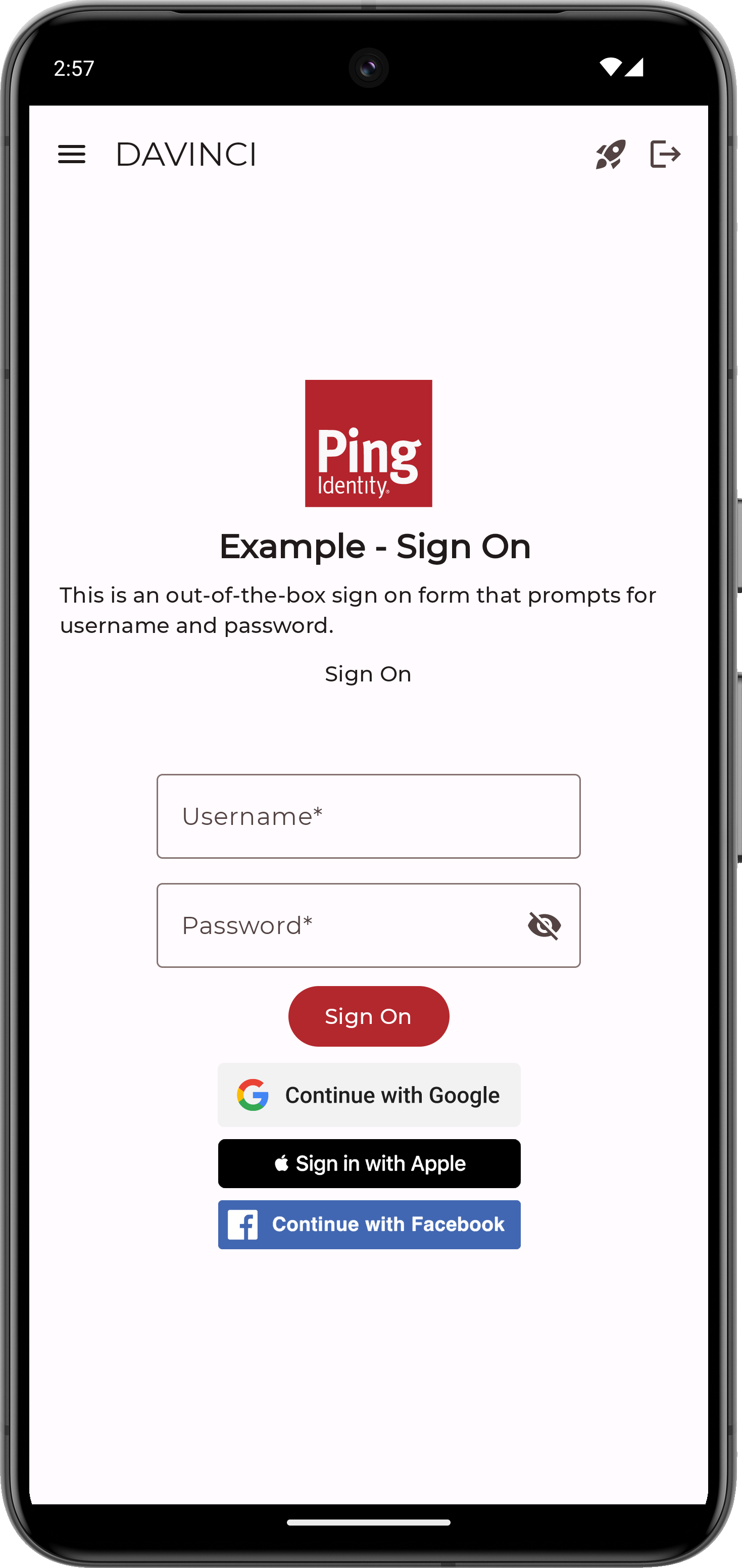
The useDaVinciForm hook manages collector form state and submit planning for the active DaVinci node.
Create the form with the node from useDaVinci, and pass handledCollectorTypes so the social sign-on collectors are excluded from blocking submit issues:
import { useDaVinci, useDaVinciForm } from '@ping-identity/rn-davinci';

const { node, next } = useDaVinci(daVinciClient);

const form = useDaVinciForm(node, {
  handledCollectorTypes: new Set(['SOCIAL_LOGIN_BUTTON']),
});
Without handledCollectorTypes, each SOCIAL_LOGIN_BUTTON collector raises an INTEGRATION_REQUIRED issue and forces form.canSubmit to false, because the module treats these collectors as requiring client-side integration.
When you list SOCIAL_LOGIN_BUTTON in handledCollectorTypes, your app declares that it handles these collectors itself, and form.canSubmit reflects the readiness of the remaining form fields.
DaVinci flows represent each social sign-on option as an IdpCollector collector with the type SOCIAL_LOGIN_BUTTON.
What fields are available in an IdpCollector?
The IdpCollector exposes the following fields:
| Field | Type | Description |
|---|---|---|
|
|
Stable server-assigned IdP identifier. Use this value as the form field key and as the React list key when rendering buttons. |
|
|
The collector type. Always |
|
|
Human-readable button label, for example |
|
|
Server IdP identifier. The same value as |
|
|
The provider type. Use this value to choose an icon or brand styling for the button.
|
|
|
Whether the IdP is currently enabled. Disable the button when this is |
|
|
The IdP authentication URL. Informational only; your app does not use it directly. |
Render one button for each social sign-on collector, using the label and idpType fields from each entry of form.fields to style it:
const idpFields = form.fields.filter((field) => field.type === 'SOCIAL_LOGIN_BUTTON');

return idpFields.map((collector) => (
  <Button
    key={collector.key}
    title={collector.label}
    onPress={() => onIdpAuthorize(collector)}
    disabled={!collector.idpEnabled}
  />
));
Authorizing with the chosen provider
When the user taps a social sign-on button, call authorizeForDaVinci with your ExternalIdpClient and the DaVinci client.
If the node contains more than one IdpCollector, pass the index of the collector the user chose:
import type { IdpCollector } from '@ping-identity/rn-davinci';

async function onIdpAuthorize(collector: IdpCollector): Promise<void> {
  const idpFields = form.fields.filter((f) => f.type === 'SOCIAL_LOGIN_BUTTON');
  const index = idpFields.findIndex((f) => f.key === collector.key);

  try {
    await externalIdp.authorizeForDaVinci(daVinciClient, { index });
    await next({ collectors: [] });
  } catch (error) {
    // Handle the error, see below
  }
}|
The token is carried into the subsequent This is why the call to |
When authorizeForDaVinci resolves, the user has completed authentication with the external IdP, and the next() call advances the DaVinci flow to the next node.
Error handling
All promise rejections from the External IdP module throw an ExternalIdpError instance.
Use instanceof to narrow the type:
import { ExternalIdpError } from '@ping-identity/rn-external-idp';

try {
  await externalIdp.authorizeForDaVinci(daVinciClient, { index: 0 });
  await next({ collectors: [] });
} catch (err) {
  if (err instanceof ExternalIdpError) {
    console.log(err.code, err.message);
  }
}
The error codes are:
EXTERNAL_IDP_AUTHORIZE_ERROR-
The provider returned an error during authorization.
EXTERNAL_IDP_CANCELLED-
The user cancelled the sign-in flow.
EXTERNAL_IDP_UNSUPPORTED_PROVIDER-
The provider is not supported on this platform.
In DaVinci flows the module falls back to a browser redirect when a native provider SDK is not linked, so this error is uncommon.
The most common cause is a misconfigured native provider SDK, for example a Google client ID that does not match your app’s package name or signing certificate.
EXTERNAL_IDP_CALLBACK_NOT_FOUND-
The module could not find a matching
IdpCollectorin the DaVinci node. EXTERNAL_IDP_CONFIG_ERROR-
The client configuration is invalid.
EXTERNAL_IDP_ACTIVITY_UNAVAILABLE-
(Android only) The Android activity required to launch the sign-in flow is unavailable.
EXTERNAL_IDP_WINDOW_UNAVAILABLE-
(iOS only) The window required to present the sign-in flow is unavailable.