Step 3. Configuring connection properties
PingOne React Native
In this step, you configure the PingSampleApp project to connect to the PingOne OAuth 2.0 application and DaVinci flow you prepared earlier.
All connection settings are stored in a .env file in the PingSampleApp directory.
The app reads this file when you build it.
Creating the environment file
-
In a terminal, navigate to the
PingSampleAppdirectory. -
Copy the example environment file:
cp .env.example .env -
Open
.envin a text editor and update the PingOne values:Example values in the .env filePINGONE_CLIENT_ID=6c7eb89a-66e9-ab12-cd34-eeaf795650b2 PINGONE_DISCOVERY_ENDPOINT=https://auth.pingone.com/3072206d-c6ce-ch15-m0nd-f87e972c7cc3/as/.well-known/openid-configuration PINGONE_REDIRECT_URI=org.forgerock.demo://oauth2redirect PINGONE_SCOPES=openid, email, address, profile PINGONE_ACR_VALUES= PINGONE_ENVIRONMENT_LABEL=PingOne DaVinci- PINGONE_CLIENT_ID
-
The client ID from your OAuth 2.0 application in PingOne.
For example,
6c7eb89a-66e9-ab12-cd34-eeaf795650b2. - PINGONE_DISCOVERY_ENDPOINT
-
The
.well-knownendpoint from your PingOne environment.How do I find my PingOne .well-known URL?
To find the
.well-knownendpoint for an OAuth 2.0 client in PingOne:-
Log in to your PingOne administration console.
-
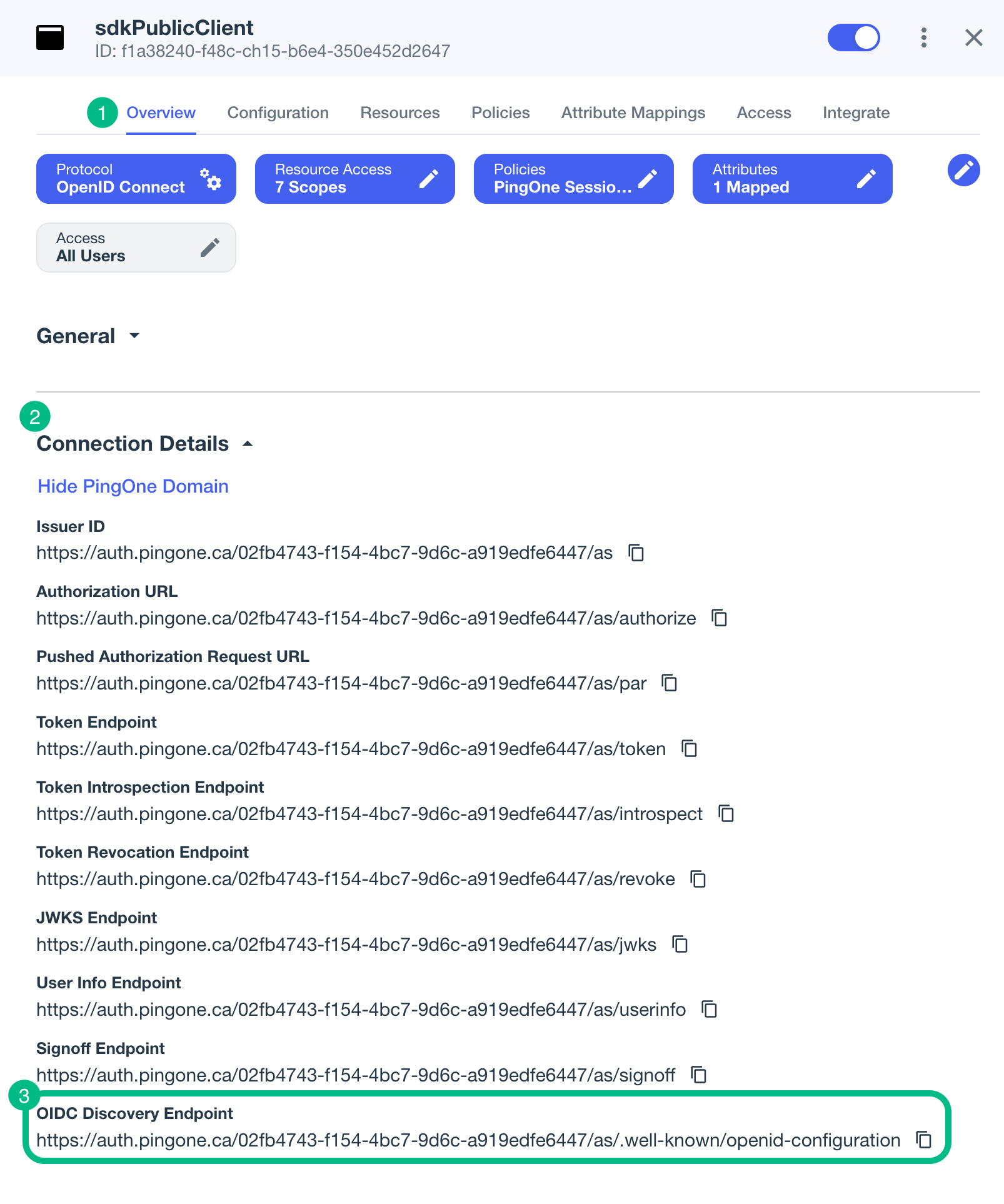
Go to Applications > Applications, and then select your OAuth 2.0 client.
For example, sdkPublicClient.
-
On the Overview tab, expand the Connection Details section, and then copy the OIDC Discovery Endpoint value.
-
- PINGONE_REDIRECT_URI
-
The redirect URI configured in your OAuth 2.0 client profile.
This value must exactly match a redirect URI registered in PingOne.
For this tutorial, use
org.forgerock.demo://oauth2redirectunless you update the corresponding native app configuration.If you use a different redirect scheme, update the Android
appRedirectUriSchemevalue inPingSampleApp/android/app/build.gradle, the iOSCFBundleURLSchemesvalue inPingSampleApp/ios/PingSampleApp/Info.plist, and the OAuth 2.0 client configuration in PingOne. - PINGONE_SCOPES
-
A comma-separated list of OAuth 2.0 scopes to request.
For example,
openid, email, address, profile. - PINGONE_ACR_VALUES
-
Optionally, the DaVinci flow policy to invoke.
Enter a DaVinci flow policy ID, or leave this value empty to use the environment’s default authentication policy.
- PINGONE_ENVIRONMENT_LABEL
-
The label displayed by the sample app for this PingOne configuration.
-
Save your changes.
The app reads the updated values the next time you build and run it.
|
The |