Installing and importing the DaVinci module
PingOne iOS
To use the DaVinci module for iOS, use Swift Package Manager (SPM) or Cocoapods to add the dependencies to your project.
Add dependencies using SPM (Swift Package Manager)
You can install this by using SPM (Swift Package Manager) on the generated iOS project.
-
In Xcode,in the Project Navigator, right-click your project, and then click Add Package Dependencies….
-
In the Search or Enter Package URL field, enter the URL of the repo containing the DaVinci module for iOS,
https://github.com/ForgeRock/ping-ios-sdk.git. -
In Add to Project, select the name of your project, and then click Add Package.
Xcode shows a dialog containing the libraries available in the Orchestration SDK for iOS.
-
Select the
PingDavincilibrary, and in the Add to Target column select the name of your project. -
Repeat the previous step for any other Orchestration SDK libraries you want to add to your project.
-
Click Add Package.
Xcode displays the chosen libraries and any prerequisites they might have in the Package Dependencies pane of the Project Navigator:
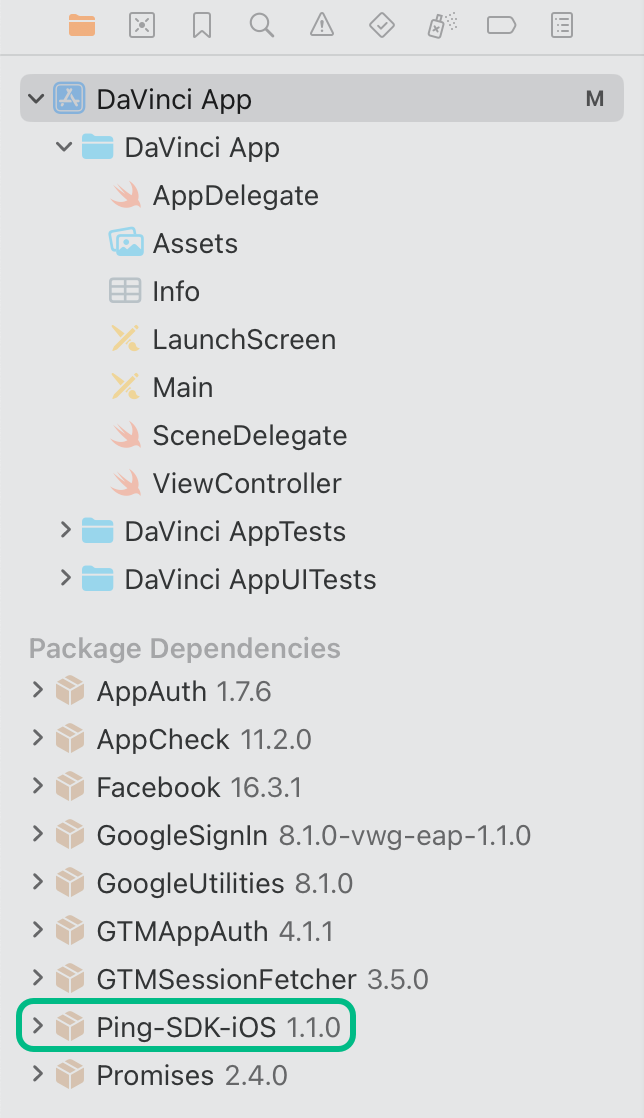 Figure 1. Package dependencies in the Xcode package navigator pane.
Add dependencies using CocoaPods
-
If you do not already have CocoaPods, install the latest version.
-
If you do not already have a Podfile, in a terminal window, run the following command to create a new Podfile:
pod init
-
Add the following lines to your Podfile:
pod 'PingDavinci'
-
Run the following command to install pods:
pod install