Try the DaVinci module
PingOne Android iOS JavaScript React Native
Configure and run a sample application to learn how to connect your own apps to a PingOne tenant to authenticate a user using a DaVinci flow, such as the PingOne sign-on with sessions flow.
This flow allows users to register, authenticate, and verify their email address with PingOne. It combines the PingOne Sign On and Password Reset flow, which allows users to reset or recover their passwords, with the PingOne Registration and Email Verification flow, which allows users to register and verify their email. In addition, this flow checks for an active user session before prompting for authentication.
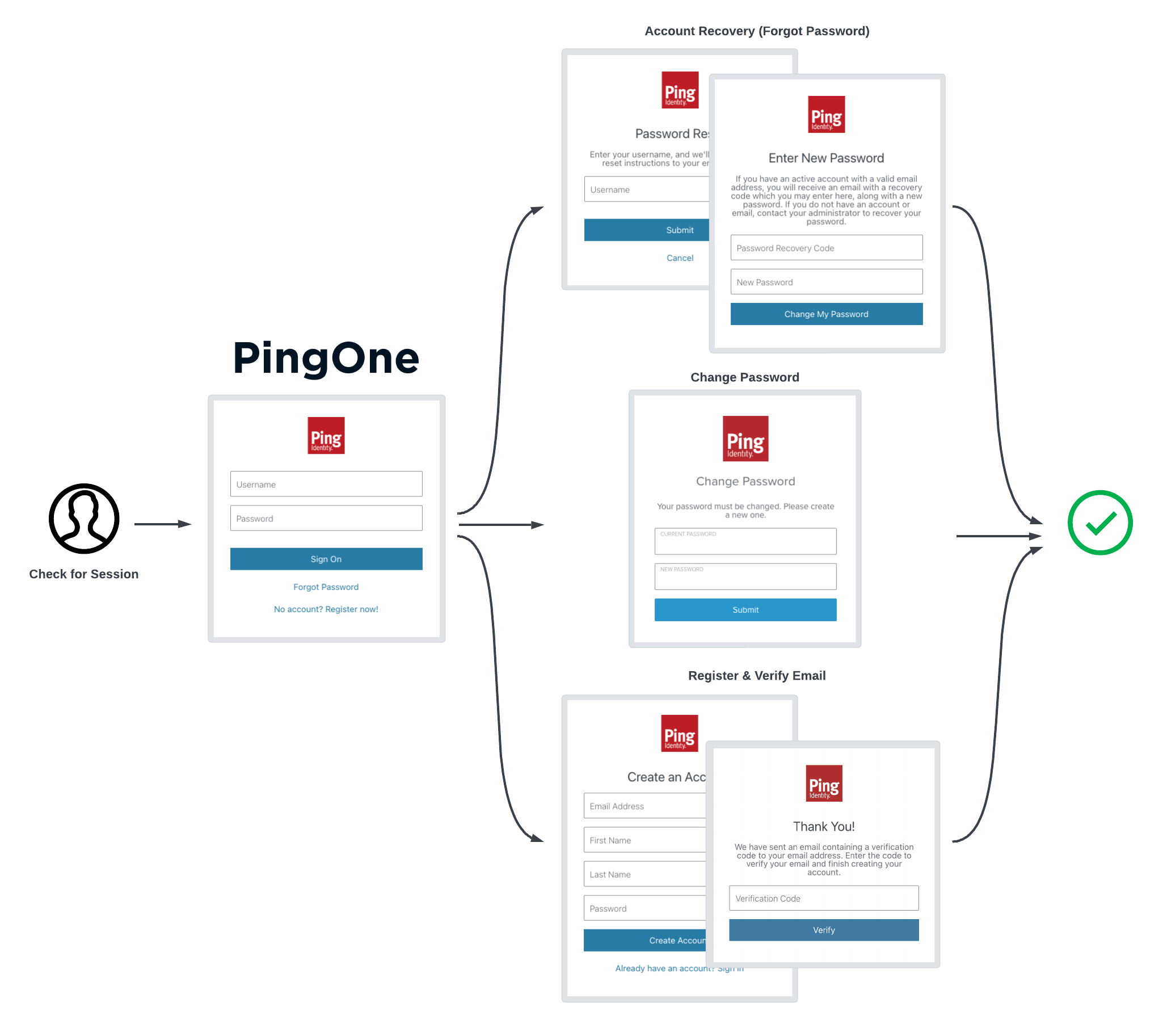
The sample projects also support DaVinci flows that use the PingOne Forms connector.
|
Each quick start page provides a list of the supported capabilities and fields. Check that your flows use only supported fields before attempting to use them with the Orchestration SDKs. |
The sample projects cover functionality such as:
-
Configuring an app with the connection settings for your PingOne instance.
-
Starting a DaVinci flow
-
Rendering UI depending on the type of node encountered in the flow
-
Returning responses to the server for different nodes encountered
-
Getting an access token for the user on completion of the flow
-
Getting the user’s details from PingOne, such as their full name and email address
-
Signing the user out of PingOne
To start, choose the platform to host your app: