Preparing Advanced Identity Cloud or PingAM for FIDO in JavaScript
PingOne Advanced Identity Cloud PingAM JavaScript
Before enabling FIDO authentication in your JavaScript apps you must configure your authentication journeys for FIDO.
Configuring authentication journeys for FIDO on JavaScript
Authentication journeys for FIDO primarily use these nodes:
- WebAuthn Registration Node
-
Handles the creation and storage of new passkeys.
- WebAuthn Authentication Node
-
Manages the sign-in process by issuing and verifying challenges.
Here’s a sample journey that supports passkeys end-to-end. It tries a passkey sign-in first, and falls back to a username and password for users who haven’t registered a passkey yet. Because registering a passkey requires an authenticated session, the journey only offers to register one after a successful sign-in.
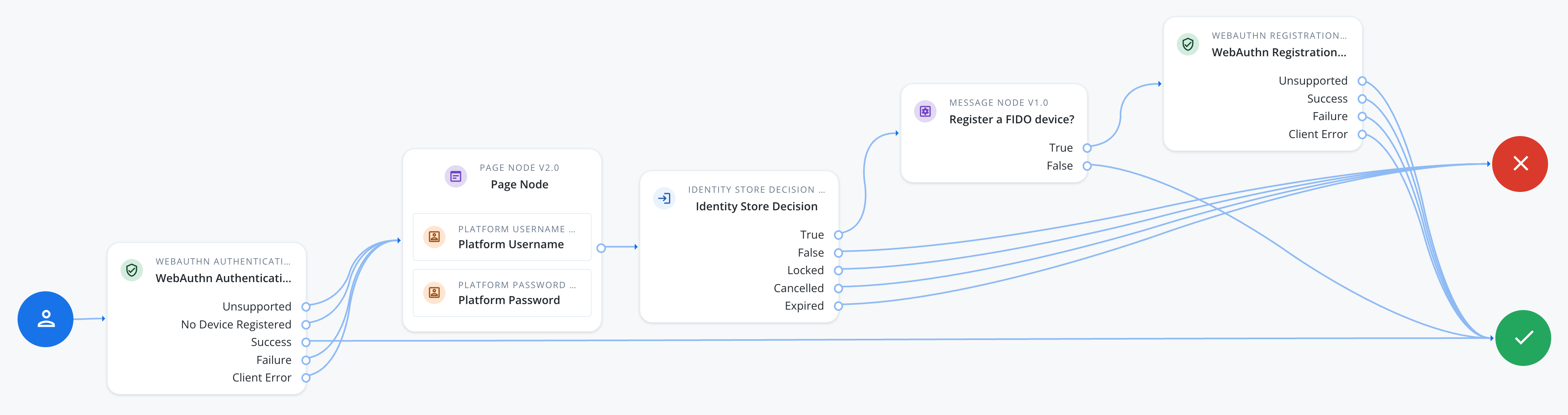
To use FIDO with a JavaScript application, configure each WebAuthn Registration node and WebAuthn Authentication node in your authentication journey.
|
Use the same configuration values in each WebAuthn Registration node and WebAuthn Authentication node in the journey. Configuration mismatches between these nodes cause authentication to fail. |
- Each WebAuthn Registration node and WebAuthn Authentication node
-
-
In Origin domains, enter the URL where you host your JavaScript app.
For example,
https://app.example.com.If you leave Origin domains empty, the server uses the origin of incoming requests as an accepted origin.
-
Optionally, to support usernameless sign-in, enable Username from device in the WebAuthn Authentication node, and Username to device in the WebAuthn Registration node.
-
- Each WebAuthn Registration node
-
-
In Accepted signing algorithms, include one or more of
ES256andRS256. -
Ensure the Limit registrations option is not enabled.
-
Optionally, use the Authentication attachment property to control the type of authenticators available for registration:
PLATFORM-
Only allow authenticators built into the user’s device, such as Face ID, Touch ID, or Windows Hello.
CROSS_PLATFORM-
Only allow external authenticators, such as security keys.
UNSPECIFIED-
Allow either type (default).
-
Configuring the journey for passkey autofill (WebAuthn conditional UI)
Passkey autofill, also known as WebAuthn conditional UI, lets a user sign in with a saved passkey directly from the browser’s autofill suggestions when they tap or click the username field, without a separate button.
|
Passkey autofill requires PingAM 8.1 or later, or PingOne Advanced Identity Cloud. Users must have a previously registered passkey before they can sign in using autofill. |
To support passkey autofill, add the Platform Username node (or Username Collector node in a standalone PingAM deployment) and the WebAuthn Authentication node to the same page using a Page node. Optionally, add a Platform Password node to the same page as a fallback for users who don’t have a registered passkey:
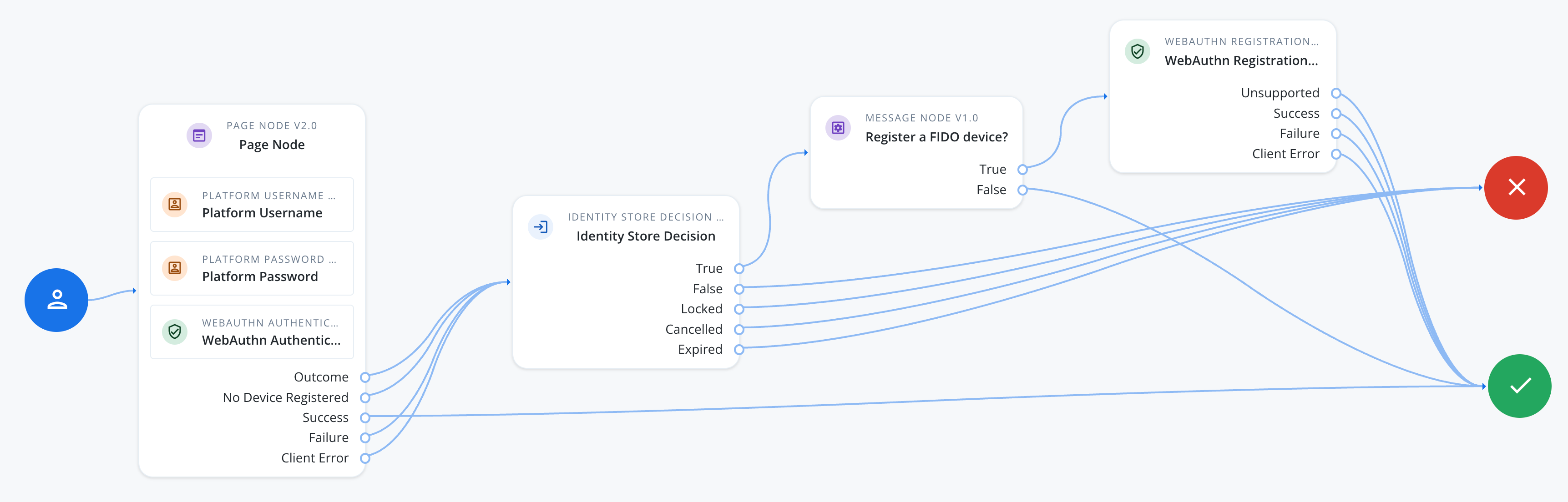
In the Platform Username node (or Username Collector node):
-
In Autocomplete Values, add
usernameandwebauthn, in that order.This tells the browser to show passkey suggestions alongside stored usernames in the autofill dropdown.
The result resembles the following:
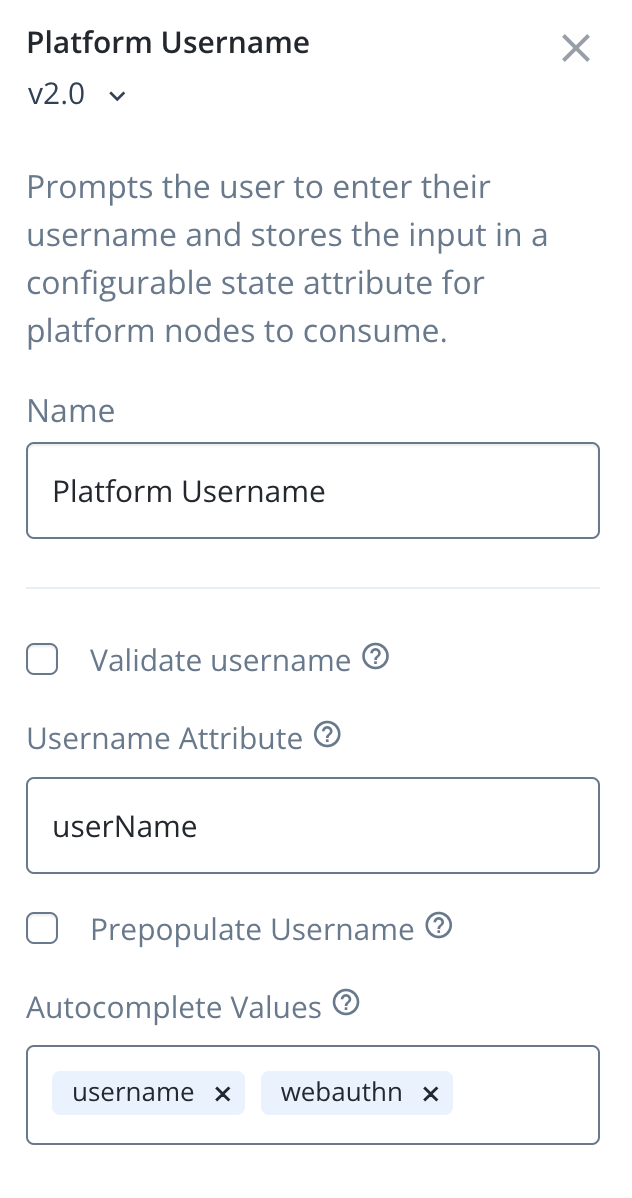 Figure 3. Configuring username nodes for passkey autofill
In the WebAuthn Authentication node:
-
In Mediation, select CONDITIONAL.
This lets the SDK request the passkey challenge silently in the background, so the browser can show a matching passkey as an autofill suggestion as soon as the user focuses the username field.
The result resembles the following:
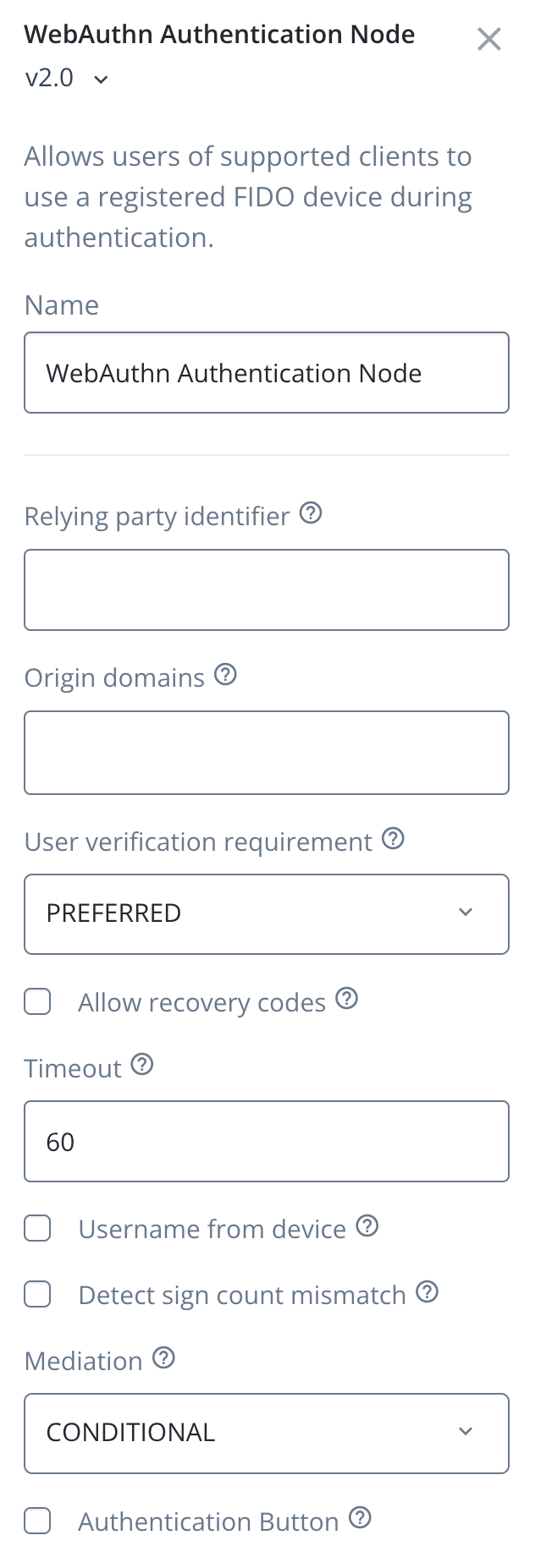 Figure 4. Configuring WebAuthn Authentication nodes for passkey autofill
Handling client errors
The WebAuthn Registration node and WebAuthn Authentication node each have a Client Error outcome. The SDK reaches this outcome when the underlying WebAuthn operation fails for a reason that isn’t a simple pass/fail, for example an unsupported authenticator, a timeout, a network problem, or a device in an unexpected state.
The outcome carries the error as a string in the ERROR::<name>:<message> format, where <name> is a standard DOMException error name, such as NotAllowedError or InvalidStateError.
To handle these errors individually rather than as a single generic outcome, add a Scripted Decision node after the Client Error outcome. Configure the script to read the error string from shared state, extract the error name, and map it to an outcome your journey can branch on:
// Error format: ERROR::<name>:<message>
// Example: ERROR::InvalidStateError:No Credential is registered
var error = sharedState.get("WebAuthenticationDOMException");
var result = error.match(/::([\w\s]{1,}):{0,}/);
outcome = result ? result[1] : "UnknownError";
The script above only extracts the error name, but a Scripted Decision node is a good place to add logic beyond simple routing, such as logging the full error message for troubleshooting, incrementing a counter to detect repeated failures from the same device, or recording metrics on which errors occur most often.
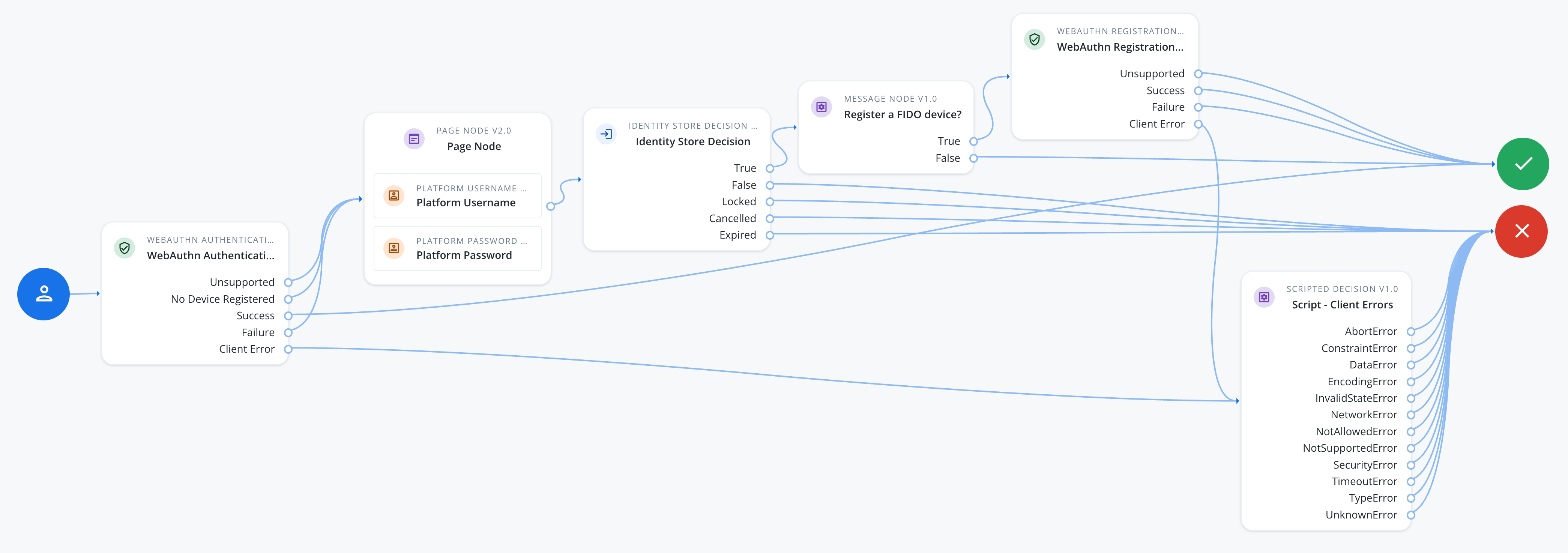
Configure an outcome for each error name your app can produce:
- AbortError
-
The operation was aborted, for example the app cancelled an in-progress request.
Route back to the passkey sign-in step.
- ConstraintError
-
The authenticator can’t satisfy a requested option, such as a resident key.
Route to a password fallback.
- DataError
-
The request contained invalid or malformed data.
Log for troubleshooting; this usually points to a configuration issue rather than something the user can fix.
- EncodingError
-
Encoding or decoding the credential data failed.
Log for troubleshooting; this usually points to a configuration issue rather than something the user can fix.
- InvalidStateError
-
The user tried to register a passkey that’s already registered.
Route to a message telling the user the passkey is already registered.
- NetworkError
-
A network problem prevented the operation from completing.
Route back to the passkey sign-in step so the user can retry.
- NotAllowedError
-
The user cancelled the prompt, or no authenticator matched.
Route back to the passkey sign-in step so the user can try again, or fall back to a password.
- NotSupportedError
-
The device doesn’t support the requested options.
Route to a password fallback instead of retrying WebAuthn.
- SecurityError
-
The operation isn’t allowed in the current context, for example an origin mismatch.
Log for troubleshooting; check your Origin domains and Relying party identifier configuration.
- TimeoutError
-
The operation took longer than the node’s Timeout setting.
Route back to the passkey sign-in step so the user can retry.
- TypeError
-
The request contained an invalid argument.
Log for troubleshooting; this usually points to a configuration issue rather than something the user can fix.
- UnknownError
-
An error occurred that doesn’t map to a more specific outcome, including any error name not listed above.
Log for troubleshooting, and route to a generic failure message.
Next steps
You can now proceed to Integrating FIDO auth journeys in JavaScript.