Step 4. Configuring iOS apps for push notifications
PingOne Advanced Identity Cloud PingAM iOS
In this step, you configure your application projects to use the Apple Push Notification service.
Enabling push notification support to an iOS app
-
In Xcode, open your app project.
-
In the Project navigator, select the project root.
-
In the editor, under Targets, click your application, then click the Signing & Capabilities tab.
-
Confirm that the application has the Push Notifications capability. If not, click + Capability to add it.
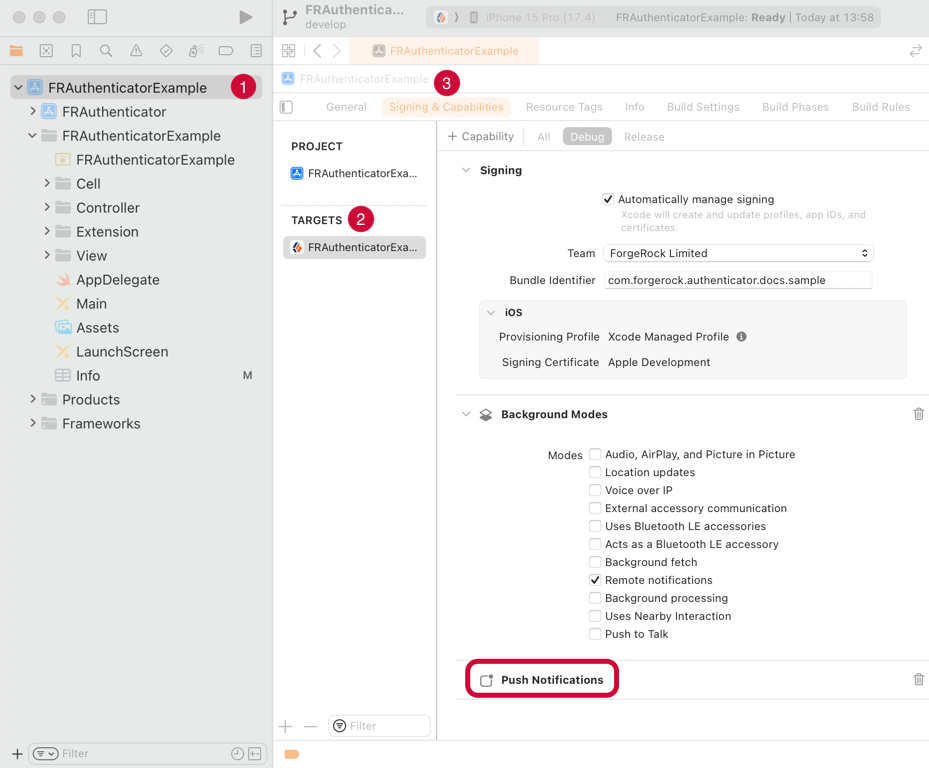 Figure 1. Checking for the Push Notifications capability in Xcode.
 -
With an admin account, log in to the Apple Developer console.
-
Navigate to Program resources > Certificates, IDs & Profiles > Identifiers.
-
Click the name of the application to which you are adding push notification support.
-
On the Capabilities tab, ensure Push Notifications is selected.