Using the DaVinci module for React Native
PingOne React Native
The DaVinci module for React Native brings PingOne DaVinci flows to React Native applications.
It wraps the Orchestration SDK for Android and the Orchestration SDK for iOS DaVinci modules as React Native TurboModules, exposing a single TypeScript API that works across both platforms.
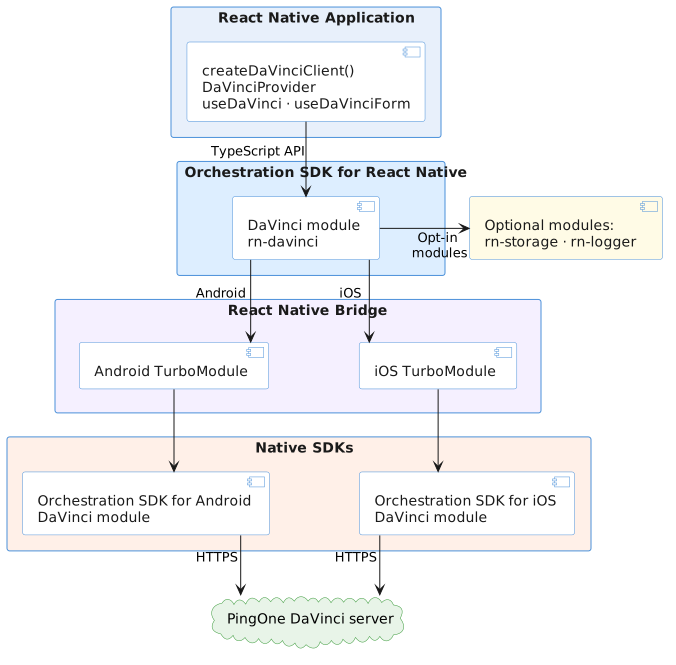
One codebase targets Android and iOS by delegating to each platform’s native DaVinci module at runtime.
Optional packages for storage and logging slot in independently so you include only what your app needs.
- One API, two platforms
-
The Orchestration SDK for React Native wraps the native DaVinci modules for Android and iOS behind a single TypeScript interface using React Native TurboModules.
You call the same
createDaVinciClient(),DaVinciProvider, anduseDaVinci()APIs regardless of which platform is running, and the native bridge handles the rest.This means your team works entirely in TypeScript and inherits the security and reliability of the native Orchestration SDKs without needing to maintain separate Android and iOS codebases.
- Native security, zero native code
-
Authentication and token handling run inside the native DaVinci module on each platform.
The React Native layer orchestrates the flow and displays the required UI, while the native SDK handles communication with PingOne and manages sensitive authentication data.
Your app gets the benefits of native security while the native SDKs remain upgradeable independently of your TypeScript layer.
- DaVinci flows as a predictable state machine
-
Every step of a DaVinci flow resolves to one of four node types:
ContinueNodefor more input,SuccessNodefor successful authentication,FailureNodewhen the flow cannot continue, orErrorNodewhen submitted data must be corrected.The four node types give you an exhaustive, unambiguous set of states, so your app always knows where it is in the flow.
- Collectors with intent
-
Each collector in a
ContinueNodedescribes the data or action that the flow requires from your app.Collector types and metadata tell your app whether to collect input, display information, submit the current values, or hand off to an integration before continuing.
You can handle collectors by type or use
useDaVinciFormto normalize them into fields, values, and submission input. - Bring your own UI
-
The
useDaVinciFormhook normalizes the collectors in a node into a flat list of fields, values, validation state, default values, and options without rendering anything itself.Your components know what to render, while the SDK handles field identity, submit planning, and value validation so they stay focused on presentation.
- Composable by default
-
The React Native SDK is a monorepo of independent packages, including
rn-core,rn-davinci,rn-storage, andrn-logger.Each is a standalone npm module that can be added when your app needs it.
A minimal integration needs
rn-coreandrn-davinci. Storage and logging are opt-in, keeping your bundle and dependency surface focused.
In this section you will learn how to add the DaVinci module, configure it to communicate with PingOne, and write the code to initiate a flow.
You’ll handle each step of a DaVinci flow, from collecting user input to processing the final session after successful authentication or handling errors if the flow fails.