Getting Started with the Journey module for React Native
PingOne Advanced Identity Cloud PingAM React Native
The Journey for React Native brings PingOne Advanced Identity Cloud and PingAM authentication journeys to React Native applications.
It wraps the Orchestration SDK for Android and the Orchestration SDK for iOS as React Native TurboModules, exposing a single TypeScript API that works across both platforms.
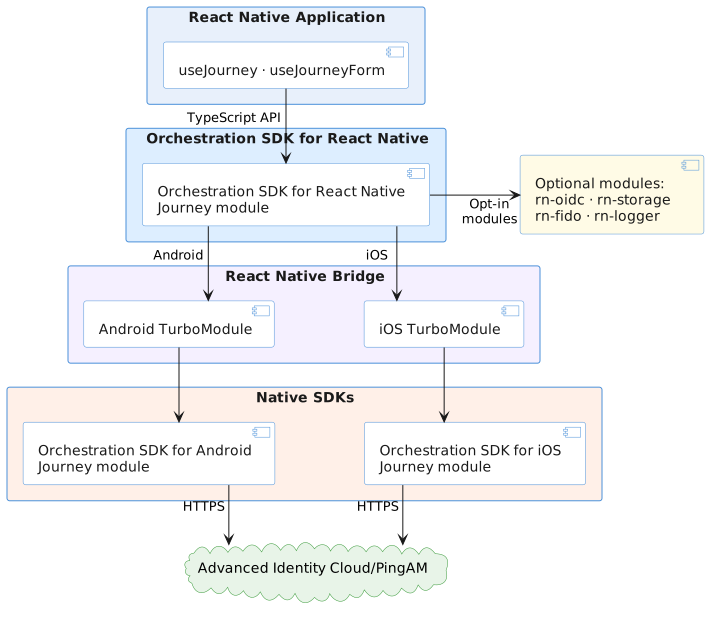
One codebase targets Android and iOS by delegating to each platform’s native SDK at runtime.
Optional packages for storage, logging, FIDO, and OIDC slot in independently so you include only what your app needs.
- One API, two platforms
-
The Orchestration SDK for React Native wraps the Orchestration SDK for Android and the Orchestration SDK for iOS behind a single TypeScript interface using React Native TurboModules.
You call the same
createJourneyClient()anduseJourney()APIs regardless of which platform is running, and the native bridge handles the rest.This means your team works entirely in TypeScript and inherits the security, reliability, and compliance guarantees of the native Orchestration SDKs without needing to maintain separate Android and iOS codebases.
- Native security, zero native code
-
Authentication logic, including secure storage, device binding, biometrics, and attestation, all run inside the native SDK on each platform.
The React Native layer orchestrates the flow but never handles sensitive material directly.
Your app gets production-grade security by default, and the native SDKs stay upgradeable independently of your JavaScript layer.
- Journeys as a predictable state machine
-
Every step of an authentication journey resolves to one of four node types:
ContinueNode(more input required),SuccessNode,FailureNode, orErrorNode.The four node types give you an exhaustive, unambiguous set of states — your app always knows where it is in the journey.
- Callbacks with intent
-
Each callback in a
ContinueNodecarries anexecutionModethat tells your app what to do with it: collect input from the user (manual), display information without input (output_only), or hand off to a native integration before continuing (integration_required).You never need to parse raw callback JSON or write per-type branching logic from scratch —
executionModetells your app how to handle each callback: whether to collect input, display information, or hand off to a native integration. - Bring your own UI
-
The
useJourneyFormhook normalizes all callbacks in a node into a flat list of typed fields — prompt, kind, validation state, default value, and options — without rendering anything itself.Your components always know exactly what to render, and the SDK handles field identity, submit planning, and value validation so they stay focused on presentation.
- Composable by default
-
The SDK is a monorepo of independent packages:
rn-journey,rn-oidc,rn-storage,rn-logger,rn-fido, and more.Each is a standalone NPM module and can be added, or not, without affecting the others.
A minimal integration needs only
rn-coreandrn-journey. Everything else is opt-in, keeping your bundle lean and your dependency surface small.
In this section you will learn how to add the Journey module, configure it to communicate with the identity server, and write the code to initiate a login.
You’ll handle each step of an authentication journey, from collecting user credentials to processing the final session token upon success or handling errors if the login fails.