PingOne Platform APIs

Resource Attributes

PingOne access tokens are signed JWTs (JSON Web Tokens) that include identity claims about and attributes of the requestor, usually a user identity. The resource attributes service lets you customize the content of access tokens by adding custom attributes and their values. This is a great way to convey additional information about the user to applications. Custom attributes have a cumulative length constraint of 16 Kb. Refer to Custom attributes in Schemas for more information.

Resource attributes are essentially custom identity claims associated with a resource. For example, suppose the clothing.preferences resource with scope sizes provides "clothing size" user claims in the token. By default, the sizes scope does not include a t-shirt size user claim. To include the user.tshirtSize user attribute as a user claim in the token, a resource attribute entity can be created that associates the tshirtSize attribute with the clothing.preferences resource. Then, for token requests to clothing.preferences with scope sizes, the tshirtSize user claim is included in the token. If the attribute is multiValued, then the claim will be an array of values. The following diagram shows the workflow:
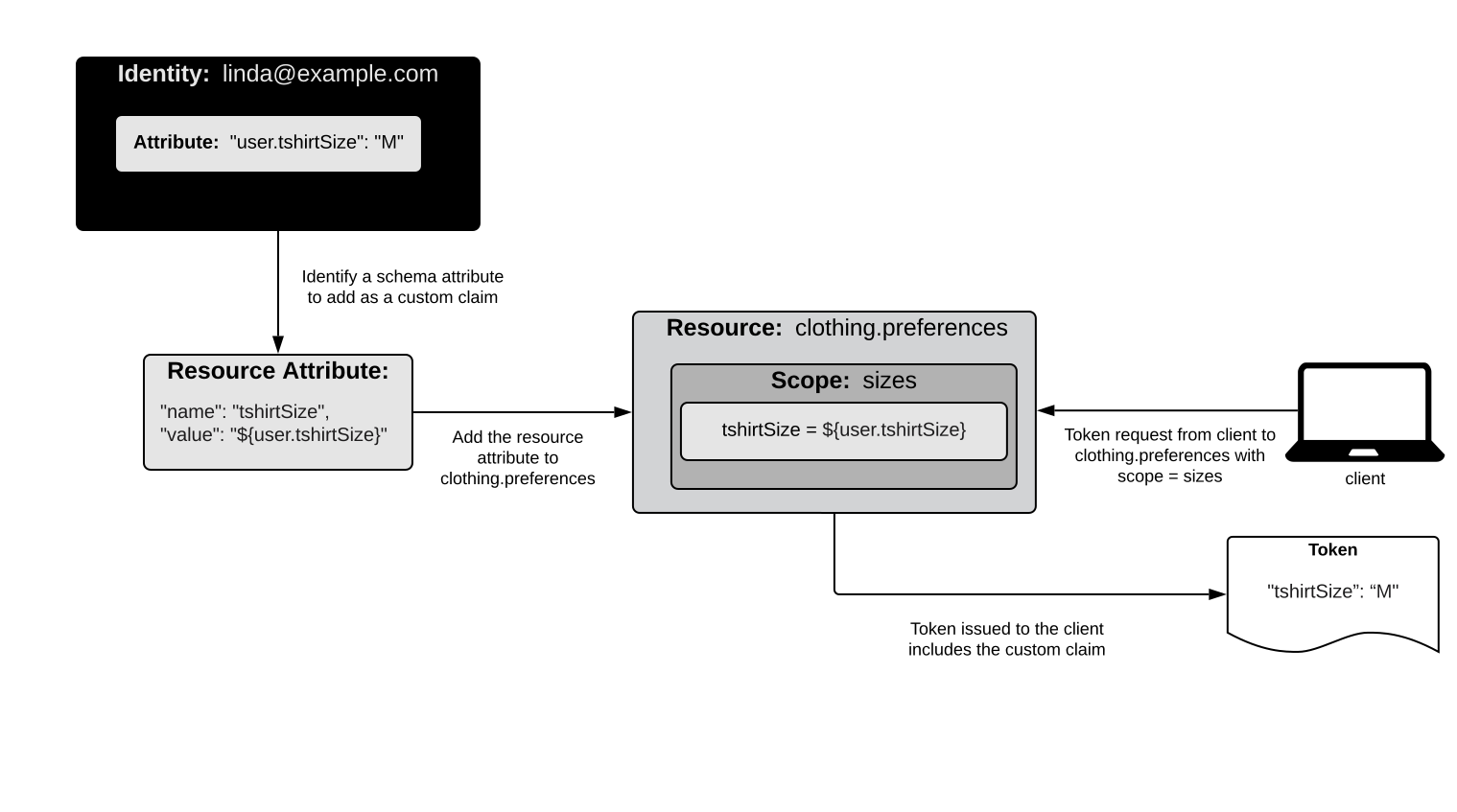
Resource attributes custom identity claims

For information about an access token’s core claims, refer to Access token claims. A token’s core identity claims cannot be modified or deleted.

Advanced resource attribute mapping

You can use PingOne’s expression language for advanced attribute mappings of a custom resource or the OpenID Connect resource. The supported expression language is an augmentation of SpEL. SpEL is a powerful expression language used for querying and manipulating an object graph at runtime.

For more information about PingOne’s expression language, refer to PingOne’s expression language.

Resource attributes data model

Property Type Required Mutable Description

idToken

Boolean

Optional

Mutable

A boolean that specifies whether the attribute mapping should be available in the ID Token. This property is applicable only when the application’s protocol property is OPENID_CONNECT. If omitted, the default is true. Note that the idToken and userInfo properties cannot both be set to false. At least one of these properties must have a value of true.

userInfo

Boolean

Optional

Mutable

A boolean that specifies whether the attribute mapping should be available through the /as/userinfo endpoint. This property is applicable only when the application’s protocol property is OPENID_CONNECT. If omitted, the default is true. Note that the idToken and userInfo properties cannot both be set to false. At least one of these properties must have a value of true.

name

String

Required

Mutable

A string that specifies the name of the custom resource attribute to be included in the access token. The following are reserved names and cannot be used. These reserved names are applicable only when the resource’s type property is OPENID_CONNECT:

* acr

* amr

* aud

* auth_time

* client_id

* env

* exp

* iat

* iss

* jti

* org

* p1.* (any name starting with the p1. prefix)

* scope

* sid

* sub

required

Boolean

Optional

Mutable

Indicates whether the attribute is required for the resource. Defaults to false if unspecified.

type

String

Optional

Read-only

A string that specifies the type of resource attribute. Options are:

* CORE: The claim is required and cannot not be removed.

* CUSTOM: The claim is not a CORE attribute. All created attributes are of this type.

* PREDEFINED: A designation for predefined OIDC resource attributes such as given_name. These attributes cannot be removed; however, they can be modified.

value

String

Required

Mutable

A string that specifies the value of the custom resource attribute. This value can be a placeholder that references an attribute in the user schema, expressed as "${user.path.to.value}", or it can be a static string. Placeholders must be valid, enabled attributes in the environment’s user schema. Examples fo valid values are: "${user.email}", "${user.name.family}", and "myClaimValueString".

Advanced resource attribute mapping events generated

Refer to Audit Reporting Events for the events generated.

Response codes

Code Message

200

Successful operation.

201

Successfully created.

204

Successfully removed. No content.

400

The request could not be completed.

401

You do not have access to this resource.

404

The requested resource was not found.

Resource attribute errors

In addition to the general error codes, resource attribute operations can return the following errors:

HTTP status Top‑level code Detail code When it happens and what the response contains

400

INVALID_DATA

EMPTY_VALUE or INVALID_VALUE

Message: Validation Error : [<field> <message>]

When and details

When: A POST or PUT request body omits name or value, or supplies a name that fails the object-name pattern validation

Details: must not be null for an omitted name or value, or must contain only Unicode letters, marks, numbers, spaces, forward slashes, dots, apostrophes, underscores, or hyphens for a name that fails the object-name pattern validation, for example Validation Error : [name must not be null].

400

INVALID_DATA

INVALID_VALUE

Message: The request could not be completed. One or more validation errors were in the request.

When and details

When: A POST or PUT request on the OpenID Connect resource uses a reserved claim name (such as acr, aud, exp, iss, sub, or a name starting with p1.), or supplies a value placeholder expression that is not a valid user attribute or available request parameter

Details: Attribute name '<name>' is reserved for system use. with target name, or <expression> is not a valid user attribute with target value (or, when the additional token context or token exchange feature is enabled, <expression> is not a valid user attribute or an available request parameter)

400

INVALID_DATA

OUT_OF_RANGE

Message: Validation Error : [size must be greater than 1], Validation Error : [regular strings must not be longer than 256 characters], Validation Error : [advanced expressions must not be longer than 1029 characters], or Validation Error : [name size must be between 1 and 256]

When and details

When: A POST or PUT request supplies a value that is too short or too long (regular strings must be 1 to 256 characters; advanced ${…​} expressions must not exceed 1029 characters), or a name that is empty or longer than 256 characters

Details: Same message. For a value failure, the target is value; for a name failure, the target is name with rangeMinimumValue and rangeMaximumValue inner errors (1 and 256).

400

REQUEST_FAILED

CONSTRAINT_VIOLATION

Message: The request could not be completed. There was an issue processing the request.

When and details

When: A POST or PUT request on the OpenID Connect resource sets both idToken and userInfo to false (or omits both), or the attribute targets the PINGONE_API resource

Details: Attribute userInfo must be true if idToken is false. with target userInfo, or Attributes can only be created for CUSTOM and OPENID_CONNECT resources. with target resource.id

400

INVALID_DATA

UNIQUENESS_VIOLATION

Message: The request could not be completed. One or more validation errors were in the request.

When and details

When: A POST or PUT request specifies a name already used by another attribute on the same resource

Details: A resource with the specified name already exists. with target name and the existing attribute’s ID in an existingId inner error

400

INVALID_DATA

INVALID_VALUE

Message: The request could not be completed. One or more validation errors were in the request.

When and details

When: A PUT request renames a CORE or PREDEFINED attribute

Details: Attribute named '<existingName>' cannot be renamed '<newName>' because name is immutable for <type> attributes. with target name

403

ACCESS_FAILED

None

Message: The actor attempting to perform the request is not authorized.

When and details

When: The actor lacks the resources:create:attribute permission (POST), the resources:read:attribute permission (GET), the resources:update:attribute permission (PUT), or the resources:delete:attribute permission (DELETE)

Details: None.

404

NOT_FOUND

None

Message: The request could not be completed. The requested resource was not found.

When and details

When: A GET, PUT, or DELETE request references a resource ID or attribute ID that does not exist

Details: None.

Related topics