Ping Identity DevOps Registration
|
The team responsible for the Ping DevOps program doesn’t have access to the user account system on the Ping Identity website. If you have trouble with your account and are unable to follow these instructions to enroll, the issue is likely with your credentials in our system. Please contact your sales representative at Ping Identity Support. |
Ping Identity DevOps Registration
Registering for Ping Identity’s DevOps Program provides you with credentials that enable you to easily deploy and evaluate Ping Identity products using trial licenses automatically using tools and platforms like Helm or Kubernetes.
To register for the DevOps Program:
-
Make sure you have a registered account with Ping Identity. If you’re not sure, click the link to Sign On and follow the instructions to access your account.
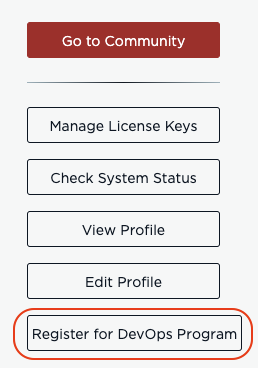
A confirmation message will be shown and the DevOps credentials will be forwarded to the email address associated with your Ping Identity account.
|
When you receive your key, follow the instructions below for saving them. |
Example:
-
PING_IDENTITY_DEVOPS_USER=jsmith@example.com -
PING_IDENTITY_DEVOPS_KEY=e9bd26ac-17e9-4133-a981-d7a7509314b2
Saving Your DevOps User and Key
Save your DevOps credentials as environment variables by adding the following statements to your shell profile (for example, ~/.bash_profile in a bash shell):
export PING_IDENTITY_DEVOPS_USER=jsmith@example.com
export PING_IDENTITY_DEVOPS_KEY=e9bd26ac-17e9-4133-a981-d7a7509314b2
export PING_IDENTITY_ACCEPT_EULA=YES
Containers read these variables to retrieve evaluation licenses. For more information about using your DevOps User and Key in various ways (including Kubernetes and with stand-alone containers), see Using Your DevOps User and Key.
After you’ve configured these settings, you can verify they are exported in your environment by restarting your shell or sourcing your shell profile, then running env | grep PING_IDENTITY.
If you saved your DevOps credentials in the ~/.pingidentity/config property file (created by earlier Ping Identity DevOps tooling), the containers can also read them from that file, and you can load them into your environment by sourcing the file from your shell profile.
Resending your DevOps User and Key
If you have misplaced or lost your DevOps User/Key, there are two convenient ways to recover it.
-
If you saved the credentials in your shell profile, they can be printed by entering the following command:
env | grep PING_IDENTITY-
If you did not save the credentials, you can recover your credentials by logging in to your Ping Identity account.
-
Navigate to Sign On and follow the instructions to access your account.
-
When signing on, select Support and Community in the Select Account list.
-
After you’re signed on, you’re directed to your profile page.
-
In the right-side menu, click Register for DevOps Program again. A confirmation message will be shown and the same DevOps credentials will be resent to the email address associated with your Ping Identity account.