Deploying PingFederate Across Multiple Kubernetes Clusters
This section will discuss deploying a single PingFederate cluster that spans across multiple Kubernetes clusters.
Deploying PingFederate in multiple regions should not imply that spanning a single PingFederate cluster across multiple Kubernetes clusters is necessary or optimal. This scenario makes sense when you have:
-
Traffic that can cross between regions at any time. For example, west and east and users may be routed to either location.
-
Configuration that needs to be the same in multiple regions and there is no reliable automation to ensure this is the case
If all configuration changes are delivered via a pipeline, and traffic will not cross regions, having separate PingFederate clusters can work.
| The set of pre-requisites required for AWS Kubernetes multi-clustering to be successful is found here. |
Static engine lists, which may be used to extend traditional, on-premise PingFederate clusters is out of scope in this document.
Prerequisites
-
Two Kubernetes clusters created with the following requirements:
-
VPC IPs selected from RFC1918 CIDR blocks
-
The two cluster VPCs peered together
-
All appropriate routing tables modified in both clusters to send cross cluster traffic to the VPC peer connection
-
Security groups on both clusters to allow traffic for ports 7600 and 7700 in both directions
-
Verification that a pod in one cluster can connect to a pod in the second cluster on ports 7600 and 7700 (directly to the back-end IP assigned to the pod, not through an exposed service)
-
externalDNS enabled
See example "AWS configuration" instructions here
-
-
Helm client installed
Overview
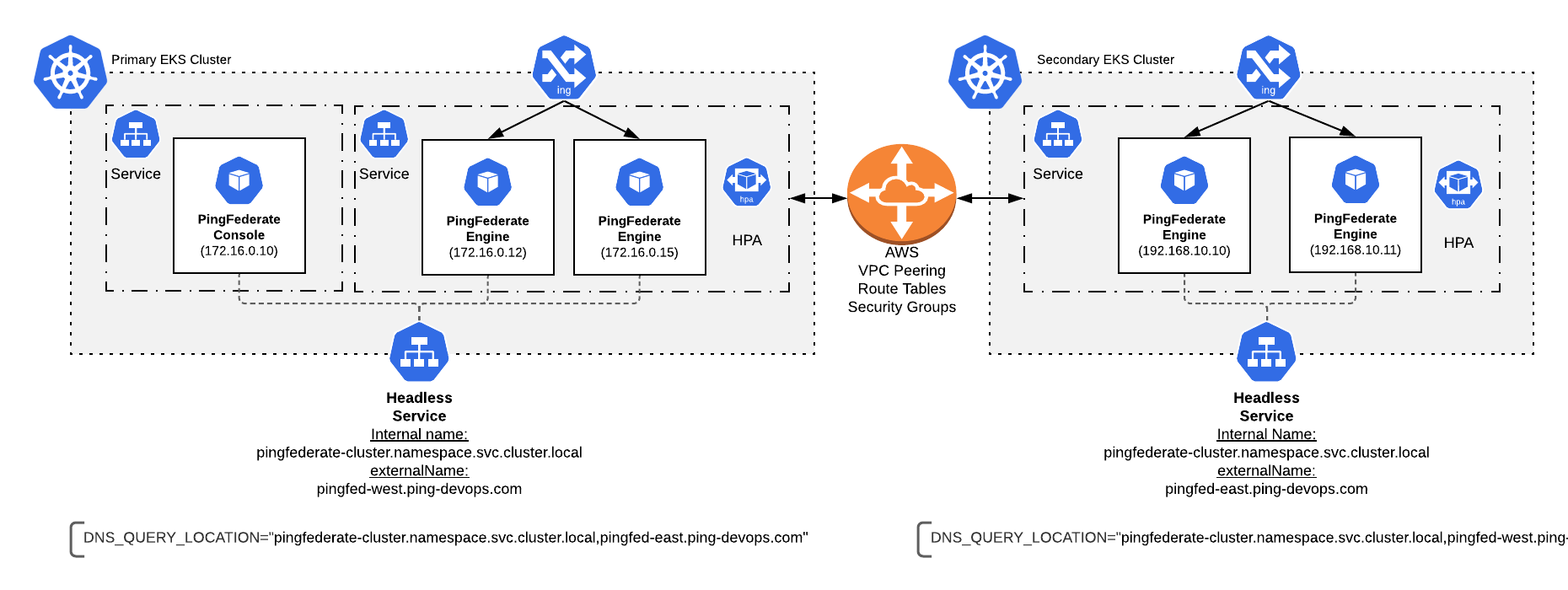
The PingFederate Docker image default instance/server/default/conf/tcp.xml file points to DNS_PING. After you have two peered Kubernetes clusters, spanning a PingFederate cluster across the two becomes easy. A single PingFederate cluster uses DNS_PING to query a local headless service. In this example we use externalDNS to give an externalName to the headless service. The externalDNS feature from the Kubernetes special interest group (SIG) creates a corresponding record on AWS Route53 and constantly updates it with container IP addresses of the backend PF engines.
| If you are unable to use externalDNS, another way to expose the headless service across clusters is needed. HAProxy may be a viable option to explore and is beyond the scope of this document. |
What You Will Do
-
Clone the example files from the
getting-startedRepository -
Edit the externalName of the pingfederate-cluster service and the DNS_QUERY_LOCATION variable as needed
Search the files for
# CHANGEMEcomments to find where these changes need to be made. -
Deploy the clusters
-
Cleanup
Example deployment
Clone this getting-started repository to get the Helm values yaml for the exercise. The files are located under the folder 30-helm/multi-region/pingfederate.
After cloning:
-
Update the first uncommented line under any
## CHANGEMEcomment in the files. The changes will indicate the Kubernetes namespace and the externalName of the pingfederate-cluster service. -
Deploy the first cluster (the example here uses kubectx to set the kubectl context))
kubectx west helm upgrade --install example pingidentity/ping-devops -f base.yaml -f 01-layer-west.yaml -
Deploy the second cluster
kubectx east helm upgrade --install example pingidentity/ping-devops -f base.yaml -f 01-layer-east.yaml -
Switch back to the first cluster, and simulate a regional failure by removing the PingFederate cluster entirely:
kubectx west helm uninstall example -
Switch back to the second cluster and switch failover to active
kubectx east
helm upgrade --install example pingidentity/ping-devops -f base.yaml -f 02-layer-east.yaml