Securing AI Agents with PingFederate using delegated access tokens
PingFederate
PingFederate supports OAuth 2.0 Token Exchange (RFC 8693), allowing you to issue standard access tokens containing delegation claims that provide a full audit trail of agent activity. Each token can be scoped to the strict minimum required for the specific task. This enforces the concept of least-privilege across the entire chain, ensuring that even if one agent is compromised, the damage is restricted to its specific, short-lived scope.
Consider an enterprise expense management system where employees interact with an AI-powered assistant through a web portal. The assistant needs to:
-
Read the employee’s expense reports
-
Look up budget data for the employee’s cost center
-
Approve or submit expenses on the employee’s behalf
Without using a delegation model such as OAuth and OpenID Connect (OIDC), organizations face two bad choices:
-
Share user credentials with the agent, with no audit trail distinguishing agent actions from human actions. If the agent is compromised, the attacker has full user access.
-
Give the agent its own service account, where there is no link between the human who authorized the action and the agent performing it.
PingFederate configured for token exchange leverages existing OAuth and OIDC flows to provide constrained delegation with full traceability.
Goals
-
Configure PingFederate to process token exchange requests and issue delegated access tokens
-
Optionally configure CIBA for step-up authentication for sensitive transactions where human approval is required
-
Optionally configure SPIFFE/SPIRE to achieve even stronger cryptographic proof of agent identity compared to a standard JWT.
What you’ll do
Token exchange architecture
PingFederate converts a user’s identity assertion into a delegated access token that encodes exactly who authorized the action, which agent is performing it, and which operations are permitted.
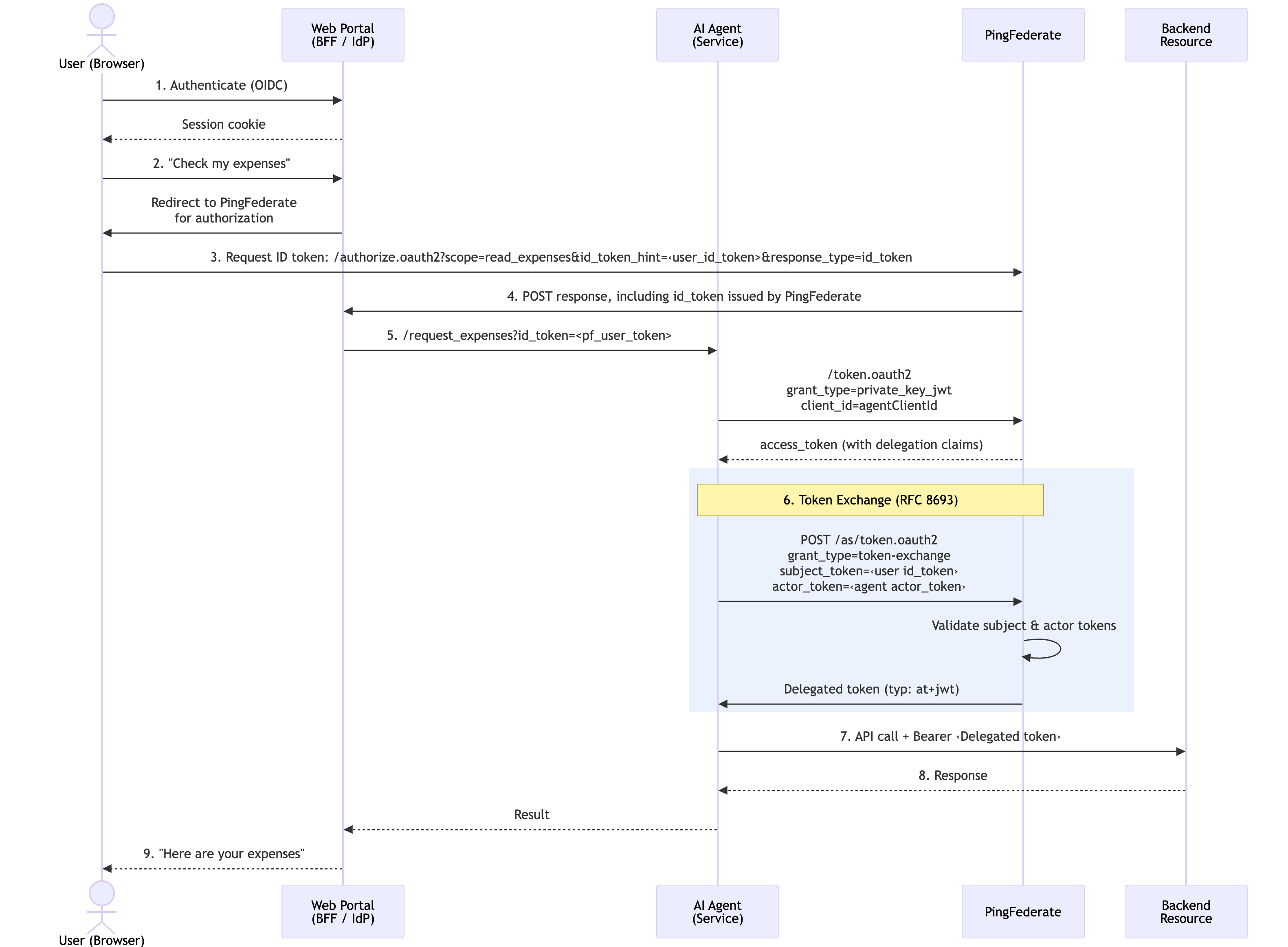
A delegation access token issued by PingFederate carries a precise record of the delegation:
{
  "typ": "at+jwt",
  "iss": "https://pingfederate.example.com",
  "aud": "https://api.example.com",
  "sub": "alice@example.com",
  "act": {
    "sub": "expense-agent"
  },
  "scope": "expenses:read tools:list",
  "department": "Finance",
  "iat": 1742200000,
  "exp": 1742200300
}
The token contains the following claims:
| Claim | Description |
|---|---|
|
The human user who authorized the action |
|
The AI agent performing the action |
|
Constrained permissions granted to the agent for this action |
|
Custom attribute passed downstream for attribute-based access decisions |
|
Restricts the token to a specific downstream resource |
|
Standard JWT access token type ( |
This gives downstream services everything they need to make authorization decisions: who is the human, who is the agent, what they’re allowed to do, and how to trace this specific action.
Delegated access tokens offer many security benefits:
- Short-lived
-
Delegated access tokens have a tight time-to-live (TTL), such as 5 minutes. They are not stored, cached, or refreshed, and each new action requires a new exchange.
- Audience-restricted
-
The token is only valid at a specific resource server, preventing it from accepting an unauthorized token.
- Agent never holds user credentials
-
The agent never sees the user’s session or password. It only receives a constrained delegation token.
Tasks
Defining the access token manager
Create a dedicated Access Token Manager (ATM) for delegated access tokens. This ATM issues standard JWTs (at+jwt) with an extended attribute contract that carries delegation claims.
-
Admin console
-
Developer API
Steps
-
In the PingFederate admin console, go to Applications > OAuth > Access Token Management and click Create New Instance.
-
On the Type tab, configure the following values:
Field Value Description Instance Name
Transaction Token Manager
Descriptive name for the ATM
Instance ID
TxnTokenMgrID referenced by token exchange mappings
Type
JSON Web Tokens
Standard JWT ATM format
-
On the Instance Configuration tab, click Show Advanced Fields and configure the following values:
Setting Value Description Token Lifetime
300Time in seconds
JWS Algorithm
RSA using SHA-256
Use centralized signing key
Issuer Claim
https://pingfederate.example.comYour PingFederate issuer
Audience Claim
https://api.example.comTarget resource server
Type Header Value
at+jwtStandard access token type per RFC 9068
Expand Scope Groups
True
Expands scope group names to individual scopes
-
On the Access Token Attribute Contract tab, add the following extended attributes:
Attribute Description subHuman user identity mapped from the subject token
actAgent identity as a JSON object
{"sub": "<agent-id>"}scopeDelegated scopes (space-delimited)
-
On the Resource URIs tab, set the Resource URI to the target audience, for example
https://api.example.com.PingFederate will automatically select this ATM when the token exchange targets this resource.
-
Click Save.
Steps
-
Use a
POSTrequest to the/pf-admin-api/v1/oauth/accessTokenManagersendpoint to configure the PingFederate ATM.POST /pf-admin-api/v1/oauth/accessTokenManagers{ "id": "TxnTokenMgr", "name": "Transaction Token Manager", "pluginDescriptorRef": { "id": "com.pingidentity.pf.access.token.management.plugins.JwtBearerAccessTokenManagementPlugin" }, "configuration": { "fields": [ { "name": "Token Lifetime", "value": "300" }, { "name": "Use Centralized Signing Key", "value": "true" }, { "name": "JWS Algorithm", "value": "RS256" }, { "name": "Issuer Claim Value", "value": "https://pingfederate.example.com" }, { "name": "Audience Claim Value", "value": "https://api.example.com" }, { "name": "JWT ID Claim Length", "value": "22" }, { "name": "Include Key ID Header Parameter", "value": "true" }, { "name": "Include Issued At Claim", "value": "true" }, { "name": "Scope Claim Name", "value": "scope" }, { "name": "Space Delimit Scope Values", "value": "true" }, { "name": "Expand Scope Groups", "value": "true" }, { "name": "Type Header Value", "value": "at+jwt" } ] }, "selectionSettings": { "resourceUris": [ "https://api.example.com" ] }, "attributeContract": { "extendedAttributes": [ { "name": "sub" }, { "name": "act" }, { "name": "scope" } ] } }
Defining scopes for downstream resources
Define fine-grained scopes that represent the operations your AI agent can perform. Group baseline scopes that every token exchange receives, and keep elevated scopes separate for step-up authorization.
-
In the PingFederate admin console, go to System > OAuth Settings > Scope Management.
-
Create the following scopes:
Scope Description Included in Base Group expenses:readRead expense reports
Yes
tools:listList available tools
Yes
expenses:approveApprove expense reports
No (requires CIBA)
expenses:submitSubmit expense reports
No (requires CIBA)
budget:readView budget information
No (requires CIBA)
-
Create a Scope Group Value containing the base scopes, for example
base-agent-scopes, and add the relevant scopes.When the ATM has Expand Scope Groups enabled, the group name is expanded to the individual scope strings in the issued token.
-
Click Save.
Configuring token processors for subject and actor validation
Create two token processors:
- Subject token processor
-
Validates the JWT that asserts the user’s identity. It can come from an upstream identity provider, a reverse proxy, or another PingFederate instance.
- Actor token processor
-
Validates the JWT that identifies the AI agent making the request. This can be any verifiable JWT, such as a client-credentials token, a service mesh identity, or a SPIFFE JWT-SVID.
If your infrastructure uses SPIFFE/SPIRE for workload identity, the agent can present a JWT-SVID as the actor token. This provides cryptographic proof of the agent’s identity tied to its runtime environment. Unlike a client ID, a JWT-SVID is an attestation that this specific workload running in this specific namespace is the one making the request. PingFederate validates the JWT-SVID signature using the SPIRE OIDC Discovery Provider’s JWKS endpoint.
-
Admin console
-
Developer API
Steps
-
In the PingFederate admin console, go to Authentication > Token Exchange > Token Processors. Click Create New Instance.
-
In the Type field, click JWT Token Processor 2.0. Click Next.
-
On the Instance Configuration tab, click Show Advanced Fields and configure the following values for the subject token processor:
Setting Value Description Issuer
https://pingfederate.example.com:9031The upstream token issuer
JWKS URL
https://pingfederate.example.com:9031/pf/JWKSThe issuer’s JWKS endpoint for signature validation
Require Audience
True
Whether the
audclaim is required in the tokenRequire Expiration Time
True
Whether the
expclaim is required in the tokenAllowed Clock Skew
10Time in seconds
-
In the Attribute Contract tab, map the
subclaim, and any other optional claims such asemail,name, anddepartment. Click Save. -
Repeat steps 1 and 2 to create the actor token processor.
-
On the Instance Configuration tab, click Show Advanced Fields and configure the following values for the actor token processor:
Setting Value Description Issuer
https://spire.example.comAgent identity provider (for example, SPIRE OIDC endpoint, or your own issuer)
JWKS URL
https://spire.example.com/jwksThe agent identity provider’s JWKS endpoint
Require Audience
True
Whether the
audclaim is required in the tokenRequire Expiration Time
True
Whether the
expclaim is required in the token -
In the Attribute Contract tab, map the
subclaim from the actor token and click Save.
Steps
-
Use
POSTrequests to the/pf-admin-api/v1/idp/tokenProcessorsendpoint to configure the token processors.POST /pf-admin-api/v1/idp/tokenProcessors{ "id": "SubjectTokenProcessor", "name": "Subject Token Processor", "pluginDescriptorRef": { "id": "com.pingidentity.pf.tokenprocessors.jwt.JwtTokenProcessor" }, "configuration": { "fields": [ { "name": "Require Audience", "value": "true" }, { "name": "Require Expiration Time", "value": "true" }, { "name": "Allowed Clock Skew", "value": "10" } ], "tables": [ { "name": "Allowed Issuers", "rows": [{ "fields": [ { "name": "Issuer", "value": "https://upstream-idp.example.com" }, { "name": "JWKS URL", "value": "https://upstream-idp.example.com/jwks" } ] }] }, { "name": "Allowed Audiences", "rows": [{ "fields": [ { "name": "Audience", "value": "expense-agent" } ] }] } ] }, "attributeContract": { "coreAttributes": [{ "name": "sub" }], "extendedAttributes": [ { "name": "email" }, { "name": "name" } ] } }
Creating a token exchange processor policy
The token exchange processor policy defines which subject and actor token processors PingFederate will use when presented with a token exchange request with the specified token types.
-
Admin console
-
Developer API
Steps
-
In the PingFederate admin console, go to Applications > Token Exchange > Processor Policies and click Add Processor Policy.
-
Enter a Name and ID for the policy, and select Actor Token Required. Click Next.
-
In the Token Processor Mapping tab, click Map New Token Processor. Configure the following values and then click Next:
Setting Value Description Subject Token Processor
Your Subject Token Processor
The UI name of the subject token processor you created in Configuring token processors for subject and actor validation
Subject Token Type
urn:ietf:params:oauth:token-type:jwtStandard JWT token type
Actor Token Processor
Your Actor Token Processor
The UI name of the actor token processor you created in Configuring token processors for subject and actor validation
Actor Token Type
urn:ietf:params:oauth:token-type:jwtStandard JWT token type
-
In the Contract Fulfillment tab, map the following values:
Processor Policy Contract Source Value subjectSubject Token
sub
actor_subActor Token
sub
-
Click Save.
Steps
-
Use a
POSTrequest to the/pf-admin-api/v1/oauth/tokenExchange/policiesendpoint to configure the token exchange policy.POST /pf-admin-api/v1/oauth/tokenExchange/policies{ "id": "TokenExchangePolicy", "name": "User Token Exchange Policy", "actorTokenRequired": true, "attributeContract": { "coreAttributes": [{ "name": "subject" }], "extendedAttributes": [{ "name": "actor_sub" }] }, "processorMappings": [{ "subjectTokenType": "urn:ietf:params:oauth:token-type:jwt", "subjectTokenProcessor": { "id": "SubjectTokenProcessor" }, "actorTokenType": "urn:ietf:params:oauth:token-type:jwt", "actorTokenProcessor": { "id": "ActorTokenProcessor" }, "attributeContractFulfillment": { "subject": { "source": { "type": "SUBJECT_TOKEN" }, "value": "sub" }, "actor_sub": { "source": { "type": "ACTOR_TOKEN" }, "value": "sub" } } }] }
Mapping the token exchange policy to the ATM
An access token mapping binds the token exchange policy to the ATM. This mapping controls how claims from the validated subject and actor tokens are transformed into claims in the issued access token.
-
Admin console
-
Developer API
Steps
-
In the PingFederate admin console, go to Applications > OAuth > Access Token Mappings.
-
Configure the following values and then click Add Mapping:
Setting Value Description Context
Token Exchange Processor Policy
The name of the token exchange policy you created in Creating a token exchange processor policy
Access Token Manager
Transaction Token Manager
The name of the ATM you created in Defining the access token manager
-
In the Contract Fulfillment tab, configure the following values:
Contract Source Value Description subToken Exchange Processor Policy
subject
Maps the
subclaim in the issued token to thesubjectattribute from the token processor policyactExpression
Collections.singletonMap("sub", actor_sub)Constructs the
actclaim as a JSON object containing the agent’s identityscopeNo Mapping
PingFederate populates from granted scopes
The actclaim is constructed as a JSON object{"sub": "<agent-identity>"}per RFC 8693 Section 4.1. Using an OGNL expression in PingFederate allows this nested structure to be built at issuance time. -
Click Save.
Steps
-
Use a
POSTrequest to the/pf-admin-api/v1/oauth/accessTokenMappingsendpoint to configure the Access Token Mapping.POST /pf-admin-api/v1/oauth/accessTokenMappings{ "context": { "type": "TOKEN_EXCHANGE_PROCESSOR_POLICY", "contextRef": { "id": "TokenExchangePolicy" } }, "accessTokenManagerRef": { "id": "TxnTokenMgr" }, "attributeContractFulfillment": { "sub": { "source": { "type": "TOKEN_EXCHANGE_PROCESSOR_POLICY" }, "value": "subject" }, "act": { "source": { "type": "EXPRESSION" }, "value": "@java.util.Collections@singletonMap(\"sub\", #this.get(\"tepp.actor_sub\") != null ? #this.get(\"tepp.actor_sub\").toString() : \"\")" }, "scope": { "source": { "type": "NO_MAPPING" } } } }
Registering the agent as an OAuth client
The agent requires the Token Exchange grant type and optionally CIBA for step-up authorization flows.
-
Admin console
-
Developer API
Steps
-
In the PingFederate admin console, go to Applications > OAuth > Clients and click Add Client.
-
Configure the following values:
Setting Value Description Client ID
exampleAgent
A service identifier or SPIFFE ID
Client Authentication
PRIVATE KEY JWT
PingFederate supports multiple authentication methods
JWKS URL
https://example.spire.com/jwks
PingFederate fetches the agent’s public keys from here
Allowed Grant Types
Token Exchange, CIBA
Token exchange is required. CIBA enables step up
Default Access Token Manager
Transaction Token Manager
Delegation access tokens issued by default
Exclusive Scopes
base-agent-scopesScopes reserved for this agent
Client Authentication Methods: PingFederate supports multiple methods for the agent to authenticate during token exchange:
| Method | Description | Best For |
|---|---|---|
Private Key JWT |
Agent signs a JWT with its private key (X.509, SPIFFE SVID, and so on) |
Zero-trust, certificate-based environments |
Client Secret |
Shared secret |
Simpler deployments |
Client TLS Certificate |
Mutual TLS with client certificate |
Infrastructure-level mTLS |
Steps
-
Use an
POSTrequest to the/pf-admin-api/v1/oauth/clientsendpoint to configure the OAuth client.POST /pf-admin-api/v1/oauth/clients{ "clientId": "expense-agent", "name": "Expense AI Agent", "enabled": true, "clientAuth": { "type": "PRIVATE_KEY_JWT" }, "jwksSettings": { "jwksUrl": "https://agent.internal/jwks" }, "grantTypes": [ "TOKEN_EXCHANGE", "CIBA" ], "defaultAccessTokenManagerRef": { "id": "TxnTokenMgr" }, "exclusiveScopes": [ "base-agent-scopes" ], "bypassApprovalPage": true }
Advanced: Step-up authorization with CIBA
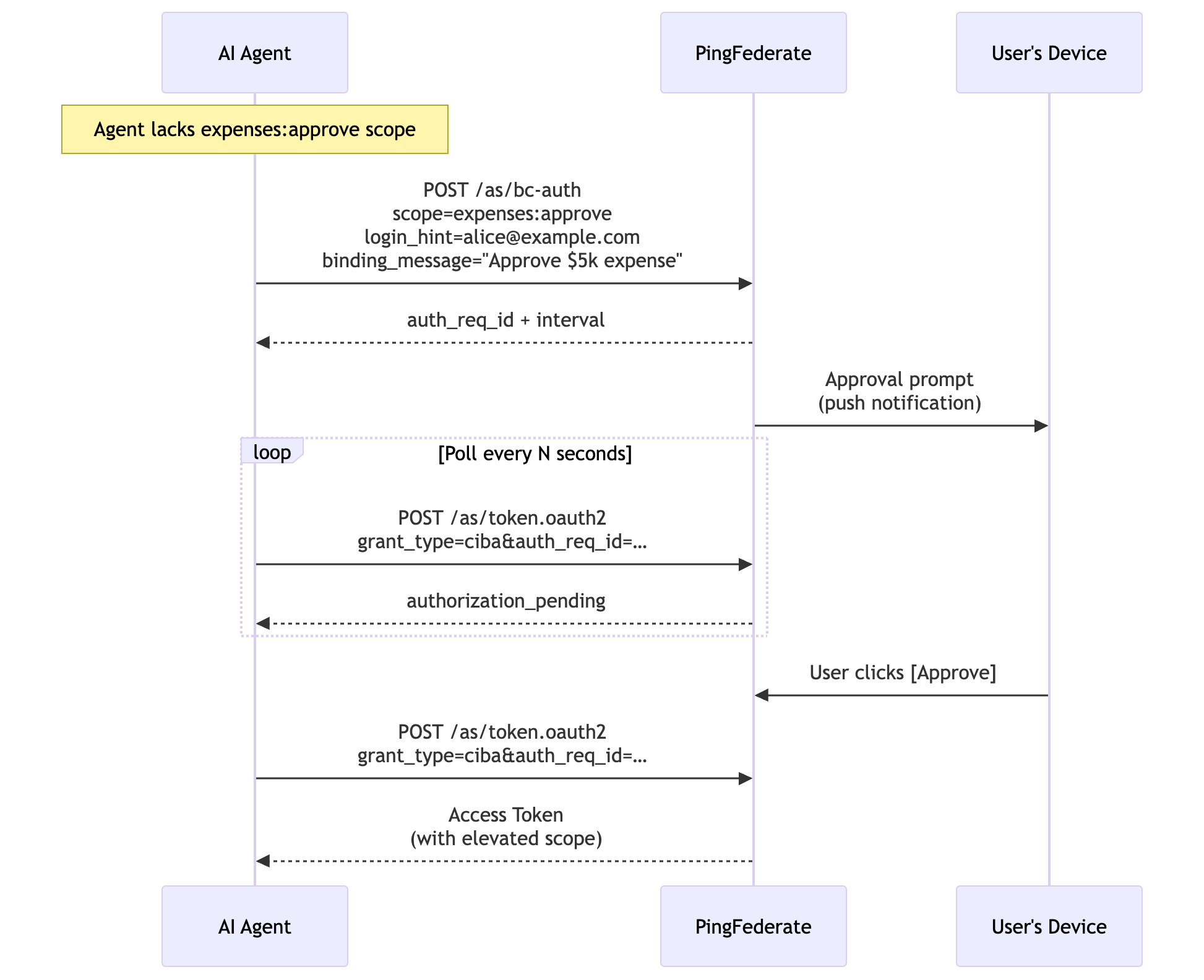
Some operations require explicit user consent before the agent can proceed. PingFederate supports Client-Initiated Backchannel Authentication (CIBA) to enable a step-up authorization flow:
-
The agent attempts an operation that requires an elevated scope, such as
expenses:approve. -
The resource server returns a structured error indicating insufficient permissions.
-
The agent initiates a CIBA request to PingFederate, specifying the user (
login_hint), desired scope, and a human-readable description (binding_message). -
PingFederate delivers an approval prompt to the user’s device through a webhook, push notification, or custom authenticator.
-
The user reviews and explicitly approves the action.
-
The agent polls the PingFederate token endpoint and receives a new access token with the elevated scope.
-
The agent retries the operation with the new token.
This ensures that sensitive actions (such as approving expenses or modifying budgets) require the human to explicitly authorize each action, even when delegating to an AI agent.
Security Considerations
- Agents never hold user credentials
-
The AI agent never receives the user’s session token, access token, or credentials. It only receives delegation access tokens, which are constrained, short-lived, audience-restricted assertions of delegated authority. If the agent is compromised, the attacker cannot escalate to the user’s full privileges or access other services.
- Audit trail
-
Every delegation access token carries the full delegation chain (
sub+act). This enables:-
Correlating agent actions back to the authorizing user
-
Distinguishing between human-initiated and agent-initiated operations
-
Detecting anomalous agent behavior tied to specific users
-
- Least privilege with scope groups
-
By defining scope groups with Expand Scope Groups enabled on the ATM, administrators control exactly which operations agents can perform by default. Elevated scopes require explicit CIBA step-up consent, enforcing the principle of least privilege at the token level.
- Short Token Lifetime
-
A 5-minute time-to-live (TTL) on delegated access tokens means each agent session requires a fresh token exchange. There is no long-lived credential to steal, and token revocation is effectively automatic.
Advanced: Cryptographic Agent Identity with SPIFFE and SPIRE
In the previous steps, you configured PingFederate to validate an actor token that identifies the AI agent. In many deployments, this is a client-credentials token or a pre-provisioned JWT. These credentials must be distributed, rotated, and stored securely, and if an attacker extracts the agent’s credentials, they can impersonate the agent from any location.
Secure Production Identity Framework for Everyone (SPIFFE) and its reference implementation SPIRE offer a stronger alternative: an automatically rotated workload identity that binds the agent’s credential to its runtime environment.
SPIFFE and SPIRE provide the following benefits:
- Platform attestation
-
The agent’s identity is issued only to a workload running in a verified environment (such as a Kubernetes namespace, service account, or node) and not to anyone who possesses a static secret.
- Automatic rotation
-
JWT-SVIDs and X.509-SVIDs are short-lived and automatically rotated by the SPIRE Agent.
- No secret distribution
-
Agents receive identities through a local Unix domain socket (SPIFFE Workload API) so that no secrets stored are in config files, environment variables, or vault systems.
- Uniform identity model
-
Every workload gets a SPIFFE ID URI (for example,
spiffe://example.org/ns/ai-agents/sa/expense-agent) that works consistently across Kubernetes, VMs, and cloud environments.
|
Learn more in the following resources:
|
How it works with PingFederate
When an AI agent runs in a SPIRE-managed environment, it can mint a JSON Web Token SPIFFE Verifiable Identity Document (JWT-SVID) on demand with the SPIFFE Workload API. This JWT-SVID is used as the actor_token in the token exchange request, proving the agent’s identity to PingFederate without any pre-shared secrets.
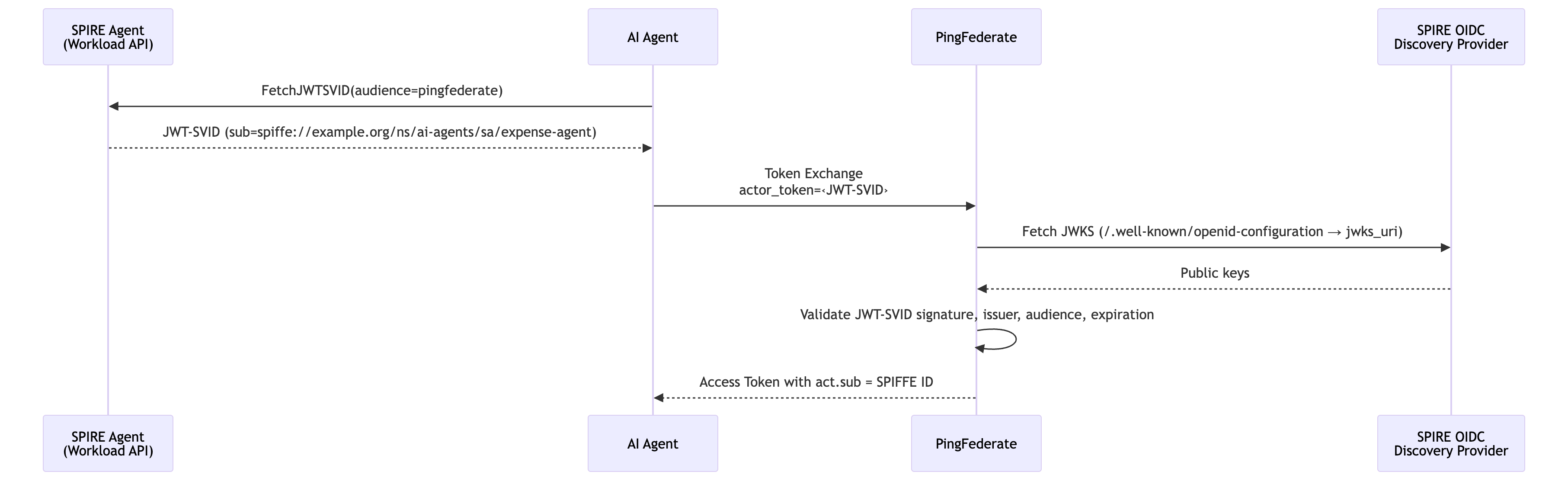
The SPIRE OIDC Discovery Provider exposes a standard /.well-known/openid-configuration endpoint with a jwks_uri, making JWT-SVIDs verifiable by any standard OIDC-compliant relying party, including PingFederate.
private_key_jwt with X.509-SVIDs
SPIFFE also provides X.509-SVIDs, which are short-lived client certificates that can be used for private_key_jwt client authentication when the agent calls the PingFederate token endpoint. In this model, the agent signs its client_assertion JWT with the private key from its X.509-SVID, and PingFederate validates the signature using the agent’s JWKS endpoint (which serves the public key from the same SVID). This eliminates all static secrets from the token exchange flow, because both the client authentication and the actor token are backed by SPIRE-issued, automatically rotated credentials.
Configuring PingFederate
To validate JWT-SVIDs as actor tokens, configure the Actor Token Processor (JWT Token Processor 2.0) with the SPIRE OIDC Discovery Provider as the trusted issuer.
-
Admin console
-
Developer API
Steps
-
In the PingFederate admin console, go to Authentication > Token Exchange > Token Processors.
-
Select the actor token processor you created in step 3 and click the Instance Configuration tab.
-
Click Show Advanced Fields and configure the following values:
Field Value Description Issuer
https://spire-oidc.example.orgSPIRE OIDC Discovery Provider URL. Must match the
issclaim in JWT-SVIDs.JWKS URL
https://spire-oidc.example.org/keysSPIRE OIDC Discovery Provider JWKS endpoint where PingFederate fetches signing keys.
Audience
https://pingfederate.ping-identity.workers.devSet to PingFederate’s own issuer URL. When the agent mints the JWT-SVID, it requests this value as the
audclaim, binding the SVID to PingFederate specifically.Require Audience
trueJWT-SVID must contain the PingFederate issuer URL as the audience.
Require Expiration Time
trueRequire the
expclaim in the token. JWT-SVIDs are short-lived by design.Max Future Validity
1The time in minutes that specifies how far in the future the
expclaim can be. SPIRE SVIDs have short lifetimes. Reject anything with an unreasonably long expiry. -
Click the Extended Contract tab and map the
subclaim.For JWT-SVIDs, the subclaim contains the full SPIFFE ID (for example,spiffe://example.org/ns/ai-agents/sa/expense-agent), which flows into the access token’sact.subclaim.
Steps
-
Use a
POSTrequest to the/pf-admin-api/v1/idp/tokenProcessorsendpoint to configure PingFederate.POST /pf-admin-api/v1/idp/tokenProcessors{ "id": "AgentActorProcessor", "name": "Agent Actor Token Processor", "pluginDescriptorRef": { "id": "com.pingidentity.pf.tokenprocessors.jwt.JwtTokenProcessor" }, "configuration": { "fields": [ { "name": "Require Audience", "value": "true" }, { "name": "Require Expiration Time", "value": "true" }, { "name": "Allowed Clock Skew", "value": "10" }, { "name": "Max Future Validity", "value": "60" } ], "tables": [ { "name": "Allowed Issuers", "rows": [{ "fields": [ { "name": "Issuer", "value": "https://spire-oidc.example.org" }, { "name": "JWKS URL", "value": "https://spire-oidc.example.org/keys" } ] }] }, { "name": "Allowed Audiences", "rows": [{ "fields": [ { "name": "Audience", "value": "https://pingfederate.example.com" } ] }] } ] }, "attributeContract": { "coreAttributes": [{ "name": "sub" }] } }
Result
When the AI agent needs to act on behalf of a user, it sends a token exchange request to PingFederate:
POST /as/token.oauth2 HTTP/1.1
Host: pingfederate.example.com
Content-Type: application/x-www-form-urlencoded

grant_type=urn:ietf:params:oauth:grant-type:token-exchange
&subject_token=eyJhbG...                        # User's identity assertion (JWT)
&subject_token_type=urn:ietf:params:oauth:token-type:jwt
&actor_token=eyJhbG...                          # Agent's identity token (JWT)
&actor_token_type=urn:ietf:params:oauth:token-type:jwt
&client_assertion_type=urn:ietf:params:oauth:client-assertion-type:jwt-bearer
&client_assertion=eyJhbG...                     # Agent's client authentication JWT
PingFederate processes the request as follows:
-
Authenticates the client by validating the
client_assertionagainst the agent’s registered JWKS. -
Evaluates the policy and checks that the token types match a configured processor mapping.
-
Validates the subject token with the configured token processor, checking signature, issuer, audience, and expiration.
-
Validates the actor token with the configured token processor.
-
Applies the attribute mapping and signs the access token with the ATM.
PingFederate responds with the access token:
{
  "access_token": "eyJhbG...",
  "token_type": "Bearer",
  "expires_in": 300,
  "issued_token_type": "urn:ietf:params:oauth:token-type:access_token"
}
The access_token is a standard JWT (typ: at+jwt) enriched with the claims described in Token exchange architecture.
If SPIFFE is configured, the issued access token carries the agent’s full SPIFFE ID in the act claim:
{
  "sub": "alice@example.com",
  "act": {
    "sub": "spiffe://example.org/ns/ai-agents/sa/expense-agent"
  },
  "scope": "expenses:read tools:list"
}
This SPIFFE ID is useful as it encodes the trust domain (example.org), namespace (ai-agents), and service account (expense-agent), which downstream services can use to make decisions. For example, PingAuthorize could enforce that only agents in the ai-agents namespace can access certain data.
Backend services that receive delegation access tokens validate them as standard JWTs:
-
Fetch the PingFederate JWKS from the well-known endpoint (
/.well-known/openid-configuration). -
Verify the signature against the PingFederate public key.
-
Validate standard claims:
iss,aud,exp. -
Verify
typ: at+jwtper RFC 9068. -
Enforce permissions according to the
scopeclaim. -
Log the delegation chain using
sub(user) andact.sub(agent) for audit.
Services can also make attribute-based decisions using custom claims. For example, a department claim to allow only Finance department users to access budget data.
PingFederate provides the authorization infrastructure that makes AI agents enterprise-ready: every action is authorized and traceable, and every sensitive operation requires human consent.
Next steps
While application-level JWT validation is sufficient for many deployments, you can offload and centralize access token enforcement using other Ping Identity products:
- PingGateway
-
Deployed as a reverse proxy in front of backend resources, PingGateway can validate access tokens with PingFederate token introspection (RFC 7662) before requests reach the application. It can also enforce MCP protocol-level rules, ensuring that only well-formed JSON-RPC requests carrying valid tokens are forwarded to downstream services. This removes token validation logic from application code entirely.
- PingAuthorize
-
For fine-grained, attribute-based authorization, PingAuthorize acts as a Policy Decision Point (PDP). PingGateway or other policy enforcement points send the access token claims, including
sub,act,scope, anddepartment, to PingAuthorize through its sideband API. PingAuthorize evaluates these attributes against centrally managed policies and returns permit or deny decisions. This enables rules such as "only users in the Finance department can approve expenses over $1,000" or "agent X can only read expenses, never approve them" without modifying application code. - PingAccess
-
Acts as a Backend-for-Frontend (BFF) reverse proxy between the user’s browser and backend services. PingAccess manages the user’s OAuth session (tokens stored server-side, browser receives only an encrypted HttpOnly cookie), and can inject identity assertions into downstream requests using identity mapping. This keeps user tokens invisible to the browser and provides a clean separation between user authentication and agent delegation.
Together, these products enable a layered enforcement model: PingAccess secures the user session, PingFederate issues constrained delegation access tokens, PingGateway enforces protocol and token validation at the edge, and PingAuthorize applies fine-grained authorization policies, all without requiring backend resources to implement complex security logic.