Agent types
Artificial intelligence (AI) agents open up a new channel for businesses to engage with customers. As multiple agents collaborate to complete requests, understanding each agent type is critical for ensuring security and maintaining trust.
Not all agents are equal, and the identity implications vary depending on who manages the agent, where the agent is deployed, and the purpose of the agent.
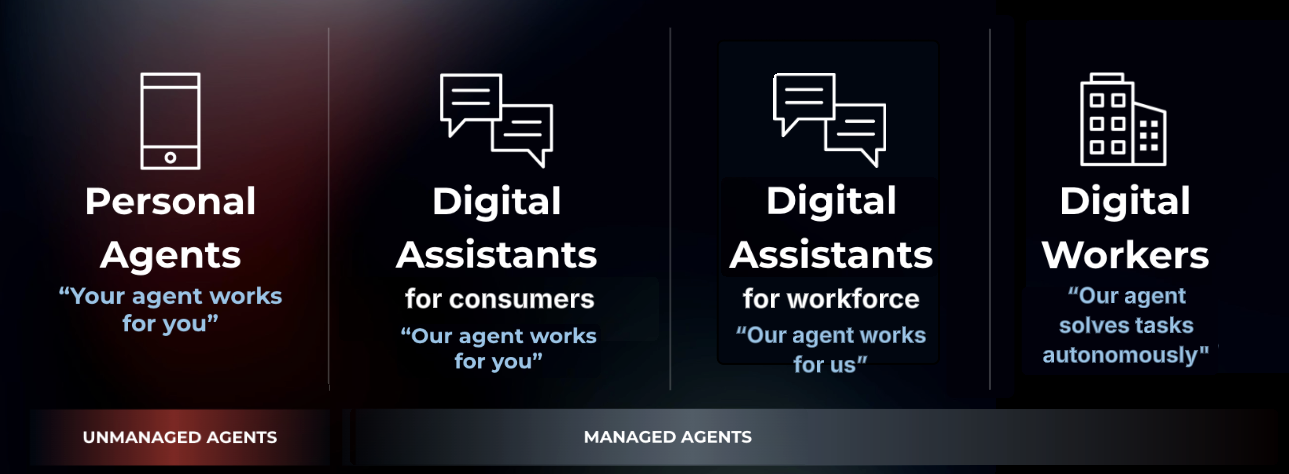
Ping Identity categorizes agents into four types, each serving a distinct use case with its own trust and security considerations:
These types can also be classified based on the level of control you have:
- Unmanaged agents
-
Agents that operate outside your organization’s trust boundary, such as a user’s personal agent. These agents interact with your services but aren’t governed or controlled by your organization.
- Managed agents
-
Agents that your organization creates and controls. You can monitor their activity, enforce policies, and grant access to sensitive resources as needed. Managed agents include digital assistants and digital workers.
In the following sections, we’ll discuss what distinguishes each agent type and the identity challenges associated with each. We’ll also explore how Ping Identity brings together existing and new identity and access management (IAM) concepts to secure agentic identities.
Personal agents
A personal agent can be accessed on your device and perform a wide array of tasks for you. For example, you might prompt ChatGPT to aggregate the best flight deals between airlines.
Personal agents are unmanaged agents that are governed by a third party.
In this case, the agent lies outside of your organization’s trust boundary.
The following diagram shows a simplified flow of a personal agent interacting with your services:
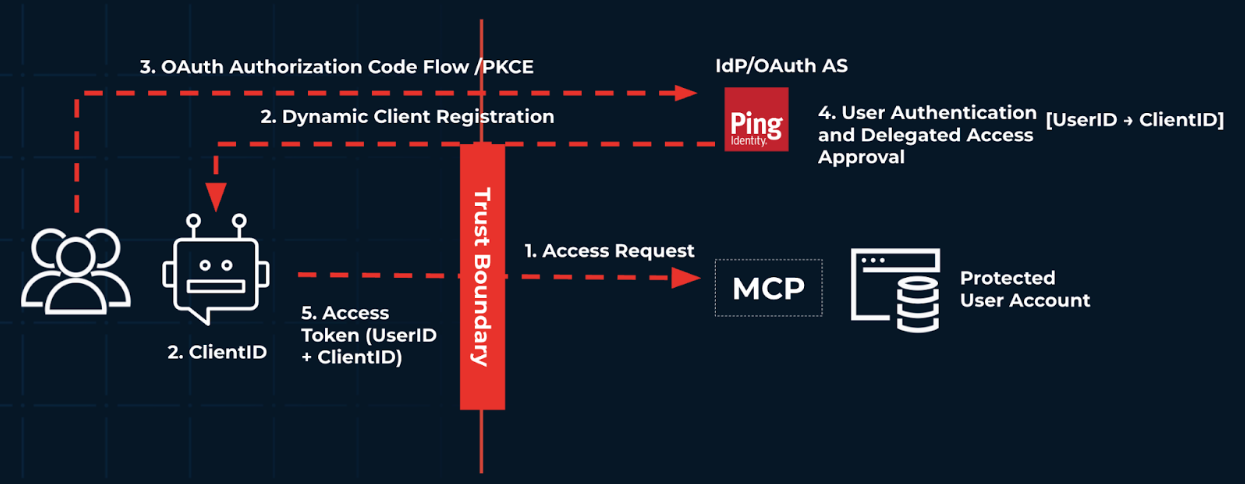
Since the agent above could come from anywhere, it’s operating outside of the organizational trust boundary. If your organization is an insurance company, the interactions in the flow could resemble the following:
-
A user prompts their personal agent, such as ChatGPT, to shop for the latest deals on car insurance.
-
The agent attempts to access that user’s account in your organization to look at their existing policy. Your organization uses Ping Identity as their identity provider and authorization server (AS), and you require the agent to be dynamically registered with the AS and tied to an end user. With the user registered with Ping Identity, the OAuth 2.0 client requires human-in-the-loop (HITL), meaning it requires the user to approve this access.
-
The user completes an authentication journey.
-
After the user authenticates successfully, the AS issues minimally scoped tokens back to the agent.
-
With an access token, the agent can now access the user’s current insurance rate information.
Digital assistants for consumers
Digital assistants for consumers are customer-facing agents owned by an organization to help users complete specific tasks, such as a chatbot that assists with booking an appointment.
Unlike a personal agent, a digital assistant is a managed agent that’s created and governed by your organization. They interact directly with users, but often require access to protected information to complete user requests.
The following diagram details high-level interactions between the digital assistant for consumers agent, the end user, and an organization’s backend resources. It doesn’t delve into how to securely integrate Model Context Protocol (MCP) servers just yet.
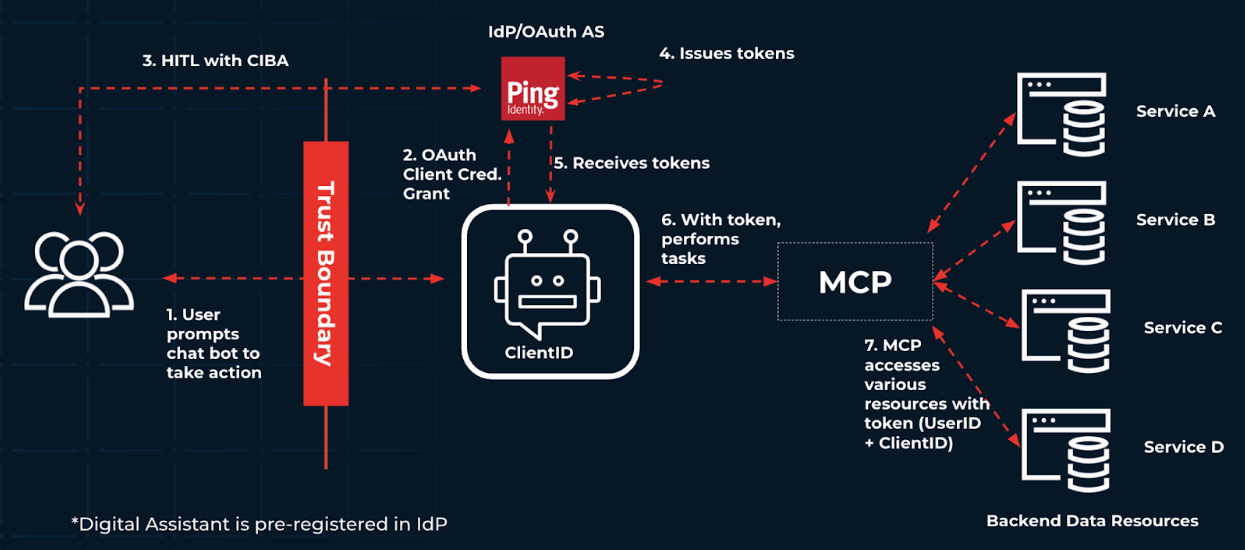
Compared to the personal agent, the digital assistant is now within the organizational trust boundary. An organization would create their digital assistant agent, and then preregister it using Ping Identity as the IdP and AS.
In this example, your organization is again an insurance company. This time, you want to create a digital assistant chatbot on your website. The chatbot must be able to access the backend resources and APIs required to assist customers while ensuring that:
-
The user authenticates and approves the chatbot’s actions.
-
The chatbot operates with only the permissions granted by the user.
-
You can monitor the chatbot’s activities (logging and auditing).
|
Chatbots and agents aren’t inherently secure. They shouldn’t be given user credentials, user tokens, or long-lived tokens. Instead, register them with their own identity, and use short-lived tokens to access protected resources. |
The flow is as follows:
-
With the chatbot registered with Ping Identity as an OAuth 2.0 client, the end user prompts the chatbot to change their payments from every 6 months to a monthly basis.
-
The chatbot doesn’t have sufficient access to perform this change, so it interacts with Ping Identity as the IdP through the Client Credentials grant flow to gain the necessary tokens.
-
With Ping Identity as the IdP and the AS, the flow requires a HITL interaction to grant tokens. With Client-Initiated Backchannel Authentication (CIBA), the end user is sent a push notification, and they approve the action of the chatbot.
-
Ping Identity issues tokens.
-
The chatbot receives the tokens.
-
The chatbot sends the request to the MCP server with the tokens to access protected resources.
-
The MCP server accesses the backend API to update the user’s payment plan.
Digital assistants for workforce
Digital assistants for workforce are similar to digital assistants for consumers. They’re agents managed by your organization, they need to access backend resources to perform tasks on behalf of the user, and they’ll use MCP and Agent2Agent (A2A) protocol to do so.
However, digital assistants for workforce are targeted internally to increase the efficiency of an organization. For example, an organization might implement a HR digital assistant to help employees submit time-off requests.
Now, both the agent and the user are within the organizational trust boundary, as the end user is an employee within the organization’s purview.
Digital workers
A digital worker is a managed agent that’s semi-autonomous to fully autonomous within an enterprise designed to perform internal tasks.
Similar to an intern with a simple set of tasks who checks in periodically to ensure they’re on the right path, a digital worker performs tasks on its own and checks in with a human when required.
For example, let’s say you create a digital worker to manage inventory and coordinate logistics. This digital worker can reason and understand external factors that influence the quantity and cadence of inventory purchases. The digital worker is completely within your organization’s trust boundary. It requires:
-
Its own identity and set of credentials to perform actions as itself.
-
Depending on business requirements, a human supervisor to approve certain actions.
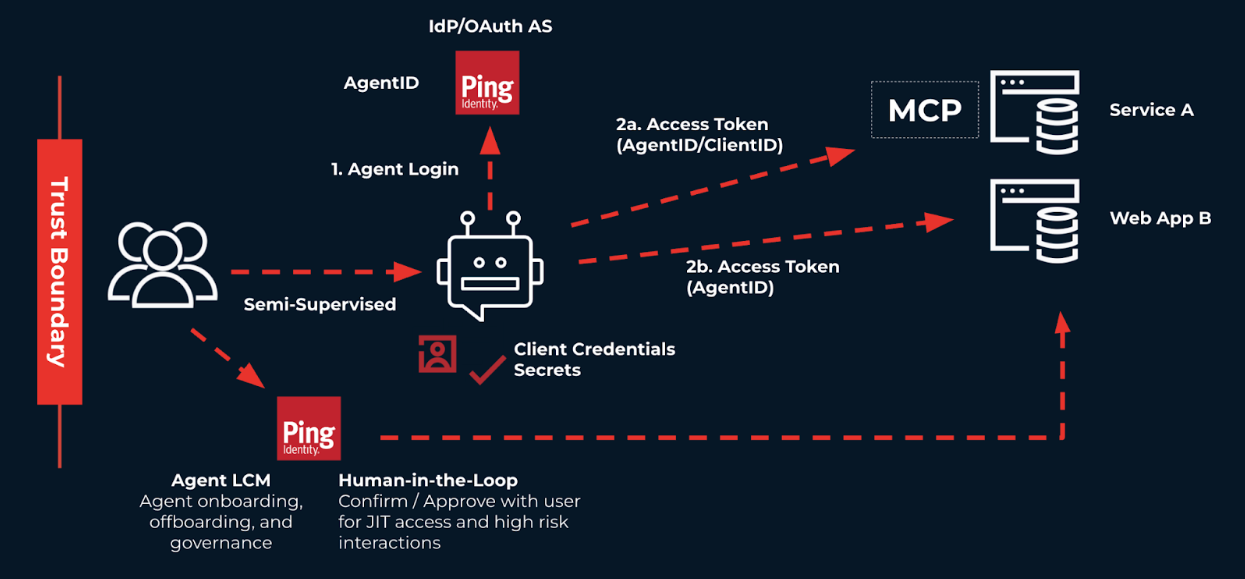
Consider the following diagram:
-
Just as an end user would, the digital worker signs on with Ping Identity as the IdP and AS.
-
After signing on, the worker receives appropriately scoped tokens to access purchasing and manage inventory.
The worker also accesses the organization’s web app to interact and view the status of delivery on inventory.
-
For high-sensitivity transactions, a HITL interaction is required. Additionally, the worker is monitored just like a human user to ensure that the worker has the minimal access it needs to perform its tasks.