Integrating Gemini Enterprise Agent Platform with Ping Identity solutions
The Gemini Enterprise Agent Platform enables organizations to deploy and manage artificial intelligence (AI) agents. The platform provides tools and services for building and deploying AI agents, and managing their lifecycles.
Integrating Gemini Enterprise Agent Platform with Ping Identity’s authorization solution, PingOne Authorize, transforms how your organization secures AI agents, shifting from simple network connectivity to dynamic runtime authorization. In this integration, Google Cloud Agent Gateway acts as a central enforcement point and PingOne Authorize acts as the decision point, authorizing agent actions in real time without relying on standing credentials.
Benefits of this integration include:
- Decoupled policy management
-
A single authorization decision point governs all agent access (to MCP tools, external APIs, or other agents), enforcing read-only constraints and role-based policies, and eliminating the need to hard code business rules into every agent implementation or API integration.
- Continuous contextual authorization
-
Static credentials alone can’t stop over-privileged agents from accessing downstream tools. Instead, upon every request approved by PingOne Authorize, the gateway coordinates with PingOne to exchange the incoming credential for a narrowly scoped, short-lived token. By checking identity, delegation history, and policy at runtime, PingOne Authorize prevents compromised agents from using stolen tokens to reach downstream tools.
- End-to-end traceability
-
Combining the gateway’s trace IDs with Ping Identity’s delegated identity model allows you to follow each request to see exactly which user was represented, which agent made the call, and which policy allowed or blocked the action.
Authorization scenarios
This integration supports three primary authorization use cases based on the identity and delegation requirements of the agent and the downstream tool:
| Use case | Scenario |
|---|---|
An agent calls a supply chain MCP server using an agent-only identity. No user context is involved. |
|
A user invokes an agent that subsequently calls an MCP server. The user’s identity is delegated directly through the agent. |
|
A user interacts with a support agent that delegates to an order status agent. The order status agent subsequently calls an MCP server. The user’s identity is delegated through the entire chain. |
Reference architecture
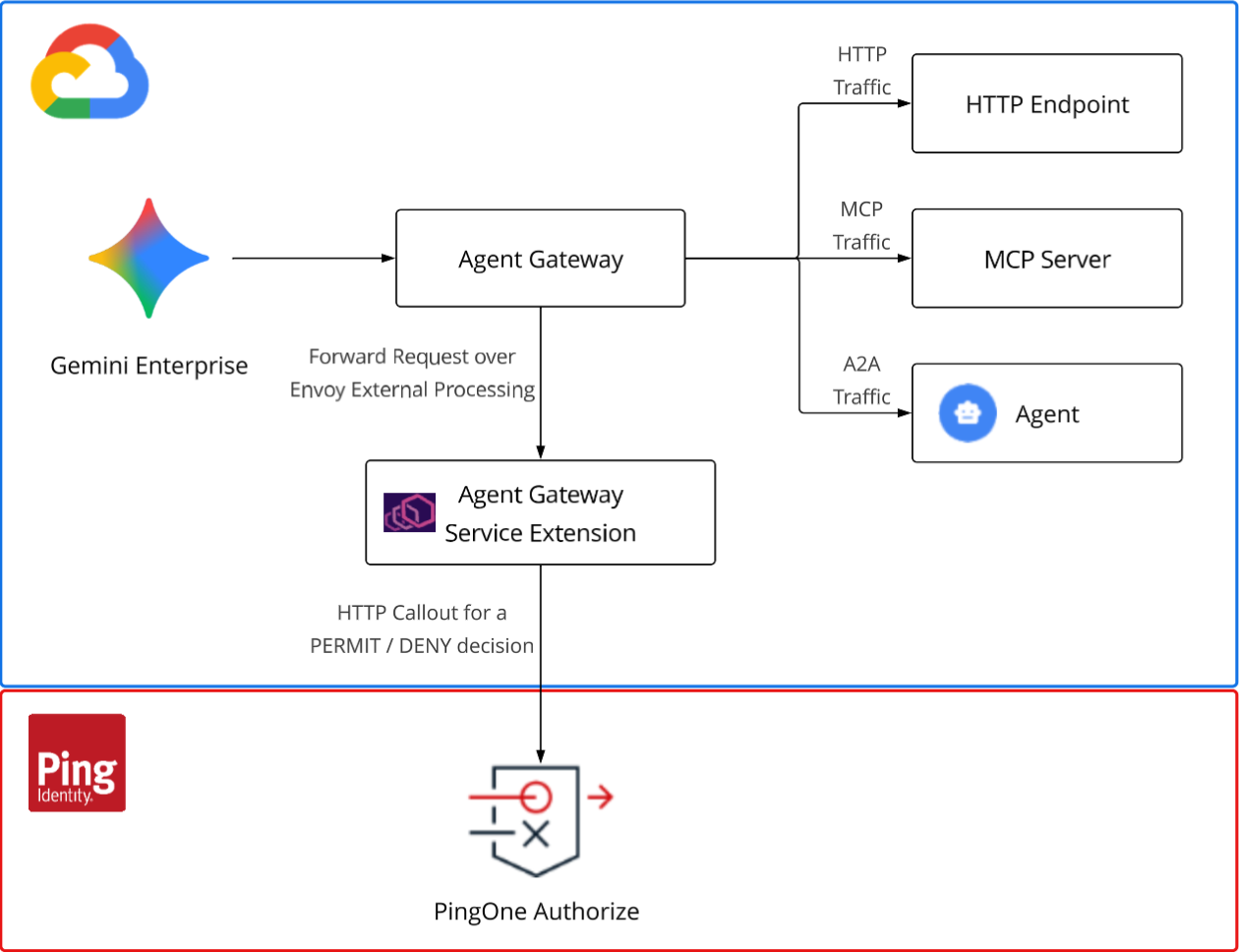
Enforcing authorization policies on agents and MCP servers running on the Gemini Enterprise Agent Platform relies on a central gateway approach. In this architecture, the calling agent never holds a credential for the downstream agent or tool it calls. Instead, Google Cloud Agent Gateway uses a service extension to validate the inbound token and consult PingOne Authorize for a permit or deny decision. Upon a permit decision, the gateway performs a delegation token exchange, minting a narrowly scoped token before forwarding the request to an agent or MCP server.
Technologies
PingOne Authorize integrates into the Google Cloud Agent Gateway flow through a custom Envoy ext_proc service extension. The gateway streams each governed request to the extension, which validates the inbound token and requests an authorization decision from PingOne Authorize. Upon a permit decision, the extension exchanges the credential for a narrowly scoped, short-lived token before forwarding the request.
| Component | Role |
|---|---|
Google Cloud platform, which manages agent lifecycles. |
|
Policy enforcement point that forwards agent requests to the service extension over the gRPC remote procedure call framework. |
|
Gateway mechanism that streams intercepted requests to the service extension over gRPC. |
|
Identity provider that authenticates agents and exchanges tokens with delegation. |
|
External policy decision point that evaluates authorization requests. |
Before you begin
-
Ensure you have:
-
A Google Cloud project with billing enabled.
-
The Google Cloud CLI authenticated against the target project.
You can find information about installing the Google Cloud CLI in the Google Cloud documentation.
-
A PingOne environment with PingOne Authorize and the following roles:
-
Environment Admin
-
Application Admin
-
-
Docker installed and running on your local machine. Docker is used to build service images.
-
-
Clone the Gemini Enterprise Agent Platform Integrations repository to your local machine. For example:
git clone https://github.com/pingidentity/gemini-enterprise-agent-platform-integrations.gitThis repository contains implementation files, code samples, and detailed instructions.
Google Cloud access requirements
Google Cloud authentication requires credentials in three separate stores. You must authenticate all three stores, because an expired credential in any store causes deployment failures.
# Authenticate the gcloud CLI for deploy commands
gcloud auth login

# Authenticate Application Default Credentials (ADC) for the Python agent SDK
gcloud auth application-default login

# Authenticate Docker for pushing images (doesn't read the gcloud CLI sign-on)
gcloud auth configure-docker
You can deploy the solution from an Apple Silicon Mac without additional configuration. The Makefiles build for the linux/amd64 platform, and the agent virtual environment targets Python 3.13.
|
If you’re using an earlier version of Python, run |
To deploy the solution, your Google Cloud user account requires specific permissions beyond the basic roles/editor role:
| Role | Description |
|---|---|
|
Allows the |
|
Grants the necessary egress permissions during the agent deployment. |
|
Allows the deployment of Cloud Run services and the attachment of service accounts. |
|
Enables Docker image pushes and manages the staging bucket. |
|
Permits Reasoning Engine deployments and queries. |
To grant these roles to a deploying user, run the following bash script:
for ROLE in roles/secretmanager.admin roles/iap.admin roles/run.admin \
            roles/iam.serviceAccountUser roles/storage.admin roles/aiplatform.user; do
  gcloud projects add-iam-policy-binding <PROJECT_ID> --member=user:<EMAIL> --role=$ROLE
done
What’s next
Learn how to authorize autonomous Gemini agents.