Securing MCP Servers with Ping’s MCP Gateway
Building MCP servers that expose your business logic to AI agents? Discover how PingGateway can act as your security bouncer, handling OAuth validation, auditing, rate limiting, and policy enforcement without adding a single line of security code to your servers.

You’ve been shipping MCP servers and each one comes with its own OAuth handler, its own scope-checking logic, its own audit hooks. Security code that should be administered centrally ends up copy-pasted across every server you build.
The MCP security gateway capabilities in PingGateway solve this by acting as a security bouncer in front of your MCP servers. The bouncer checks credentials at the door, enforces the rules, and logs everything — so your servers never have to.
You can find a deeper dive into MCP’s architecture, workflow, and security model in the Ping Identity MCP documentation.
Where PingGateway sits as your MCP security gateway
In a typical setup, PingGateway as an MCP security gateway sits between the MCP client (the AI agent) and your MCP server.
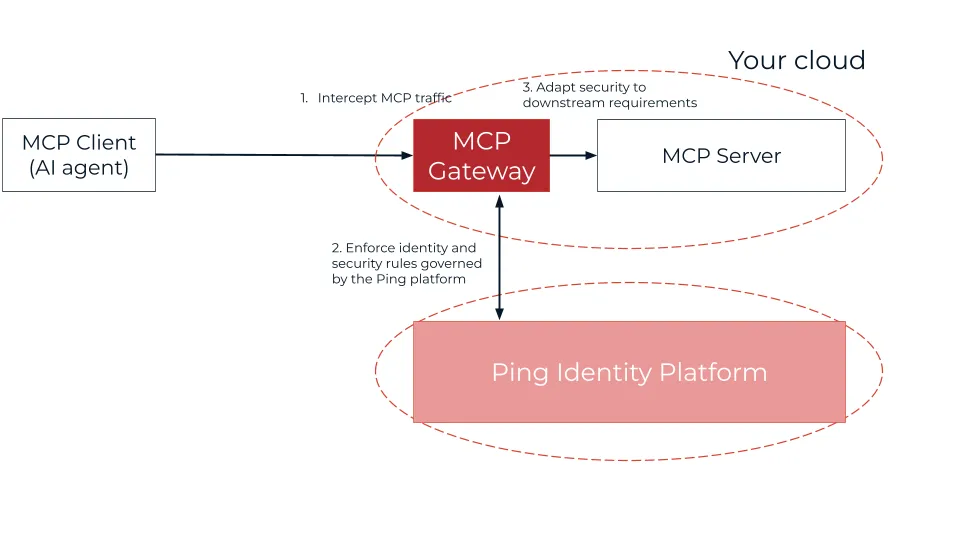
What PingGateway adds for MCP servers
By fronting your MCP server, PingGateway validates that requests are syntactically correct MCP, enforces operational requirements like audit and throttling, enforces authorization of the request, and mediates security tokens before forwarding to the MCP server.
Your server continues to implement tools and domain behavior; the gateway provides the surrounding security and operational controls.
What capabilities does PingGateway provide?
PingGateway extends its proven API security stack with MCP-aware capabilities you configure once and reuse across every server:
- McpValidationFilter: Validates Origin / Accept headers and MCP / JSON‑RPC format and populates an McpContext so subsequent filters (throttling, policy, metrics) can inspect method and tool names.
- McpProtectionFilter: Serves OAuth 2.0 Protected Resource Metadata (
/.well-known/oauth-protected-resource/...) on behalf of your MCP endpoint, ensures the access token’saudmatches the configuredresourceIdand uses PingGateway’s OAuth 2.0 resource server capabilities to validate tokens and enforce scopes. - McpAuditFilter: Emits MCP‑specific audit events (who called which tool, where, and with what result)
- MCP metrics: Exposes Prometheus metrics per MCP method/tool (counts, latencies, errors).
- MCP throttling: Rate limits access per route, per tool, per client or per identity.
Seeing it in action: the “unauthenticated” request
The gateway’s job is to stop what shouldn’t get through — and wave through what should. If the MCP client (AI agent) sends a request without the proper identity tokens required by the Ping Identity platform, the gateway will block it.
The situation: missing authorization header.
An AI agent sends a tool call without an Authorization header:
POST /mcp/v1/call_tool{
"method": "tools/call",
"params": {
"name": "access_customer_database",
"arguments": {
"customer_id": "12345"
}
}
}Result:
401 Unauthorized— rejected by PingGateway before the request ever reaches your server.
With valid credentials, the gateway allows the request through.
The same agent retries with a valid, scoped Bearer token:
POST /mcp/v1/call_tool
Authorization: Bearer <valid-access-token>
{
"method": "tools/call",
"params": {
"name": "access_customer_database",
"arguments": {
"customer_id": "12345"
}
}
}Result:
200 OK— PingGateway validates the token, confirms scope, logs the event, and forwards the request to your MCP server. Your server never saw the first request at all.
Benefits for the MCP server developer
- MCP security shouldn’t be implemented in each MCP server’s codebase
Without a gateway, each MCP server grows its own OAuth, scopes, auditing, throttling, and risk logic.
With MCP Security Gateway, a standard PingGateway route in front of each MCP server centralizes that logic; you reuse the pattern for every new server. - Comply with MCP authorization by configuration, not code
MCP requires OAuth 2.0 Protected Resource Metadata so agents know which AS to use and which resource they call. PingGateway serves this metadata and validates tokens according to it, so you configure security once instead of coding it per server. - Gain observability “for free”
Audit logs and metrics at the gateway show which tools are used, by whom, and how often, without extra instrumentation in your MCP code. - Protect MCP servers from noisy or malicious agents
Central throttling and policy/risk rules ensure your servers only see pre‑validated, rate‑limited, authorized requests. - Integrate legacy or sensitive backends cleanly
Use token mediation at the gateway to map agent tokens to whatever your backends expect (different scopes, JWT formats, API keys, mTLS), keeping your MCP server’s backend calls simple and aligned with existing security models.
The gateway acts as the “bouncer,” ensuring the server only spends resources processing requests that are properly formatted, authenticated, and authorized.
Get started!
The MCP security gateway tutorial walks you through the complete setup. Download the sample MCP agent and server (or bring your own), insert PingGateway in front of your MCP server, and enable MCP processing and authorization in the gateway configuration.
MCP exposes your business capabilities to AI agents. PingGateway makes sure only the right agents — with the right credentials and the right permissions — ever reach them.
Next steps
- Get started with the MCP security gateway tutorial.
- Visit the MCP documentation on the Ping Identity developer portal.
- Check out developer resources for all Ping Identity products at developer.pingidentity.com.
- Join the discussion on the Ping Identity Developer Community.