PingID User Management API
User Management API
| If you are managing PingID users from within PingOne SSO, you must use the PingOne API. |
The PingID user management API consists of operations for managing PingID users, their status and their paired devices:
-
The user’s lifecycle can be managed via the AddUser, GetUserDetails, EditUser and DeleteUser operations. These allow an administrator to perform CRUD actions on a user in the PingID service.
-
The status of a user (whether they are active, bypassed or suspended) can be managed with the ActivateUser, ToggleUserBypass and SuspendUser operations.
-
Devices are managed via the GetActivationCode, GetPairingStatus, StartOfflinePairing and FinalizeOfflinePairing, PairYubiKey and UnpairDevice operations.
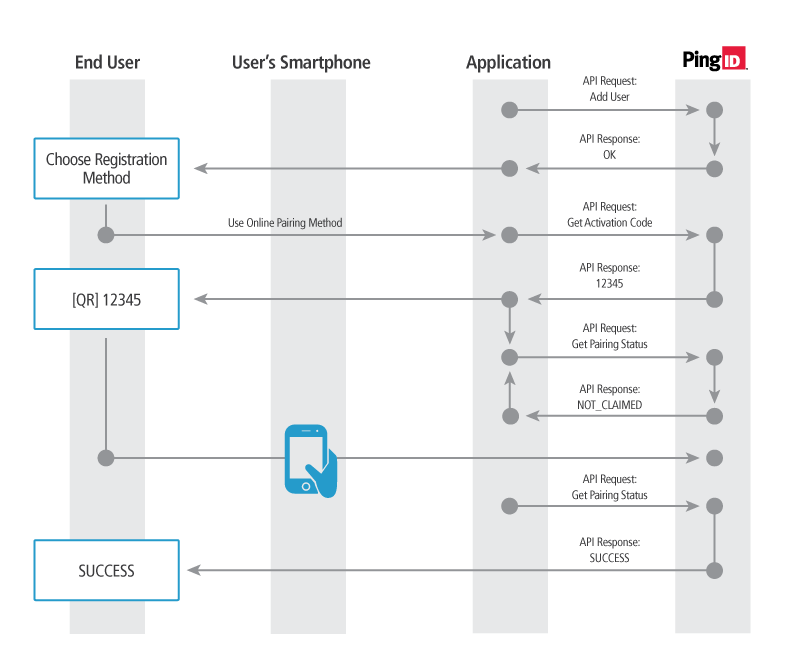
Online Pairing Workflow
This will pair a users device (and PingID application) to the PingID service so that a user can be authenticated via the AuthenticateOnline operation. The following workflow can be used to pair a user and their device:
-
The organization’s administrator enters the new user name in the organization’s internal user directory.
-
The client application calls the AddUser PingID API with an activateUser value of "false."
-
The client application offers the user a choice of registration methods: either online registration via mobile device, or offline registration via SMS, email, voice or YubiKey device.
-
The user chooses the Online Pairing method.
-
The client application calls the GetActivationCode operation.
-
The client application displays the the activation code to the user, in either numeric or QR code format.
-
The client application starts polling the device pairing status by calling the GetPairingStatus operation periodically.
-
In the PingID mobile app, the user either scans the QR code or types in the numeric code and selects "Pair Device."
-
Once the PingID mobile app has been paired, the call to GetPairingStatus will return SUCCESS and the pairing process is complete.
| If it is known that the user will use the online pairing process before creating the user, the activateUser parameter can be set to "true" during the AddUser operation to receive the activation code in the response to the AddUser operation rather than make a second call to the GetActivationCode operation. |
Offline Pairing Workflow
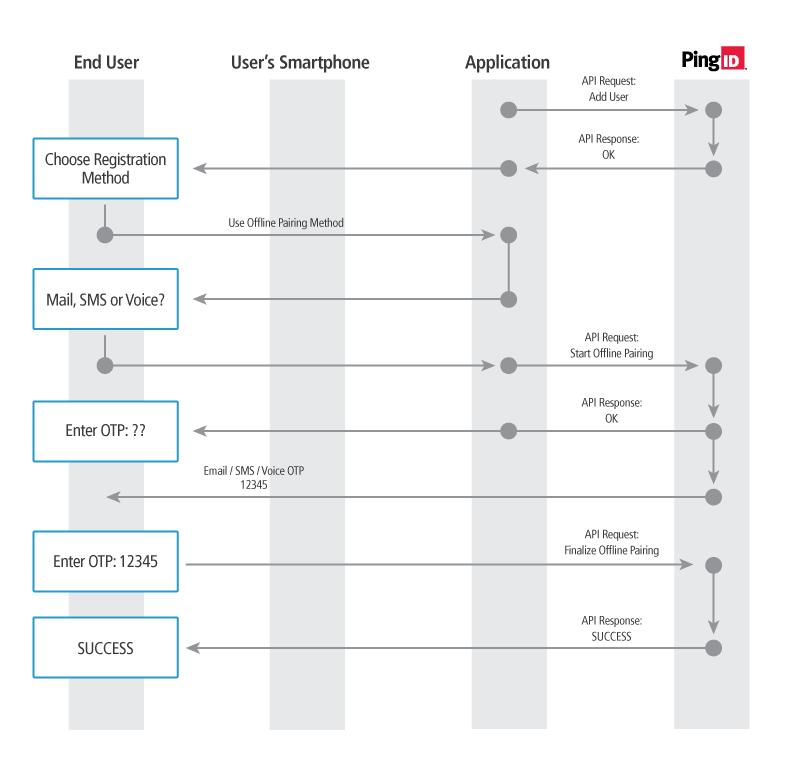
The offline pairing workflow pairs the user’s PingID account to either an SMS, Email or Voice authentication method. The following workflow can be implemented to pair a users device:
-
The organization’s administrator enters the new user name in the organization’s internal user directory.
-
The client application calls the AddUser PingID API with an activateUser value of "false."
-
The client application offers the user a choice of registration methods: either online registration via mobile device, or offline registration via SMS, email, voice or YubiKey device.
-
The user chooses the offline pairing method.
-
The client application prompts the user to enter a phone number or an email address.
-
The client application calls the StartOfflinePairing operation, passing the user’s choice of SMS, email or voice message and contact details.
-
The PingID service sends an OTP via SMS, email or voice message, depending on the method selected previously.
-
The client application prompts the user to enter the OTP received by SMS, email or voice message.
-
The client application calls the FinalizeOfflinePairing PingID API, passing the OTP that the user entered to complete the pairing process.
YubiKey Pairing Workflow
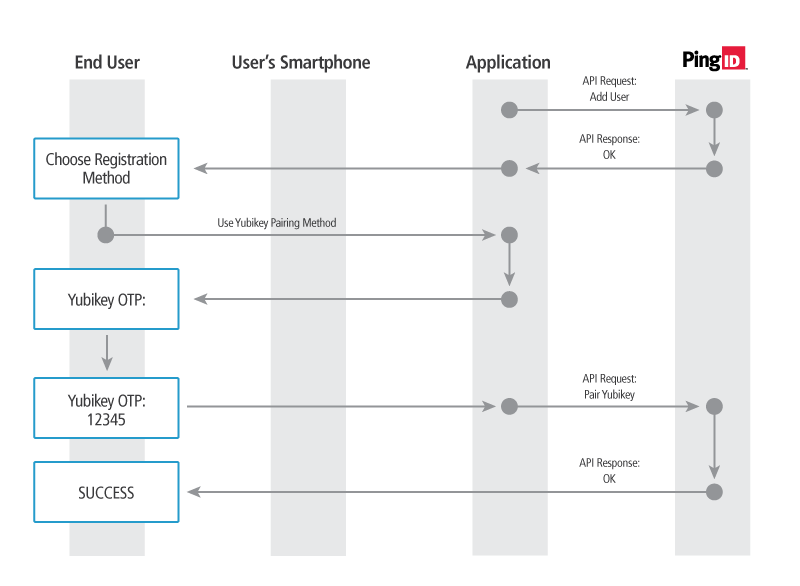
An organization can use YubiKey’s to provide an offline authentication method. Once the user has selected YubiKey as their authentication method, the following steps must be implemented:
-
The organization’s administrator enters the new user name in the organization’s internal user directory.
-
The client application calls the AddUser PingID API with an activateUser value of "false."
-
The client application offers the user a choice of registration methods: either online registration via mobile device, or offline registration via SMS, email, voice or YubiKey device.
-
The user chooses the YubiKey pairing method.
-
The client application prompts the user to enter an OTP obtained from the YubiKey device.
-
The client application calls the PairYubiKey operation, passing the OTP that the user entered to complete the pairing process.
FIDO pairing workflow
When a user wants to pair a FIDO security key or a FIDO supported biometrics device, the service provider initiates the authentication process with the WebAuthnStartPairing API, which returns parameter data required for public key credentials. These parameters are used as an input for the call to the browser’s "navigator.credentials.create" function, which is the next step in the WebAuthn pairing flow.
The "navigator.credentials.create function" returns the public key credentials.
The WebAuthnFinishPairing API then uses the public key credentials and input parameters in its request body, and completes the pairing process for the FIDO security key or FIDO supported biometrics device.
For further information, refer to:
PingID supports use cases of FIDO hybrid mode authentication, where a custom UI (not hosted by PingID) is used for registration, while PingID’s out of the box UI is used for authentication. PPM request, which was originally developed to support authentication, also supports explicit FIDO registration. For further information see PPM request for FIDO authentication with a hybrid UI.
User Status Values
The following table describes the different statuses a user entity might have throughout its life-cycle. A user’s status depends both on the PingID administrator’s actions and on whether the user has registered a mobile device with the system.
| Status | Description |
|---|---|
ACTIVE |
The user can perform any operation within the user’s privileges. This means that the administrator created this user in the system, and the user completed the registration process and was paired with a device. |
PENDING |
The user started the registration process but did not finish it. Therefore the user is not yet paired with a device. |
NOT_ACTIVE |
One of the following scenarios:
|
PENDING_ACTIVATION |
The user was activated but not paired with a device. |
SUSPENDED |
The administrator suspended this user’s ability to be authenticated by PingID. This might happen, for instance, if the user can’t find the registered device and the administrator wants to protect against a possible theft and illegal access to the system. |
PENDING_CHANGE_DEVICE |
The user’s device was deleted by the administrator and should be re-registered with a new activation code. This might happen, for instance, if the user is upgrading to a new device. |
Activation code redirect link for Online Pairing
When the organization’s application calls the GetActivationCode operation, a numeric activation code is returned. Either the user can enter the numeric code manually into the PingID mobile app, or the application can render a QR code, which the user can scan within the PingID mobile app (or any QR reader).
To create the activation code link to display to the user within a mobile application:
-
Create a string "act_code=<activation_code>", where <activation_code> is the numeric code you received in the GetActivationCode response.
-
Encode this value with Base64, and add it as a query parameter to the redirect URL (
https://idpxnyl3m.pingidentity.com/pingid/QRRedirection).
This URL will redirect the user to the PingID mobile app, and will use the activation code to pair the user:
https://idpxnyl3m.pingidentity.com/pingid/QRRedirection?base64(act_code=<activation_code>)
Generating QR Codes from redirect links
To show an activation QR code within a web application, generate a QR code from the above redirect link, using any supported library, for example: com.google.zxing.qrcode.QRCodeWriter.
| There are a number of open source QR code generation libraries available. This document does not endorse a specific library to perform the encoding. |
AddUser
The administrator who manages the service provider’s users will initiate an AddUser operation for each new user the administrator wants to create in the PingID service. The new user will still have to be paired with a mobile device before using PingID for authentication.
This is the AddUser URL:
https://idpxnyl3m.pingidentity.com/pingid/rest/4/adduser/do
Request Body Parameters
Example reqBody object in the API payload:
"reqHeader": { ... },
"reqBody": {
 "activateUser": false,
 "fname": "John",
 "lname": "Doe",
 "email": "jdoe@pingdevelopers.com",
 "username": "jdoe",
 "role": "REGULAR",
 "clientData": "Session data echoed back to the requestor",
 "deviceType": "DESKTOP"
}
The parameters included in the reqBody object are:
| Parameter | DataType | Description |
|---|---|---|
activateUser |
Boolean |
Whether to activate as well as add the user (true/false). If this value is set to true, an activation code for the user is sent in the response. |
clientData |
String |
Optional. This value is returned unchanged in the API response. It can be used to save state and/or client context data for the application between API calls. |
String |
Optional. The user’s email address. |
|
fname |
String |
Optional. The user’s first name. |
lname |
String |
Optional. The user’s last name. |
role |
String |
One of:
|
username |
String |
The user’s assigned user name. Must be unique in an organization. Up to 250 characters; can contain any characters, including blanks. |
deviceType |
String |
Optional. Valid values:
|
Response Body Parameters
Example response body:
{
 "userDetails": {
  "email": "jdoe@jdoe.com",
  "lname": "Doe",
  "userEnabled": false,
  "fname": "John",
  "spList": [],
  "lastLogin": null,
  "deviceDetails": null,
  "userName": "jdoe",
  "status": "NOT_ACTIVE"
 },
 "errorId": 200,
 "errorMsg": "",
 "uniqueMsgId":"webs_sOFLeIP0EOlR-BnOCN_DTLv1uMpivQRoFN68edsYi4Y",
 "clientData": "Session data echoed back to the requestor"
}
The parameters included in the responseBody object are:
| Parameter | DataType | Description |
|---|---|---|
errorId |
Int |
A numeric error code. |
errorMsg |
String |
A textual description of the error, if there was one. |
uniqueMsgId |
String |
A unique ID for the response message. This is logged and used to track the specific transaction for troubleshooting purposes. |
clientData |
String |
The value sent in the request’s clientData field. |
userDetails |
Object |
See details in the table below. |
The userDetails parameters:
| Parameter | DataType | Description |
|---|---|---|
deviceDetails |
Object |
The details of the default device that is paired for the user. See the deviceDetails table below. |
devicesDetails |
Array |
An array of deviceDetails objects containing the details of the all the devices that are paired for the user. |
String |
The user’s email address. |
|
fname |
String |
The user’s first name. |
lastLogin |
DateTime (epoch) |
The date and time of the user’s last login to PingID (in UNIX epoch format). |
lname |
String |
The user’s last name. |
spList |
Array |
The list of objects describing the authentication services the user can access. The objects can be for these services: "web", "pingone" (indicates single sign-on), "ssh", "vpn". See the table below. |
status |
String |
The user’s status. One of:
|
userEnabled |
Boolean |
Indicates whether the user was enabled by the PingID account administrator. If so, the user can pair with a device and can then perform authentication. |
userName |
String |
The user’s PingID user name. |
bypassExpiration |
DateTime (epoch) |
[Deprecated] The date and time when the user’s enabled bypass mode will expire (in UNIX epoch format). |
userInBypass |
Boolean |
[Deprecated] Indicates whether the user is in bypass mode. |
The deviceDetails list (one or more objects):
| Parameter | DataType | Description |
|---|---|---|
String |
The user’s email address for the OTP message (non-null if email authentication is configured). |
|
appVersion |
String |
The PingID application version installed on the device. |
hasWatch |
Boolean |
Indicates whether the authentication device is an Apple iWatch. |
countryCode |
String |
The country code of the device’s phone number (non-null if SMS or voice authentication is configured). |
sentClaimedSms |
Int |
[Deprecated] The times within the current day that the user requested an OTP via SMS or voice message and used the OTP for authentication. |
phoneNumber |
String |
The user’s assigned phone number. |
nickname |
String |
A nickname assigned to the user. |
deviceModel |
String |
The manufacturer and model information for the device. |
enrollment |
DateTime |
Format is: yyyy-MM-dd HH:mm:ss.SSS. U.S. MST timezone. |
availableNotClaimedSms |
Int |
The times within the current day that the user requested an OTP via SMS or voice message and used the OTP for authentication. |
availableClaimedSms |
Int |
The remaining available times within the current day that the user can request an OTP via SMS or voice message, which is then used for authentication. This value is reset daily (it is limited because of the costs incurred for the user). |
deviceRole |
String |
The authenticating role of the device. This can be PRIMARY or SECONDARY. |
pushEnabled |
Boolean |
Indicates whether the authentication process can push data to the device. |
deviceId |
Long |
Uniquely identifies the device. |
displayID |
String |
The ID of the device, according to the device’s type. For example:
|
sentNotClaimedSms |
Int |
[Deprecated] The times within the current day that the user requested an OTP via SMS or voice message without using the OTP for authentication). |
type |
String |
The type of device used. Possible values:
If the caller uses API Version below 4.9 in the header, there is a possibility some old PC Clients will be displayed as "PC Client". |
osVersion |
String |
If applicable, the operating system version used by the device. |
oathSerialNumber |
String |
The serial number of the device if it is an OATH token. |
oathTokenType |
String |
Type of token, if the device is an OATH token. Possible values: - HOTP - TOTP Null, if the device is not an OATH token. |
The spList list (an object):
| Parameter | DataType | Description |
|---|---|---|
spAlias |
String |
The alias used to identify the authentication service (such as, pingone or web). |
status |
String |
The status of the authentication service. This can be ACTIVE, NOT_ACTIVE or BYPASS. |
spName |
String |
The service name for the authentication service. |
bypassExpiration |
DateTime (epoch) |
The date and time bypass mode will expire for the user (in UNIX epoch format). |
GetUserDetails
The service provider application may retrieve a user’s details for display purposes, for instance, for displaying within a UI page in order to allow the user to edit the details.
This is the GetUserDetails URL:
https://idpxnyl3m.pingidentity.com/pingid/rest/4/getuserdetails/do
Request Body Parameters
Example reqBody object in the API payload:
"reqHeader": { ... },
"reqBody": {
 "getSameDeviceUsers": false,
 "userName": "jdoe",
 "clientData": "Session data echoed back to the requestor"
}
The parameters included in the reqBody object are:
| Parameter | DataType | Description |
|---|---|---|
getSameDeviceUsers |
Boolean |
Whether to return multiple users paired with the same device. |
userName |
String |
The name of the user whose details you want to retrieve. |
clientData |
String |
Optional. This value is returned unchanged in the API response. It can be used to save state and/or client context data for the application between API calls. |
Response Body Parameters
Example response body:
{
 "userDetails": {
 "email": "jdoe@gmail.com",
 "userName": "jdoe",
 "lname": "",
 "spList": [],
 "lastLogin": null,
 "deviceDetails": null,
 "userEnabled": false,
 "fname": "Johnny",
 "status": "PENDING_ACTIVATION",
 "role": "ADMIN"
 },
 "sameDeviceUsersDetails": [],
 "errorId": 200,
 "errorMsg": "",
 "uniqueMsgId":"webs_sOFLeIP0EOlR-BnOCN_DTLv1uMpivQRoFN68edsYi4Y",
 "clientData": "Session data echoed back to the requestor"
}
The parameters included in the responseBody object are:
| Parameter | DataType | Description |
|---|---|---|
errorId |
Int |
A numeric error code. |
errorMsg |
String |
A textual description of the error, if there was one. |
uniqueMsgId |
String |
A unique ID for the response message. This is logged and used to track the specific transaction for troubleshooting purposes. |
clientData |
String |
The value sent in the request’s clientData field. |
sameDeviceUsersDetails |
Array |
If requested, the user details for multiple users on the same device. |
userDetails |
Object |
See details in the table below. |
The userDetails parameters:
| Parameter | DataType | Description |
|---|---|---|
deviceDetails |
Object |
The details of the default device that is paired for the user. See the deviceDetails table below. |
devicesDetails |
Array |
An array of deviceDetails objects containing the details of the all the devices that are paired for the user. |
String |
The user’s email address. |
|
fname |
String |
The user’s first name. |
lastLogin |
DateTime (epoch) |
The date and time of the user’s last login to PingID (in UNIX epoch format). |
lname |
String |
The user’s last name. |
spList |
Array |
The list of objects describing the authentication services the user can access. The objects can be for these services: "web", "pingone" (indicates single sign-on), "ssh", "vpn". See the table below. |
status |
String |
The user’s status. One of:
|
userEnabled |
Boolean |
Indicates whether the user was enabled by the PingID account administrator. If so, the user can pair with a device and can then perform authentication. |
userName |
String |
The user’s PingID user name. |
bypassExpiration |
DateTime (epoch) |
[Deprecated] The date and time when the user’s enabled bypass mode will expire (in UNIX epoch format). |
userInBypass |
Boolean |
[Deprecated] Indicates whether the user is in bypass mode. |
The deviceDetails list (one or more objects):
| Parameter | DataType | Description |
|---|---|---|
appVersion |
String |
The PingID application version installed on the device. |
authenticationAttachment |
String |
For FIDO2 devices, indication of the type of authenticator attachment: |
availableClaimedSms |
Int |
The remaining available times within the current day that the user can request an OTP via SMS or voice message, which is then used for authentication. This value is reset daily (it is limited because of the costs incurred for the user). |
availableNotClaimedSms |
Int |
The times within the current day that the user requested an OTP via SMS or voice message and used the OTP for authentication. |
countryCode |
String |
The country code of the device’s phone number (non-null if SMS or voice authentication is configured). |
deviceId |
Long |
Uniquely identifies the device. |
deviceModel |
String |
The manufacturer and model information for the device. |
deviceRole |
String |
The authenticating role of the device. This can be PRIMARY or SECONDARY. |
String |
The user’s email address for the OTP message (non-null if email authentication is configured). |
|
enrollment |
DateTime |
Format is: yyyy-MM-dd HH:mm:ss.SSS. U.S. MST timezone. |
hasWatch |
Boolean |
Indicates whether the authentication device is an Apple iWatch. |
nickname |
String |
A nickname assigned to the user. |
oathSerialNumber |
String |
The serial number of the device if it is an OATH token. |
oathTokenType |
String |
Type of token, if the device is an OATH token. Possible values: - HOTP - TOTP Null, if the device is not an OATH token. |
osVersion |
String |
If applicable, the operating system version used by the device. |
phoneNumber |
String |
The user’s assigned phone number. |
pushEnabled |
Boolean |
Indicates whether the authentication process can push data to the device. |
sentClaimedSms |
Int |
[Deprecated] The times within the current day that the user requested an OTP via SMS or voice message and used the OTP for authentication. |
sentNotClaimedSms |
Int |
[Deprecated] The times within the current day that the user requested an OTP via SMS or voice message without using the OTP for authentication). |
type |
String |
The type of device used. Possible values:
If the caller uses API Version below 4.9 in the header, there is a possibility some old PC Clients will be displayed as "PC Client". |
transports |
Array[String] |
For FIDO2 devices,
|
The spList list (an object):
| Parameter | DataType | Description |
|---|---|---|
spAlias |
String |
The alias used to identify the authentication service (such as, pingone or web). |
status |
String |
The status of the authentication service. This can be ACTIVE, NOT_ACTIVE or BYPASS. |
spName |
String |
The service name for the authentication service. |
bypassExpiration |
DateTime (epoch) |
The date and time bypass mode will expire for the user (in UNIX epoch format). |
EditUser
| If you are managing PingID users from within PingOne SSO, you must use the PingOne API. |
The service provider application may allow users to edit their own details, such as first and last name or email address. The service provider’s user administrator may also want to update user details. In both these cases, the service provider application calls edituser.
When using edituser, keep in mind that all of the existing details for the specified user will be cleared. So if, for example, the existing user details include an email address, make sure to provide the email address in the payload of reqBody when you call edituser. Any fields that you do not include will be set to null.
Therefore, the recommended way to use edituser is to first call getuserdetails, and then use the returned object as the basis for the object that you are including for the edituser call.
This is the EditUser URL:
https://idpxnyl3m.pingidentity.com/pingid/rest/4/edituser/do
Request Body Parameters
Example reqBody object in the API payload:
"reqHeader": { ... },
"reqBody": {
 "activateUser": false,
 "email": "jdoe@pingdevelopers.com",
 "fname": "Johnny",
 "lname": "Doe",
 "role": "REGULAR",
 "userName": "jdoe",
 "clientData": "Session data echoed back to the requestor"
}
The parameters included in the reqBody object are:
| Parameter | DataType | Description |
|---|---|---|
activateUser |
Boolean |
Whether to activate as well as add the user (true/false). If this value is set to true, an activation code for the user is sent in the response. |
String |
Optional. The user’s email address. |
|
fname |
String |
Optional. The user’s first name. |
lname |
String |
Optional. The user’s last name. |
role |
String |
One of:
|
userName |
String |
The user’s assigned user name. Must be unique in an organization. Up to 250 characters; can contain any characters, including blanks. |
clientData |
String |
Optional. This value is returned unchanged in the API response. It can be used to save state and/or client context data for the application between API calls. |
Response Body Parameters
Example response body:
{
 "userDetails": {
  "email": "jdoe@jdoe.com",
  "lname": "Doe",
  "userEnabled": false,
  "fname": "Johnny",
  "spList": [],
  "lastLogin": null,
  "deviceDetails": null,
  "userName": "jdoe",
  "status": "NOT_ACTIVE"
 },
 "errorId": 200,
 "errorMsg": "",
 "uniqueMsgId":"webs_sOFLeIP0EOlR-BnOCN_DTLv1uMpivQRoFN68edsYi4Y",
 "clientData": "Session data echoed back to the requestor"
}
The parameters included in the responseBody object are:
| Parameter | DataType | Description |
|---|---|---|
errorId |
Int |
A numeric error code. |
errorMsg |
String |
A textual description of the error, if there was one. |
uniqueMsgId |
String |
A unique ID for the response message. This is logged and used to track the specific transaction for troubleshooting purposes. |
clientData |
String |
The value sent in the request’s clientData field. |
sameDeviceUsersDetails |
Array |
If requested, the user details for multiple users on the same device. |
activationCode |
String |
If the new user was activated during this call, an activation code is returned, which this user can use for online activation of their account. |
userDetails |
Object |
See details in the table below. |
The userDetails parameters:
| Parameter | DataType | Description |
|---|---|---|
deviceDetails |
Object |
The details of the default device that is paired for the user. See the deviceDetails table below. |
devicesDetails |
Array |
An array of deviceDetails objects containing the details of the all the devices that are paired for the user. |
String |
The user’s email address. |
|
fname |
String |
The user’s first name. |
lastLogin |
DateTime (epoch) |
The date and time of the user’s last login to PingID (in UNIX epoch format). |
lname |
String |
The user’s last name. |
spList |
Array |
The list of objects describing the authentication services the user can access. The objects can be for these services: "web", "pingone" (indicates single sign-on), "ssh", "vpn". See the table below. |
status |
String |
The user’s status. One of:
|
userEnabled |
Boolean |
Indicates whether the user was enabled by the PingID account administrator. If so, the user can pair with a device and can then perform authentication. |
userName |
String |
The user’s PingID user name. |
bypassExpiration |
DateTime (epoch) |
[Deprecated] The date and time when the user’s enabled bypass mode will expire (in UNIX epoch format). |
userInBypass |
Boolean |
[Deprecated] Indicates whether the user is in bypass mode. |
The deviceDetails list (one or more objects):
| Parameter | DataType | Description |
|---|---|---|
String |
The user’s email address for the OTP message (non-null if email authentication is configured). |
|
appVersion |
String |
The PingID application version installed on the device. |
hasWatch |
Boolean |
Indicates whether the authentication device is an Apple iWatch. |
countryCode |
String |
The country code of the device’s phone number (non-null if SMS or voice authentication is configured). |
sentClaimedSms |
Int |
[Deprecated] The times within the current day that the user requested an OTP via SMS or voice message and used the OTP for authentication. |
phoneNumber |
String |
The user’s assigned phone number. |
nickname |
String |
A nickname assigned to the user. |
deviceModel |
String |
The manufacturer and model information for the device. |
enrollment |
DateTime |
Format is: yyyy-MM-dd HH:mm:ss.SSS. U.S. MST timezone. |
availableNotClaimedSms |
Int |
The times within the current day that the user requested an OTP via SMS or voice message and used the OTP for authentication. |
availableClaimedSms |
Int |
The remaining available times within the current day that the user can request an OTP via SMS or voice message, which is then used for authentication. This value is reset daily (it is limited because of the costs incurred for the user). |
deviceRole |
String |
The authenticating role of the device. This can be PRIMARY or SECONDARY. |
pushEnabled |
Boolean |
Indicates whether the authentication process can push data to the device. |
deviceId |
Long |
Uniquely identifies the device. |
sentNotClaimedSms |
Int |
[Deprecated] The times within the current day that the user requested an OTP via SMS or voice message without using the OTP for authentication). |
type |
String |
The type of device used. Possible values:
If the caller uses API Version below 4.9 in the header, there is a possibility some old PC Clients will be displayed as "PC Client". |
osVersion |
String |
If applicable, the operating system version used by the device. |
oathSerialNumber |
String |
The serial number of the device if it is an OATH token. |
oathTokenType |
String |
Type of token, if the device is an OATH token. Possible values:
Null, if the device is not an OATH token. |
The spList list (an object):
| Parameter | DataType | Description |
|---|---|---|
spAlias |
String |
The alias used to identify the authentication service (such as, pingone or web). |
status |
String |
The status of the authentication service. This can be ACTIVE, NOT_ACTIVE or BYPASS. |
spName |
String |
The service name for the authentication service. |
bypassExpiration |
DateTime (epoch) |
The date and time bypass mode will expire for the user (in UNIX epoch format). |
DeleteUser
| If you are managing PingID users from within PingOne SSO, you must use the PingOne API. |
The service provider’s administrator will initiate a DeleteUser request for a user who must be removed from the PingID authentication system, for instance an employee who leaves the company, or a customer who is no longer a user of the service provider.
This is the DeleteUser URL:
https://idpxnyl3m.pingidentity.com/pingid/rest/4/deleteuser/do
Request Body Parameters
Example reqBody object in the API payload:
"reqHeader": { ... },
"reqBody": {
 "userName": "jdoe",
 "clientData": "Session data echoed back to the requestor"
}
The parameters included in the reqBody object are:
| Parameter | DataType | Description |
|---|---|---|
userName |
String |
The username of the user to delete. |
clientData |
String |
Optional. This value is returned unchanged in the API response. It can be used to save state and/or client context data for the application between API calls. |
Response Body Parameters
Example response body:
{
 "errorId": 200,
 "errorMsg": "",
 "uniqueMsgId":"webs_sOFLeIP0EOlR-BnOCN_DTLv1uMpivQRoFN68edsYi4Y",
 "clientData": "Session data echoed back to the requestor"
}
The parameters included in the responseBody object are:
| Parameter | DataType | Description |
|---|---|---|
errorId |
Int |
A numeric error code (200 indicates a successful operation) |
errorMsg |
String |
A textual description of the error, if there was one. |
uniqueMsgId |
String |
A unique ID for the response message. This is logged and used to track the specific transaction for troubleshooting purposes. |
clientData |
String |
The value sent in the request’s clientData field. |
SuspendUser
The service provider’s administrator may want to temporarily suspend a user from performing authentication via the PingID system, for example, if the user is on temporary leave. When a user is suspended, the user can’t be authenticated and therefore can’t access the service provider’s services.
A suspended user can be reactivated by calling ActivateUser.
This is the SuspendUser URL:
https://idpxnyl3m.pingidentity.com/pingid/rest/4/suspenduser/do
Request Body Parameters
Example reqBody object in the API payload:
"reqHeader": { ... },
"reqBody": {
 "userName": "jdoe",
 "clientData": "Session data echoed back to the requestor"
}
The parameters included in the reqBody object are:
| Parameter | DataType | Description |
|---|---|---|
userName |
String |
The username of the user to suspend. |
clientData |
String |
Optional. This value is returned unchanged in the API response. It can be used to save state and/or client context data for the application between API calls. |
Response Body Parameters
Example response body:
{
 "errorId": 200,
 "errorMsg": "",
 "uniqueMsgId":"webs_sOFLeIP0EOlR-BnOCN_DTLv1uMpivQRoFN68edsYi4Y",
 "clientData": "Session data echoed back to the requestor"
}
The parameters included in the responseBody object are:
| Parameter | DataType | Description |
|---|---|---|
errorId |
Int |
A numeric error code (200 indicates a successful operation) |
errorMsg |
String |
A textual description of the error, if there was one. |
uniqueMsgId |
String |
A unique ID for the response message. This is logged and used to track the specific transaction for troubleshooting purposes. |
clientData |
String |
The value sent in the request’s clientData field. |
ActivateUser
After a user has been suspended by calling SuspendUser, you can reactivate the user by calling ActivateUser. Depending on the user status, ActivateUser optionally generates an activation code as part of an activation process. See the activationCode parameter description in the response body, that lists the conditions for ActivateUser to generate an activation code.
This is the ActivateUser URL:
https://idpxnyl3m.pingidentity.com/pingid/rest/4/activateuser/do
Request Body Parameters
Example reqBody object in the API payload:
"reqHeader": { ... },
"reqBody": {
 "userName": "jdoe",
 "clientData": "Session data echoed back to the requestor",
 "deviceType": "DESKTOP"
}
The parameters included in the reqBody object are:
| Parameter | DataType | Description |
|---|---|---|
userName |
String |
The username of the user to activate. |
clientData |
String |
Optional. This value is returned unchanged in the API response. It can be used to save state and/or client context data for the application between API calls. |
deviceType |
String |
Optional. The device type for MFA. When specified, PingID will enforce and restrict pairing to the specified device type. When not specified, any permitted device type may be used for pairing. Valid values:
|
Response Body Parameters
Example response body:
{
 "errorId": 200,
 "errorMsg": "",
 "uniqueMsgId":"webs_sOFLeIP0EOlR-BnOCN_DTLv1uMpivQRoFN68edsYi4Y",
 "clientData": "Session data echoed back to the requestor"
}
The parameters included in the responseBody object are:
| Parameter | DataType | Description |
|---|---|---|
errorId |
Int |
A numeric error code (200 indicates a successful operation) |
errorMsg |
String |
A textual description of the error, if there was one. |
uniqueMsgId |
String |
A unique ID for the response message. This is logged and used to track the specific transaction for troubleshooting purposes. |
clientData |
String |
The value sent in the request’s clientData field. |
activationCode |
Long |
The activation code for the user. An activation code is only returned when the user status has one of the following values:
|
AddService
Ordinarily, a user is added to a PingID service such as the PingID integration with Windows login the first time that they log in and perform a successful MFA. However, if there is a situation where you want to set a bypass for a new user for a specific service such as the Windows login, you must first manually add them to the service using the addservice endpoint and then submit a request using the userbypass endpoint with the relevant service as a parameter. For more information, see ToggleUserBypass.
This is the AddService URL:
https://idpxnyl3m.pingidentity.com/pingid/rest/4/addservice/do
Request Body Parameters
Example reqBody object in the payload:
"reqHeader": { ... },
"reqBody": {
  "userName": "joe",
  "spAlias": "winlocal"
}
The parameters included in the reqBody object are:
| Parameter | DataType | Description |
|---|---|---|
userName |
String |
The username of the user that should be added to the specified service. |
spAlias |
String |
The service to which the user should be added. For a list of the values that can be used, see PingID Services |
Response Body Parameters
Example response body:
{
  "clientData": null,
  "errorId": 200,
  "errorMsg": "ok",
  "uniqueMsgId": "webs_jiPPOV2bTiCa0Tg0kGqMonYYnYlo2gU45WDwECNykmk"
}
The parameters included in the responseBody object are:
| Parameter | DataType | Description |
|---|---|---|
errorId |
Int |
A numeric error code. |
errorMsg |
String |
A textual description of the error, if there was one. |
uniqueMsgId |
String |
A unique ID for the response message. This is logged and used to track the specific transaction for troubleshooting purposes. |
clientData |
String |
The value sent in the request’s |
ToggleUserBypass
The service provider’s administrator may want to temporarily bypass authentication for a specific user. This could happen, for instance, if the user is having a temporary technical problem with a mobile device, and the user has spoken with the administrator and requested a bypass. When a user is in bypass mode, the user can login with a username and password alone, and is not prompted for PingID authentication.
| When you want to activate a bypass for the user, set the bypassUntil parameter value to a datetime that indicates the end of the bypass period. To remove the bypass for the user, call the same ToggleUserBypass operation, but set the bypassUntil value to null. |
This is the ToggleUserBypass URL:
https://idpxnyl3m.pingidentity.com/pingid/rest/4/userbypass/do
Request Body Parameters
Example reqBody object in the API payload:
"reqHeader": { ... },
"reqBody": {
  "bypassUntil": 1439913346850,
  "userName": "jdoe",
  "spAliases": [
    "winlocal",
    "winremote"
  ],
  "clientData": "Session data echoed back to the requestor"
}
The parameters included in the reqBody object are:
| Parameter | DataType | Description |
|---|---|---|
bypassUntil |
DateTime (epoch) |
The end of the bypass period. This is a number which indicates the number of milliseconds between 1/1/1970 (Unix epoch in ms) and the desired end time in the UTC time zone. |
userName |
String |
The username of the user to toggle user bypass. |
clientData |
String |
Optional. This value is returned unchanged in the API response. It can be used to save state and/or client context data for the application between API calls. |
spAliases |
Array |
Optional. If you want the bypass to apply to only specific PingID services, use |
Response Body Parameters
Example response body:
{
 "errorId": 200,
 "errorMsg": "",
 "uniqueMsgId":"webs_sOFLeIP0EOlR-BnOCN_DTLv1uMpivQRoFN68edsYi4Y",
 "clientData": "Session data echoed back to the requestor"
}
The parameters included in the responseBody object are:
| Parameter | DataType | Description |
|---|---|---|
errorId |
Int |
A numeric error code (200 indicates a successful operation) |
errorMsg |
String |
A textual description of the error, if there was one. |
uniqueMsgId |
String |
A unique ID for the response message. This is logged and used to track the specific transaction for troubleshooting purposes. |
clientData |
String |
The value sent in the request’s clientData field. |
GetActivationCode
The service provider’s administrator may want to get an activation code for a user who has been added to the PingID system but not activated. The user then enters this activation code either by typing it or scanning a QR code, to perform online activation.
This is the GetActivationCode URL:
https://idpxnyl3m.pingidentity.com/pingid/rest/4/getactivationcode/do
Request Body Parameters
Example reqBody object in the API payload:
"reqHeader": { ... },
"reqBody": {
 "userName": "jdoe",
 "clientData": "Session data echoed back to the requestor",
 "deviceType": "DESKTOP",
 "hoursUntilExpiration": 168
}
The parameters included in the reqBody object are:
| Parameter | DataType | Description |
|---|---|---|
userName |
String |
The username of the user whose activation code you want. |
clientData |
String |
Optional. This value is returned unchanged in the API response. It can be used to save state and/or client context data for the application between API calls. |
deviceType |
String |
Optional. The device type for MFA. When specified, PingID will enforce and restrict pairing to the specified device type. When not specified, any permitted device type may be used for pairing. Valid values:
|
hoursUntilExpiration |
Int |
Optional. Number of hours until the activation code expires. This can be any integer between 1 and 336 (two weeks). If this parameter is not specified, the activation code is valid for 48 hours. If you want to cover situations where the code has expired, you can include in your application a button that calls |
Response Body Parameters
Example response body:
{
 "activationCode": "436348609435",
 "errorId": 200,
 "errorMsg": "",
 "uniqueMsgId":"webs_sOFLeIP0EOlR-BnOCN_DTLv1uMpivQRoFN68edsYi4Y",
 "clientData": "Session data echoed back to the requestor"
}
The parameters included in the responseBody object are:
| Parameter | DataType | Description |
|---|---|---|
activationCode |
Long |
The activation code for the user. |
errorId |
Int |
A numeric error code (200 indicates a successful operation) |
errorMsg |
String |
A textual description of the error, if there was one. |
uniqueMsgId |
String |
A unique ID for the response message. This is logged and used to track the specific transaction for troubleshooting purposes. |
clientData |
String |
The value sent in the request’s clientData field. |
GetPairingStatus
The service provider’s application can call GetPairingStatus to retrieve the pairing status of a specific user who has been prompted to perform online pairing. The pairing status returned will vary depending on whether the pairing process hasn’t started, is in progress, or has started, and whether the process was completed successfully.
This is the GetPairingStatus URL:
https://idpxnyl3m.pingidentity.com/pingid/rest/4/pairingstatus/do
Request Body Parameters
Example reqBody object in the API payload:
"reqHeader": { ... },
"reqBody": {
 "activationCode": "436348609435",
 "clientData": "Session data echoed back to the requestor"
}
The parameters included in the reqBody object are:
| Parameter | DataType | Description |
|---|---|---|
activationCode |
Long |
The activation code sent by PingID for device pairing. |
clientData |
String |
Optional. This value is returned unchanged in the API response. It can be used to save state and/or client context data for the application between API calls. |
Response Body Parameters
Example response body:
{
 "pairingStatus": "PAIRED",
 "errorId": 200,
 "errorMsg": "",
 "deviceId":2841591,
 "uniqueMsgId":"webs_sOFLeIP0EOlR-BnOCN_DTLv1uMpivQRoFN68edsYi4Y",
 "clientData": "Session data echoed back to the requestor"
}
The parameters included in the responseBody object are:
| Parameter | DataType | Description |
|---|---|---|
pairingStatus |
String |
The current status of the pairing operation. One of:
|
errorId |
Int |
A numeric error code (200 indicates a successful operation) |
errorMsg |
String |
A textual description of the error, if there was one. |
uniqueMsgId |
String |
A unique ID for the response message. This is logged and used to track the specific transaction for troubleshooting purposes. |
clientData |
String |
The value sent in the request’s clientData field. |
deviceId |
Long |
The device ID that is associated with this device. |
StartOfflinePairing
The call to StartOfflinePairing causes PingID to send an OTP to the user via email, SMS or voice message, as indicated in the call parameters. The user must then enter the OTP manually to the service provider’s application, which should then call FinalizeOfflinePairing while providing the OTP, to complete the pairing process.
This is the StartOfflinePairing URL:
https://idpxnyl3m.pingidentity.com/pingid/rest/4/startofflinepairing/do
Request Body Parameters
Example reqBody object in the API payload:
"reqHeader": { ... },
"reqBody": {
 "username": "jdoe",
 "type": "SMS",
 "pairingData": "13035551234",
 "clientData": "Session data echoed back to the requestor",
 "validateUniqueDevice": "true"
}
The parameters included in the reqBody object are:
| Parameter | DataType | Description |
|---|---|---|
username |
String |
The username of the user to start offline pairing for. |
type |
String |
The type of offline device that will be paired. One of:
|
pairingData |
String |
The message target, whose value depends on the type value.
|
clientData |
String |
Optional. This value is returned unchanged in the API response. It can be used to save state and/or client context data for the application between API calls. |
validateUniqueDevice |
Boolean |
Optional. Default: false. Set to "true" in order to verify that the device is unique in the organization in context, as a prerequisite to pairing. |
Response Body Parameters
Example response body:
{
 "sessionId": "oacts_rxodmgpbVkjVltIBVP7C7m6y6ddsOY-a8BYqpDHHxZY",
 "errorId": 200,
 "errorMsg": "",
 "uniqueMsgId":"webs_sOFLeIP0EOlR-BnOCN_DTLv1uMpivQRoFN68edsYi4Y",
 "clientData": "Session data echoed back to the requestor"
}
The parameters included in the responseBody object are:
| Parameter | DataType | Description |
|---|---|---|
sessionId |
String |
A session ID value that must be sent in the sessionId parameter of the matching FinalizeOfflinePairing call. |
errorId |
Int |
A numeric error code (200 indicates a successful operation) |
errorMsg |
String |
A textual description of the error, if there was one. |
uniqueMsgId |
String |
A unique ID for the response message. This is logged and used to track the specific transaction for troubleshooting purposes. |
clientData |
String |
The value sent in the request’s clientData field. |
deviceId |
String |
Unique identifier for the device being paired. |
deviceUuid |
String |
UUID representation of the device being paired. |
tokenType |
String |
The parameter |
FinalizeOfflinePairing
The call to FinalizeOfflinePairing completes the pairing process initiated by calling StartOfflinePairing. The user enters the OTP manually to the service provider’s application, which calls FinalizeOfflinePairing while providing this OTP value.
This is the FinalizeOfflinePairing URL:
https://idpxnyl3m.pingidentity.com/pingid/rest/4/finalizeofflinepairing/do
Request Body Parameters
Example reqBody object in the API payload:
"reqHeader": { ... },
"reqBody": {
 "sessionId": "oacts_rxodmgpbVkjVltIBVP7C7m6y6ddsOY-a8BYqpDHHxZY",
 "otp": "123456",
 "clientData": "Session data echoed back to the requestor"
}
The parameters included in the reqBody object are:
| Parameter | DataType | Description |
|---|---|---|
sessionId |
String |
The sessionId value received in the response to StartOfflinePairing. |
otp |
String |
The one-time password entered by the user. |
clientData |
String |
Optional. This value is returned unchanged in the API response. It can be used to save state and/or client context data for the application between API calls. |
oathResync |
boolean |
Optional. Determine whether the server should attempt to resync the token during pairing (default is false). If it set to true, it checks if the token is out of sync, and if so, returns the 30016 status. In this case, the caller can call FinalizeOfflinePairing again with the "otp" parameter value as the next OTP displayed on the device, and the other parameters as they were in the previous request. |
Response Body Parameters
Example response body:
{
 "errorId": 200,
 "errorMsg": "",
 "uniqueMsgId":"webs_sOFLeIP0EOlR-BnOCN_DTLv1uMpivQRoFN68edsYi4Y",
 "clientData": "Session data echoed back to the requestor"
}
The parameters included in the responseBody object are:
| Parameter | DataType | Description |
|---|---|---|
errorId |
Int |
A numeric error code (200 indicates a successful operation) |
errorMsg |
String |
A textual description of the error, if there was one. |
uniqueMsgId |
String |
A unique ID for the response message. This is logged and used to track the specific transaction for troubleshooting purposes. |
clientData |
String |
The value sent in the request’s clientData field. |
embeddedParameters |
Map <String, String> |
Optional key/value pairs. Used to provide the client with the oathSerialNumber and oathTokenType (HOTP/TOTP). In device management it provides instructions to the user based on the token type, or sends the resync request with the serial number, without the user re-entering it. |
OfflinePairing
OfflinePairing pairs the user so that they can later authenticate with the method that was specified - email, SMS, voice message, OATH token, or authenticator app. (Note that there’s no verification of the email or phone number supplied).
This is the OfflinePairing URL:
https://idpxnyl3m.pingidentity.com/pingid/rest/4/offlinepairing/do
Request Body Parameters
Example reqBody object in the API payload:
"reqHeader": { ... },
"reqBody": {
 "username": "jdoe",
 "type": "SMS",
 "pairingData": "13035551234",
 "clientData": "Session data echoed back to the requestor",
 "validateUniqueDevice": "true"
}
The parameters included in the reqBody object are:
| Parameter | DataType | Description |
|---|---|---|
username |
String |
The username of the user. |
type |
String |
The authentication method that will be used after pairing. Must be one of the following values:
|
pairingData |
String |
The data required for pairing, depends on the
|
clientData |
String |
Optional. |
validateUniqueDevice |
Boolean |
Optional. |
Response Body Parameters
Example response body:
{
 "sessionId": "oacts_rxodmgpbVkjVltIBVP7C7m6y6ddsOY-a8BYqpDHHxZY",
 "errorId": 200,
 "errorMsg": "",
 "uniqueMsgId":"webs_sOFLeIP0EOlR-BnOCN_DTLv1uMpivQRoFN68edsYi4Y",
}
The parameters included in the responseBody object are:
| Parameter | DataType | Description |
|---|---|---|
sessionId |
String |
A session ID value that must be sent in the sessionId parameter of the StartOfflinePairing call. |
errorId |
Int |
A numeric error code (200 indicates a successful operation) |
errorMsg |
String |
A textual description of the error, if there was one. |
uniqueMsgId |
String |
A unique ID for the response message. This is logged and used to track the specific transaction for troubleshooting purposes. |
deviceId |
String |
Unique identifier for the device being paired. |
deviceUuid |
String |
UUID representation of the device being paired. |
tokenType |
String |
The parameter |
PairYubiKey
The service provider application can call PairYubiKey to pair a user with a YubiKey device instead of a mobile device. In this case, the user enters an OTP that the YubiKey generates, and this value must be passed in the call parameters.
This is the PairYubiKey URL:
https://idpxnyl3m.pingidentity.com/pingid/rest/4/pairyubikey/do
Request Body Parameters
Example reqBody object in the API payload:
"reqHeader": { ... },
"reqBody": {
 "otp": "ccccccdugencbubvthvennvnduljtfhnjldtnctfdfkn",
 "username": "jdoe",
 "clientData": "Session data echoed back to the requestor",
 "validateUniqueDevice": "true"
}
The parameters included in the reqBody object are:
| Parameter | DataType | Description |
|---|---|---|
otp |
String |
A one-time password generated by the YubiKey. |
username |
String |
The username of the user to pair with the YubiKey. |
clientData |
String |
Optional. |
validateUniqueDevice |
Boolean |
Optional. |
Response Body Parameters
Example response body:
{
 "errorId": 200,
 "errorMsg": "",
 "uniqueMsgId":"webs_sOFLeIP0EOlR-BnOCN_DTLv1uMpivQRoFN68edsYi4Y",
 "clientData": "Session data echoed back to the requestor"
}
The parameters included in the responseBody object are:
| Parameter | DataType | Description |
|---|---|---|
errorId |
Int |
A numeric error code (200 indicates a successful operation) |
errorMsg |
String |
A textual description of the error, if there was one. |
uniqueMsgId |
String |
A unique ID for the response message. This is logged and used to track the specific transaction for troubleshooting purposes. |
clientData |
String |
The value sent in the request’s clientData field. |
deviceId |
String |
Unique identifier for the device being paired. |
deviceUuid |
String |
UUID representation of the device being paired. |
OATH token management
resyncoathtoken
Hardware tokens need to maintain time synchronization. If a token returns an error, it needs to be resynchronized.
PingID supports resyncing the token, one OTP at a time. The caller provides the first OTP. If the OTP is valid, then the status 30016 is returned together with a sessionId in the response body. The caller can make another resync call with the next OTP and the sessionId to complete the resync process.
This is the ResyncOathToken URL:
https://idpxnyl3m.pingidentity.com/pingid/rest/4/resyncoathtoken/do
Request Body Parameters
Example reqBody object in the API payload:
The parameters included in the reqBody object are:
| Parameter | DataType | Description |
|---|---|---|
serialNumber |
String |
The token’s serial number. |
otps |
List |
One-time passcodes. The list can not be empty and can contain a maximum of 2 OTPs. A valid OTP is a 6-digit or 8-digit string. |
sessionId |
String |
Optional. A session ID value that is returned from the previous resync call. It can be used to complete an ongoing resync flow with the next OTP. |
initiatedBy |
enum - possible values USER or ADMIN |
Optional. The initiator of the resync request. Possible values:
|
username |
String |
The name of the user who initiated the resync request. |
Single-step resync example
In a single-step resync process, two OTPs are provided in one request:
Single-step resync request
"reqBody": {
   "serialNumber": "123321",
   "otps": ["112814","889429"],
   "initiatedBy": "ADMIN"
}
Single-step resync response
Completion of a successful resync returns the HttpStatus=200 errorId=200 values.
{
 "responseBody": {
 "clientData": null,
 "errorId": 200,
 "errorMsg": "OK",
 "sessionId": null,
 "uniqueMsgId": "webs_V-12nF20Q6iSj7oyunUlN6uLc15k_fxp5KzsIfycDy0"
 }
}
Two-step resync example
In a two-step resync process, each OTP is provided, one at a time.
Two-step resync process (first step request)
"reqBody": {
   "serialNumber": "123321",
   "otps": ["112814"],
   "initiatedBy": "ADMIN"
}
Two-step resync process (first step response)
Successful completion of a the first step of a two-step resync returns the HttpStatus=200 errorId= 30016 values.
{
 "responseBody": {
 "clientData": null,
 "errorId": 30016,
 "errorMsg": "To resync this token, wait for the next passcode on your device and enter it.",
 "sessionId": "oarys_BQ413MplMhO0m2mN1vEha4lurBfJqHq756UbMfLQ-yA",
 "uniqueMsgId": "webs_Temma_l5cGnS2cF8v4xPO1kQmhcwzh5nRGHhNhzW4dk"
 }
}
Two-step resync process (second step request)
The request in the second step uses the sessionId that was returned in the response of the first step request.
"reqBody": {
 "serialNumber": "123321",
 "otps": ["222973"],
 "initiatedBy": "ADMIN",
 "sessionId": "oarys_M0lbkATkRWXH3bHcWrmTRpISAr6TKVFRcjUvnPSq0sk"
 }
Two-step resync process (second step response)
Successful completion of a the second step of a two-step resync returns the HttpStatus=200 errorId=200 values.
{
 "responseBody": {
 "clientData": null,
 "errorId": 200,
 "errorMsg": "OK",
 "sessionId": null,
 "uniqueMsgId": "webs_riJIWfq_XQvpW0oJLpSCqGc3pm1ZOroyUB1nG_xAn7U"
 }
}
createorgtokens
You can use the createorgtokens endpoint to upload a list of OATH tokens that can then be mapped to individual users.
This is the CreateOrgTokens` URL:
https://idpxnyl3m.pingidentity.com/pingid/rest/4/createorgtokens/do
Request Body Parameters
Example reqBody object in the API payload:
"reqHeader": { ... },
"reqBody": {
  orgAlias: "111111111111111111111111111111",
  tokens: [
    {
      serialNumber: "1",
      tokenType: "TOTP",
      secretKey: "AAAAAAAAAAAAAAAAAAAAAAAAAAA",
      otpLength: "6",
      timeStep: "30"
    },
    {
      serialNumber: "2",
      tokenType: "TOTP",
      secretKey: "EEEEEEEEEEEEEEEEEEEEEEEEEE",
      otpLength: "6",
      timeStep: "30"
    }
  ]
}
The parameters included in the reqBody object are:
| Parameter | DataType | Description |
|---|---|---|
orgAlias |
String |
The value of org_alias in the PingID properties file. |
tokens[] |
Array |
Collection of OATH tokens that should be uploaded. |
tokens[].serialNumber |
String |
The serial number of the token. |
tokens[].tokenType |
String |
The type of token - can be TOTP or HOTP. |
tokens[].secretKey |
String |
The secret key for the token. |
tokens[].otpLength |
String |
The length of the OTP for the token - can be 6 or 8. |
tokens[].timeStep |
String |
For tokens of type TOTP, the timestep for the OTP in seconds - value can be 30 or 60. |
Response Body Parameters
The response body contains a jobToken field. You can then use the value of this field with the getjobstatus endpoint to retrieve the results of the upload attempt (see GetJobStatus).
Example response body:
{
  "responseBody": {
    "clientData": null,
    "errorId": 200,
    "errorMsg": "ok",
    "jobToken": "XXXXXJobTokenXXXXXX",
    "uniqueMsgId": "webs_XXXX"
  }
}
When you use the value of jobToken in a getjobstatus request, the response looks like this:
{
  "responseBody": {
    "clientData": null,
    "errorId": 200,
    "errorMsg": null,
    "status": "done",
    "jobResult": {
      "type": "CreateOath",
      "status": "DONE",
      "duplicates": [
        {
          "row": "",
          "serial": "1",
          "password": "1xxxxx"
        },
        {
          "row": "",
          "serial": "12",
          "password": "1xxxxxx"
        }
      ],
      "numberOfDuplicates": 2
    },
    "uniqueMsgId": "webs_NqLdXuJacyohO7SJG08q0hMLIiknQbEsfPoy47HnVo0"
  }
If there is already an existing token with the same serial number as a token you are trying to create, the remaining tokens are created, but there is no attempt to recreate the duplicate tokens.
-
jobResult.numberOfDuplicatesindicates how many tokens in the request already exist. -
If there were no duplicates, the
jobResult.duplicatesarray will be empty. Otherwise, it will include the basic information for each of the tokens that were identified as duplicates: the serial number of the existing token (jobResult.duplicates.serial) and its secret key (jobResult.duplicates.password).
revokeorgtokens
You can use the revokeorgtokens endpoint to revoke one or more OATH tokens that you previously uploaded for use.
This is the RevokeOrgTokens URL:
https://idpxnyl3m.pingidentity.com/pingid/rest/4/revokeorgtokens/do
Request Body Parameters
Example reqBody object in the API payload:
"reqHeader": { ... },
"reqBody": {
  orgAlias: "1111111111111111111",
  unpairBeforeDelete: false,
  serialNumbers: ["72","107"]
}
The parameters included in the reqBody object are:
| Parameter | DataType | Description |
|---|---|---|
orgAlias |
String |
The value of org_alias in the PingID properties file. |
unpairBeforeDelete |
Boolean |
By default, revoke requests will fail if one or more of the specified tokens are currently mapped to a user. If you want tokens to be revoked even if they are mapped to a user, set the value of |
serialNumbers[] |
Array |
Collection of the serial numbers of the tokens that are to be revoked. |
Response Body Parameters
The response body contains a jobToken field. You can then use the value of this field with the getjobstatus endpoint to retrieve the results of the upload attempt (see GetJobStatus).
Example response body:
{
  "responseBody": {
    "clientData": null,
    "errorId": 200,
    "errorMsg": "ok",
    "jobToken": "XXXXXJobTokenXXXXXX",
    "uniqueMsgId": "webs_XXXX"
  }
}
When you use the value of jobToken in a getjobstatus request, the response will look like this if the revokeorgtokens request succeeded:
{
  "responseBody": {
    "clientData": null,
    "errorId": 200,
    "errorMsg": null,
    "status": "done",
    "jobResult": {
      "type": "JobResult",
      "status": "DONE"
    },
    "uniqueMsgId": "webs_xxxxxx"
  }
}
If one or more of the tokens to revoke is paired to a user, and you did not set the unpairBeforeDelete parameter to true, the entire revoke request fails. In such cases, the response includes a message field that explains the problem and a pairedSerials object that lists the serial numbers of the paired tokens and the username of the user that each is paired with:
{
  "responseBody": {
    "clientData": null,
    "errorId": 200,
    "errorMsg": null,
    "status": "failure",
    "jobResult": {
      "type": "RevokeOathTokensJobResult",
      "status": "FAILURE",
      "pairedSerials": {
        "12345": "username"
      },
      "message": "The following tokens cannot be deleted because they are currently paired to users."
    },
    "uniqueMsgId": "XXXXXXXXXX"
  }
}
UnpairDevice
When a user activates a PingID account, the user must be paired with a mobile device. This specific device is the one the user will use for PingID online authentication. The service provider’s administrator may want to unpair a mobile device from a user, for instance, when the user is switching to a new device.
This is the UnpairDevice URL:
https://idpxnyl3m.pingidentity.com/pingid/rest/4/unpairdevice/do
Request Body Parameters
Example reqBody object in the API payload:
"reqHeader": { ... },
"reqBody": {
 "userName": "jdoe",
 "deviceId": 64498,
 "clientData": "Session data echoed back to the requestor"
}
The parameters included in the reqBody object are:
| Parameter | DataType | Description |
|---|---|---|
userName |
String |
The username of the user to unpair from their device. |
deviceId |
Long |
Optional.
The device ID can be retrieved in the GetUserDetails API. |
clientData |
String |
Optional. This value is returned unchanged in the API response. It can be used to save state and/or client context data for the application between API calls. |
Response Body Parameters
Example response body:
{
 "errorId": 200,
 "errorMsg": "",
 "uniqueMsgId":"webs_sOFLeIP0EOlR-BnOCN_DTLv1uMpivQRoFN68edsYi4Y",
 "clientData": "Session data echoed back to the requestor"
}
The parameters included in the responseBody object are:
| Parameter | DataType | Description |
|---|---|---|
errorId |
Int |
A numeric error code (200 indicates a successful operation) |
errorMsg |
String |
A textual description of the error, if there was one. |
uniqueMsgId |
String |
A unique ID for the response message. This is logged and used to track the specific transaction for troubleshooting purposes. |
clientData |
String |
The value sent in the request’s clientData field. Used to track the specific transaction for troubleshooting purposes. |
UpdateDeviceAttributes
When a user has more than one device paired they can choose which of their devices will be the default device and set a nickname for each of their devices.
For example if a user pairs two iPhones they can provide them nicknames like "Personal iPhone" and "Work iPhone" and set one of them to be the default device.
This is the UpdateDeviceAttributes URL:
https://idpxnyl3m.pingidentity.com/pingid/rest/4/updatedeviceattr/do
Request Body Parameters
Example reqBody object in the API payload:
"reqHeader": { ... },
"reqBody": {
 "attributeName": "SET_PRIMARY",
 "attributeValue": "true",
 "userName": "jdoe",
 "deviceId": 64498,
 "clientData": "Session data echoed back to the requestor"
}
The parameters included in the reqBody object are:
| Parameter | DataType | Description |
|---|---|---|
attributeName |
String |
SET_PRIMARY - set a device as a primary device. NICKNAME - set a nickname for the device. ORDER - the position (sequence number) of the device in the user’s device list. This determines the order in which devices will be used for authenticating the user, in cases where the primary device can’t be used. |
attributeValue |
String |
For attribute SET_PRIMARY, set this value to "true". For attribute NICKNAME, set this value to the nickname the user selected for their device. For attribute ORDER, set this value to an integer in the range of 1 to the user’s number of devices. The ORDER number must be unique within the user’s device list. Assigning the value 1 to ORDER is the same as using the SET_PRIMARY attributeName. |
userName |
String |
The username of the user to update devices for. |
deviceId |
Long |
The ID of the device to update. The device ID can be retrieved in the GetUserDetails API. |
clientData |
String |
Optional. This value is returned unchanged in the API response. It can be used to save state and/or client context data for the application between API calls. |
Response Body Parameters
Example response body:
{
 "errorId": 200,
 "errorMsg": "",
 "uniqueMsgId":"webs_sOFLeIP0EOlR-BnOCN_DTLv1uMpivQRoFN68edsYi4Y",
 "clientData": "Session data echoed back to the requestor"
}
The parameters included in the responseBody object are:
| Parameter | DataType | Description |
|---|---|---|
errorId |
Int |
A numeric error code (200 indicates a successful operation) |
errorMsg |
String |
A textual description of the error, if there was one. |
uniqueMsgId |
String |
A unique ID for the response message. This is logged and used to track the specific transaction for troubleshooting purposes. |
clientData |
String |
The value sent in the request’s clientData field. |
AuthenticatorAppStartPairing
The call to AuthenticatorAppStartPairing causes PingID to generate a pairing key URI which should be embedded in a QR code, and a matching pairing key which allows the user to pair manually.
The user scans the QR code or manually pairs the authenticator app. Then, in the service provider’s application, the user must manually enter the OTP that is displayed in the authenticator app.
To complete the pairing process, the service provider’s application should then call AuthenticatorAppFinishPairing while providing the OTP.
This is the AuthenticatorAppStartPairing URL:
https://idpxnyl3m.pingidentity.com/pingid/rest/4/authenticatorappstartpairing/do
Request Body Parameters
Example reqBody object in the API payload:
"reqHeader": { ... },
"reqBody": {
 "username": "jdoe",
 "pairingType": "TOTP"
}
The parameters included in the reqBody object are:
| Parameter | DataType | Description |
|---|---|---|
username |
String |
The username of the user, for starting authenticator app pairing. |
pairingType |
String |
The pairing type. Currently, only TOTP is supported. |
Response Body Parameters
Example response body:
{
 "sessionId": "oacts_rxodmgpbVkjVltIBVP7C7m6y6ddsOY-a8BYqpDHHxZY",
 "errorId": 200,
 "errorMsg": "",
 "uniqueMsgId":"webs_sOFLeIP0EOlR-BnOCN_DTLv1uMpivQRoFN68edsYi4Y",
 "pairingKeyUri": "otpauth://totp/MyOrg%3Ajdoe%myorg.com?secret=RRHWKYHJZAYBEONJREBUTW3GKL2VLZK2&issuer=MyOrg",
 "pairingKey":"RRHW KYHJ ZAYB EONJ REBU TW3G KL2V LZK2"
}
The parameters included in the responseBody object are:
| Parameter | DataType | Description |
|---|---|---|
sessionId |
String |
A session ID value that must be sent in the sessionId parameter of the matching AuthenticatorAppFinishPairing call. |
errorId |
Int |
A numeric error code. 200 indicates a successful operation. |
errorMsg |
String |
A textual description of the error, if there was one. |
uniqueMsgId |
String |
A unique ID for the response message. This is logged and used to track the specific transaction for troubleshooting purposes. |
pairingKeyUri |
String |
Secret keys should be encoded in a QR codes as a URI, using the format: For further information see https://github.com/google/google-authenticator/wiki/Key-Uri-Format. |
issuer |
String |
The organization’s name. |
account |
String |
The user’s account ID, based on the following:
|
pairingKey |
String |
The secret, in a UI-friendly manner. The pairing key should be used for manual pairing. |
deviceId |
String |
Unique identifier for the device being paired. |
deviceUuid |
String |
UUID representation of the device being paired. |
AuthenticatorAppFinishPairing
The call to AuthenticatorAppFinishPairing completes the pairing process initiated by calling AuthenticatorAppStartPairing. The user enters the OTP which is displayed on the Authenticator App.
This is the AuthenticatorAppFinishPairing URL:
https://idpxnyl3m.pingidentity.com/pingid/rest/4/authenticatorappfinishpairing/do
Request Body Parameters
Example reqBody object in the API payload:
"reqHeader": { ... },
"reqBody": {
 "sessionId": "oacts_rxodmgpbVkjVltIBVP7C7m6y6ddsOY-a8BYqpDHHxZY",
 "otp": "123456"
}
The parameters included in the reqBody object are:
| Parameter | DataType | Description |
|---|---|---|
sessionId |
String |
The sessionId value received in the response to StartOfflinePairing. |
otp |
String |
The one-time password entered by the user. Requires a string of digits and returns an error if other characters or white spaces are used. |
Response Body Parameters
Example response body:
{
 "errorId": 200,
 "errorMsg": "",
 "uniqueMsgId":"webs_sOFLeIP0EOlR-BnOCN_DTLv1uMpivQRoFN68edsYi4Y"
}
The parameters included in the responseBody object are:
| Parameter | DataType | Description |
|---|---|---|
errorId |
Int |
A numeric error code. 200 indicates a successful operation. |
errorMsg |
String |
A textual description of the error, if there was one. |
uniqueMsgId |
String |
A unique ID for the response message. This is logged and used to track the specific transaction for troubleshooting purposes. |
WebAuthnStartPairing (FIDO security key, FIDO biometrics, FIDO2 devices)
The WebAuthnStartPairing API is an integral step in the pairing flow for FIDO security keys, FIDO biometrics, and FIDO2 devices. The service provider initiates WethAuthn pairing using the WebAuthnStartPairing API. The WebAuthnStartPairing API returns parameter data for public key credentials. These parameters are required as an input for the next step in the WebAuthn authentication flow, the call to the browser’s navigator.credentials.create function, which will return the public key credentials. For further information, see Example: PingID FIDO security key and Example: PingID FIDO biometrics.
This is the WebAuthnStartPairing URL:
https://idpxnyl3m.pingidentity.com/pingid/rest/4/webauthnstartpairing/do
Request Body Parameters
Example reqBody object for security key:
"reqBody": {
   "rpId": "pingone.com",
   "rpName": "PingID Web Authentication",
   "userName": "fidouser1",
   "webauthnType": "WebAuthn",
   "name": "User1",
   "displayName": "User1@pingidentity.com"
}
Example reqBody object for biometrics:
"reqBody": {
   "rpId": "pingone.com",
   "rpName": "PingID Web Authentication",
   "userName": "fidouser1",
   "webauthnType": "webauthn_platform",
   "name": "User1",
   "displayName": "User1@pingidentity.com"
}
The parameters included in the reqBody object are:
| Parameter | DataType | Description |
|---|---|---|
displayName |
String |
Provide a value for this parameter if you would like to display specific user information text on the account selection screen instead of the default information displayed by the device for the displayName field. The string can be up to 100 characters. (Keep in mind that the actual number of characters that will be displayed is device-dependent.) |
name |
String |
Provide a value for this parameter if you would like to display specific user information text on the account selection screen instead of the default information displayed by the device for the name field. The string can be up to 100 characters. (Keep in mind that the actual number of characters that will be displayed is device-dependent.) |
rpId |
String |
Domain of the service provider. The rpId that is used for pairing must be used for authentication. |
rpName |
String |
Descriptive string or name of the provider’s service. |
userName |
String |
The user’s PingID username. |
webauthnType |
String |
For FIDO security keys, set to |
Response Body Parameters
Example response body:
{
  "responseBody": {
    "clientData": null,
    "errorId": 200,
    "errorMsg": "",
    "sessionId": "9652e5e9-b698-4495-8038-c2f440596972",
    "publicKeyCredentialOptions": "{\"rp\":{\"id\":\"pingone.com\",\"name\":\"PingID Web Authentication\"},\"user\":{\"id\":[-66,8,-83,24,113,124,39,-53,36,106,-87,75,-4,71,-83,46,-115,62,-43,59,-50,27,-56,99,46,78,-31,-120,13,-71,-8,-46],\"displayName\":\"fidouser1@pingidentity.com\",\"name\":\"fidouser1@pingidentity.com\"},\"challenge\":[-110,61,102,122,-28,-117,-55,-65,-101,6,108,89,-70,-75,-31,54,37,-75,-116,-25,13,-113,-49,17,-10,-11,118,-116,87,56,17,35],\"pubKeyCredParams\":[{\"type\":\"public-key\",\"alg\":\"-7\"},{\"type\":\"public-key\",\"alg\":\"-37\"},{\"type\":\"public-key\",\"alg\":\"-257\"}],\"timeout\":120000,\"excludeCredentials\":[],\"authenticatorSelection\":{\"authenticatorAttachment\":\"platform\",\"requireResidentKey\":false,\"userVerification\":\"preferred\"},\"attestation\":\"direct\"}",
    "uniqueMsgId": "webs_ohi_K2NBLZnZpR-avezCrtaKQUwsyKGt4aSXwtD6rEg09so"
  }
}
The parameters included in the responseBody object are:
| Parameter | DataType | Description |
|---|---|---|
clientData |
String |
This value is returned unchanged in the API response. It can be used to save state and/or client context data for the application between API calls. |
deviceId |
String |
Unique identifier for the device being paired. |
deviceUuid |
String |
UUID representation of the device being paired. |
errorId |
Int |
A numeric response code indicating the success or failure state of the API call. |
errorMsg |
String |
Text describing the state or cause of an unsuccessful API call. |
publicKeyCredentialOptions |
String |
JSON structure containing parameters for retrieving the public key credentials for the FIDO security key, FIDO biometrics, or FIDO2 device. |
sessionId |
String |
The WebAuthn session ID. |
WebAuthnFinishPairing (FIDO security key, FIDO biometrics, FIDO2 devices)
The WebAuthnFinishPairing API is an integral step in the pairing flow for FIDO security keys, FIDO biometrics, and FIDO2 devices. The WebAuthnFinishPairing API must follow the call to the browser’s navigator.credentials.create function, which follows a WebAuthnStartPairing API call. The navigator.credentials.create function returns the public key credentials, which are required by the WebAuthnFinishPairing API to complete the pairing process. For further information, see Example: PingID FIDO security key and Example: PingID FIDO biometrics.
This is the WebAuthnFinishPairing URL:
https://idpxnyl3m.pingidentity.com/pingid/rest/4/WebAuthnFinishPairing/do
Request Body Parameters
Example reqBody object in the API payload:
"reqBody": {
   "rpId": "pingone.com",
   "sessionId": "b6367b8e-1da8-490d-9c6d-6814cb2cfc81",
   "userName": "fidouser1",
   "origin": "https:// admin.pingone.com",
   "publicKeyCredentialJson": "<output from navigator.credentials.create function>"
}
The parameters included in the reqBody object are:
| Parameter | DataType | Description |
|---|---|---|
origin |
String |
The scheme and domain of the URL that the user wants to access. |
publicKeyCredentialJson |
String |
JSON structure comprising the public key value and metadata parameters. |
rpId |
String |
Domain of the service provider. The rpId that is used for pairing must be used for authentication. |
sessionId |
String |
The session ID returned from a previous call to WebAuthnStartPairing. |
userName |
String |
The user’s PingID username. |
PingID Services
In this context, PingID services refers to the type of integration with PingID that is being used, for example, the PingID integration with Windows login.
A number of endpoints can take a service as an optional parameter, for example, userbypass.
A parameter representing the PingID service is also used in authentication flows, where the relevant parameter uses the value web.
The parameter for specifying the PingID service is usually called spAlias.
The following table lists the different values that can be used for the service parameter and explains what each value represents.
| Value | Description |
|---|---|
|
Used with endpoints from the PingID Authentication API |
|
Used for RDP authentication to a remote Windows computer using the PingID integration with Wndows login |
|
Used for authentication on a local Windows computer using the PingID integration with Wndows login |
|
Used for authentication on a local Mac computer using the PingID integration with Mac login |
|
For RADIUS authentication using the RADIUS PCV |
|
For SSH authentication using the PingID integration with SSH |
Job Management
Running Jobs
Use CreateJob to run a job. You can check the job status using GetJobStatus. The status is returned in the jobToken parameter. A status value of "done" indicates that the job executed successfully and the client can continue the job workflow (for example, using GetOrganizationReport). If the status is "failure", contact an administrator for assistance. A status of "in_progress" indicates the client needs to continue polling the job status using GetJobStatus until the status is "done".
CreateJob
A generic interface to asynchronously create PIngID jobs.
This is the CreateJob URL:
https://idpxnyl3m.pingidentity.com/pingid/rest/4/createjob/do
Request Body Parameters
Example reqBody object in the API payload:
"reqHeader": { ... },
"reqBody": {
 "jobType": "USER_REPORTS",
 "clientData": "Session data echoed back to the requestor"
}
The parameters included in the reqBody object are:
| Parameter | DataType | Description |
|---|---|---|
jobType |
String |
Currently, this can be only "USER_REPORTS". |
clientData |
String |
Optional. This value is returned unchanged in the API response. It can be used to save state and/or client context data for the application between API calls. |
Response Body Parameters
Example response body:
{
 "jobToken": "DTLv1uMpivQRoFN68edsYi4Y",
 "clientData": "Session data echoed back to the requestor"
}
The parameters included in the responseBody object are:
| Parameter | DataType | Description |
|---|---|---|
jobToken |
String |
The token assigned to this job. This token is used by other APIs (such as GetJobStatus) to reference this job. |
clientData |
String |
The value sent in the request’s clientData field. |
GetJobStatus
Retrieve the status of a job created by a CreateJob operation.
This is the GetJobStatus URL:
https://idpxnyl3m.pingidentity.com/pingid/rest/4/getjobstatus/do
Request Body Parameters
Example reqBody object in the API payload:
"reqHeader": { ... },
"reqBody": {
 "jobToken": "DTLv1uMpivQRoFN68edsYi4Y",
 "clientData": "Session data echoed back to the requestor"
}
The parameters included in the reqBody object are:
| Parameter | DataType | Description |
|---|---|---|
jobToken |
String |
A jobToken value returned by CreateJob. Use this token to get the status of a particular job. |
clientData |
String |
Optional. This value is returned unchanged in the API response. It can be used to save state and/or client context data for the application between API calls. |
Response Body Parameters
Example response body:
{
 "status": "pending",
 "clientData": "Session data echoed back to the requestor"
}
The parameters included in the responseBody object are:
| Parameter | DataType | Description |
|---|---|---|
status |
String |
The current status of the referenced job. This can be any one of the following: "done", "in_progress", "failure", "pending". |
clientData |
String |
The value sent in the request’s clientData field. |
GetBulkJobStatus
Accepts a list of job tokens, and returns a map of the job tokens and their statuses.
This is the GetBulkJobStatus URL:
https://idpxnyl3m.pingidentity.com/pingid/rest/4/getbulkjobstatus/do
Request Body Parameters
Example reqBody object in the API payload:
"reqBody": {
 "jobTokens":["Fg9bVV8BVlpZWRdNRERaVVoHSFdBXhBUSAheAgtTUwwRUUMc","FFpeBFxVVg1ZCkIfFkRaVwxUSFYSWEdUFAwIVwhRVApFDExB"],
 }
The parameters included in the reqBody object are:
| Parameter | DataType | Description |
|---|---|---|
jobTokens |
String |
List of jobToken values, returned by CreateJob. Use these jobTokens to get the statuses of these jobs. |
clientData |
String |
Optional. This value is returned unchanged in the API response. It can be used to save state and/or client context data for the application between API calls. |
Response Body Parameters
Example response body:
{
 "responseBody": {
   "clientData": null,
   "errorId": 200,
   "errorMsg": null,
   "uniqueMsgId": "webs_nkzHr4xGLvmnh33y-HPD1UZmJDP85P_KlOD1V3aA79Y",
   "jobResults": {
     "FFpeBFxVVg1ZCkIfFkRaVwxUSFYSWEdUFAwIVwhRVApFDExB": {
       "status": "DONE",
       "type": "JobResult"
     },
     "Fg9bVV8BVlpZWRdNRERaVVoHSFdBXhBUSAheAgtTUwwRUUMc": {
       "status": "DONE",
       "type": "JobResult"
     }
   }
 }
}
The parameters included in the responseBody object are:
| Parameter | DataType | Description |
|---|---|---|
clientData |
String |
The value sent in the request’s clientData field. |
errorId |
Int |
A numeric error code. |
errorMsg |
String |
A textual description of the error, if there was one. |
UniqueMsgID |
String |
A unique ID for the response message. This is logged and used to track the specific transaction for troubleshooting purposes. |
jobResults |
Map |
A map of job tokens and job statuses. For each jobToken:
|
GetOrganizationReport
Retrieves an open stream of the last completed User Reports job.
| By design, and for performance purposes, the report is cached for up to two hours. Rerunning the report within two hours of running the previous report will not present updated results. |
This is the GetOrganizationReport URL:
https://idpxnyl3m.pingidentity.com/pingid/rest/4/getorgreport/do
Request Body Parameters
Example reqBody object in the API payload:
"reqHeader": { ... },
"reqBody": {
 "fileType": "JSON",
 "clientData": "Session data echoed back to the requestor"
}
The parameters included in the reqBody object are:
| Parameter | DataType | Description |
|---|---|---|
fileType |
String |
The file format to use for the report. This can be only: "CSV" or "JSON". |
clientData |
String |
Optional. This value is returned unchanged in the API response. It can be used to save state and/or client context data for the application between API calls. |
Response Body Parameters
The response body is an open stream. Typically, the client sends the stream to a local file. The output report file has the following layout:
| Parameter | Description | JSON DataType | CSV DataType |
|---|---|---|---|
username |
The name of the user in PingID. |
String |
String |
deviceID |
The device’s unique ID in PingID. |
String |
String |
status |
The status of the user account. The value will be identical on all rows that relate to that user. This value can be:
|
String |
String |
userCreationTime |
The date and time that the user was registered in PingID. If more than one row is shown per user, the value will be identical for all of the user’s entries. |
Timestamp |
String in "yyyy/mm/dd hh:mm:ss" format, UTC timezone |
orgEmail |
The user’s contact email address. If a user has multiple devices, this email address will be identical on all rows. |
String |
String |
deviceCount |
The number of authentication devices registered to this user. This number should match the number of rows of devices for that user, and appear as an identical value on each of that user’s device rows. |
Integer |
String comprising an integer |
deviceType |
The type of authenticating device. Possible values:
|
String |
String |
deviceRole |
The role of the device. Possible values: Primary or Secondary. |
String |
String |
devicePairingDate |
The date and time that the device was paired. |
Timestamp |
String in "yyyy/mm/dd hh:mm:ss" format, UTC timezone |
deviceModel |
The model of the mobile device, tablet, or computer, on which the PingID App is installed. |
String |
String |
osVersion |
The version of the operating system of the mobile device, tablet or computer, on which the PingID App is installed. |
String |
String |
appVersion |
The PingID mobile app or desktop version installed on the user’s mobile device, tablet, or computer. |
String |
String |
countryCode |
The international country dialing code for SMS or Voice authentication. |
String |
String |
phoneNumber |
The phone number for SMS or Voice authentication, excluding the international country dialing code. |
String |
String |
yubikeySerialNumber |
The serial number of the YubiKey paired with the user account. |
String |
String |
deviceEmail |
The email address for an email authentication device type. |
String |
String |
lastTrxTime |
The date and time of the most recent successful authentication activity of this user, irrespective of association with a particular authentication device. If a user has multiple devices, the date and time of the last activity will be identical on all rows. Note: When lastTrxTime is empty, either the user has never performed an authentication, or has last authenticated prior to October, 2018 and never since. |
Timestamp |
String in "yyyy/mm/dd hh:mm:ss" format, UTC timezone |
bypassUntil |
For an active user, the entry in this column will be empty. If the admin has configured a user to be able to bypass PingID MFA, the date and time the bypass will expire, or has expired, is reported on each device row for that user. |
Timestamp |
String in "yyyy/mm/dd hh:mm:ss" format, UTC timezone |
lastDeviceTrxTime |
The last device transaction time reflects the last time that a particular device was used for authentication. It is not necessarily the last time the user authenticated with any available device. Note: When lastDeviceTrxTime is empty, either the user has never performed an authentication on the specific device, or has last authenticated with the device prior to March, 2020 and never since. |
Timestamp |
String in "yyyy/mm/dd hh:mm:ss" format, UTC timezone |