Securing High-Risk Actions: Transactional Authorization over REST
A practical guide to securing high-risk actions with REST-based Transactional Authorization.

This post was originally published on Medium.
Introduction
Requiring a user to explicitly authorise access to a sensitive resource every time they attempt to access it is a common security requirement. A typical example is in financial services, where initiating a payment might trigger a one-time passcode (OTP) sent to the user’s device, or a push notification requiring approval. These additional steps increase friction intentionally, ensuring the user is genuinely present and consenting before a high-risk action is allowed.
In the PingOne Advanced Identity Cloud (P1AIC) and PingOne Advanced Identity Software (self-managed PingAM), this capability is known as Transactional Authorisation (TAuthZ). You can read more about it here.
The most common and recommended architecture for enabling Transactional Authorisation is to use a Policy Enforcement Point (PEP) such as PingGateway or the PingAgent, which interact with P1AIC or PingAM as the Policy Decision Point (PDP). Another pattern is to implement enforcement directly in applications via the Ping SDKs (JavaScript, iOS and Android).
However, some customers who operate their own application gateways prefer to interact directly with the PDP REST APIs. This blog focuses on that third approach and provides a clear, end-to-end example using an automated shell script to demonstrate how the REST flow works.
The high-level sequence of events for both application-based and gateway-based integrations is broadly the same. It’s explained in detail here, but here’s the simplified flow:
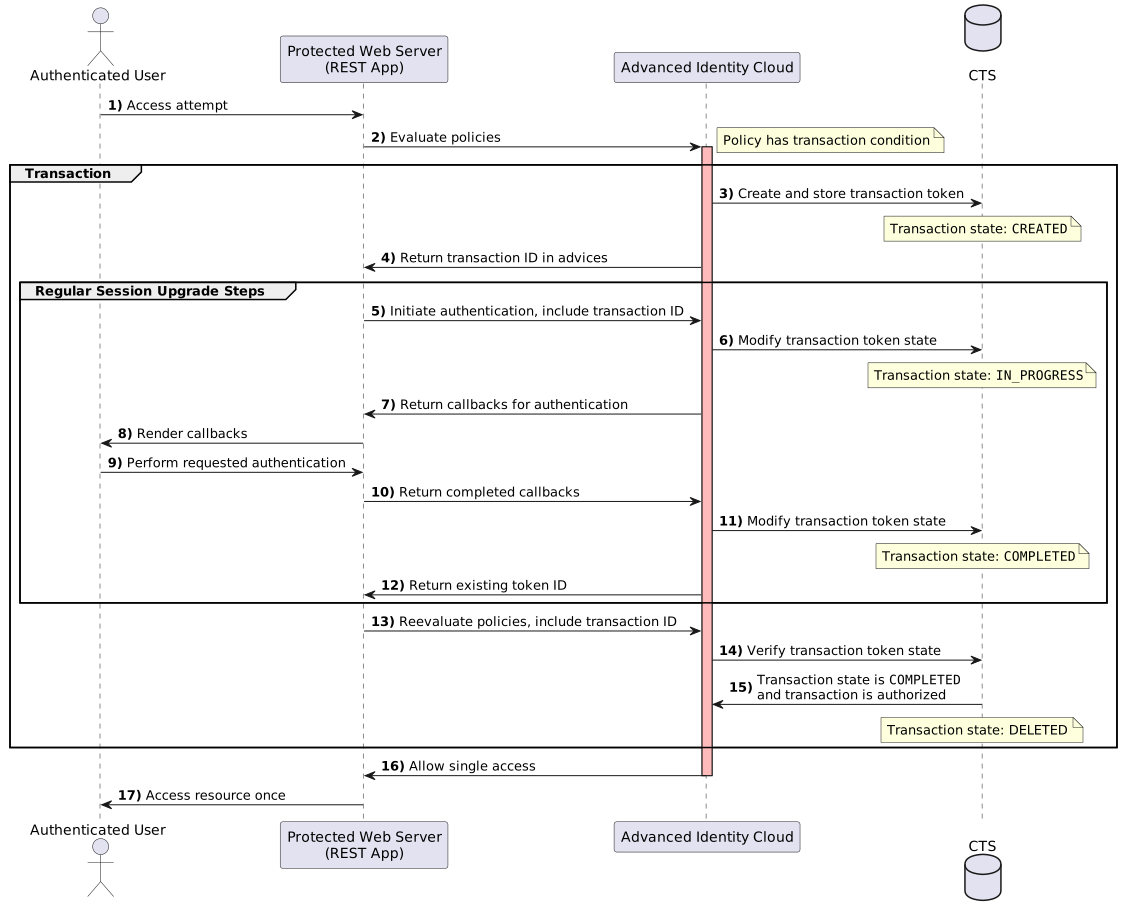
Use Case
In this blog, we demonstrate a REST-based approach to Transactional Authorization (TAuthZ) using an automated shell script. The scenario covers a high-risk operation — accessing an example makePayment API
(https://api.bankingexample.com:443/makepayment) via an HTTP POST request.
The script performs the following steps:
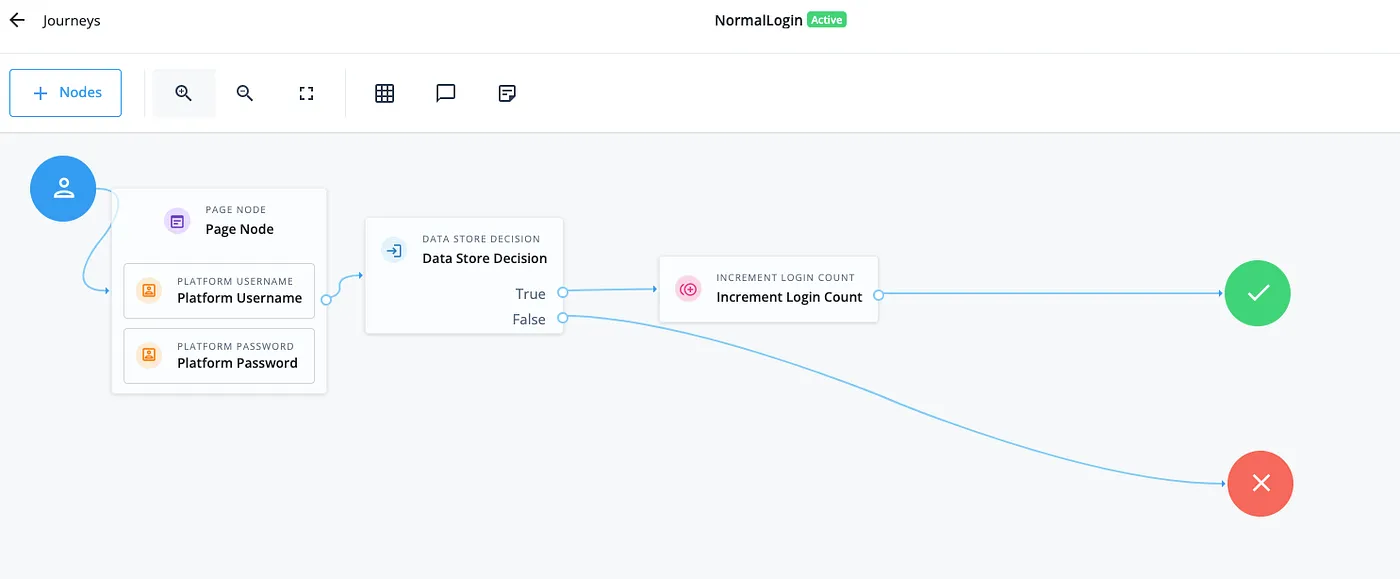
- Authenticate the user using a standard login journey and obtain an SSO token
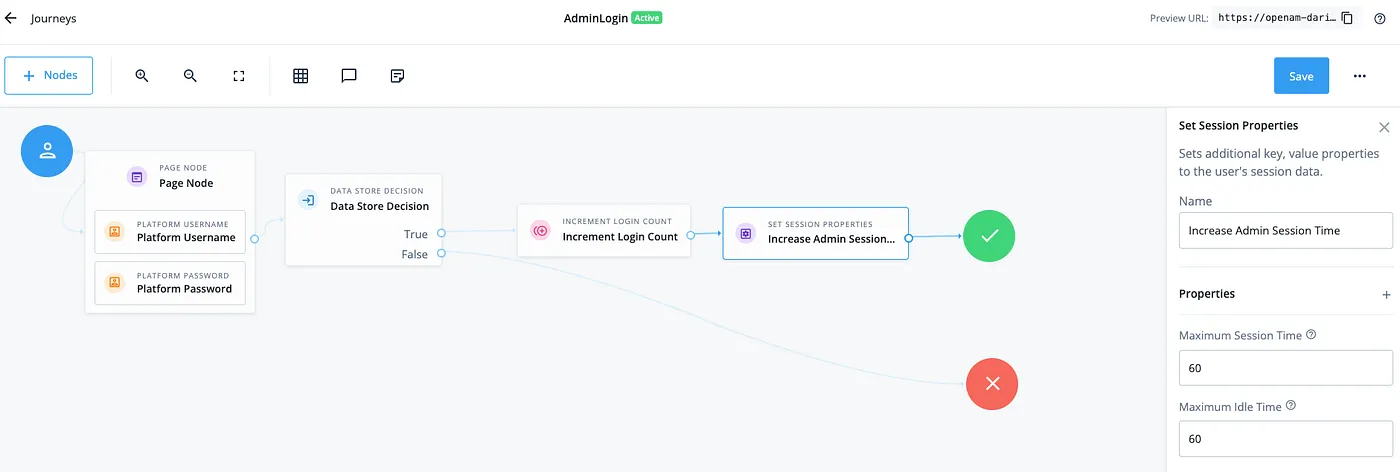
- Authenticate an admin using an admin-specific login journey in order to access the policy endpoint, issuing an SSO token with extended session durations (for example, a 60-minute idle and max time) so the client can cache it and improve performance.
- Calls the policy evaluation endpoint to request access to the protected
makePaymentAPI. - Receive a policy advice with a
TransactionConditionAdvice(TxId) from the PDP instructing the client to execute a Transactional Authorization journey (for example, OTP or push approval). - Executes the required TAuthZ journey with this
TxId, collecting and completing the necessary callbacks for the one-time step-up authentication flow. - Resubmits the policy evaluation request, now including the completed transactional context and
TxId. - Finally, receives a one-time authorization decision granting access to the sensitive API.
This demonstrates how applications or gateways can interact directly with the PDP REST APIs to enforce secure, single-use authorization for high-risk operations.
Solution
Let’s get building 💪
All assets are located here.
Import the Journeys
For this example we’ll import three journeys:
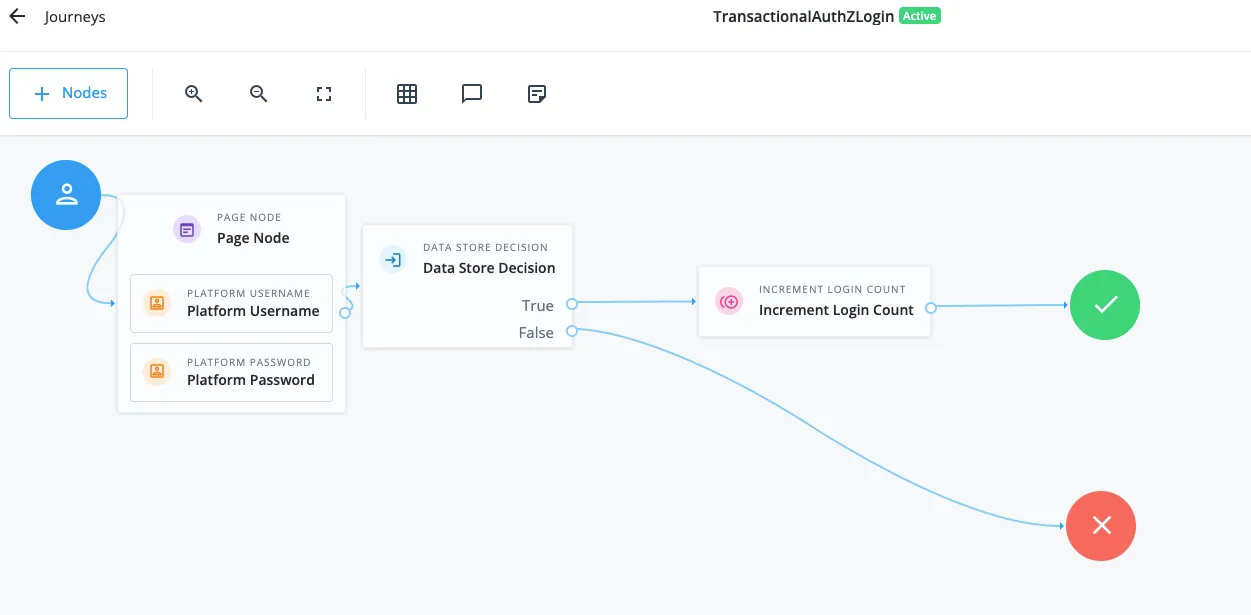
NormalLogin— Used to simulate a standard user login.AdminLogin— Used to simulate admin login with extended session timeouts.TransactionalAuthZLogin— Used as the step-up authentication journey triggered by the TAuthZ policy.
- Download the journey export from here.
- From the P1AIC Platform UI, navigate to Journeys on the left panel > Click Import > Take a Backup if required > Select Browse > Locate and open the file from step 1 > Click Next > Start Import
Once the import is complete, the three new journeys will appear as shown below. Note that the TransactionalAuthZLogin journey should be a strong MFA journey. However, a simplified version has been used here for clarity in this blog.
Import the Transactional Authorization Policy
- Download the policy XML file from here.
- From the P1AIC Platform UI, expand Native Consoles > Click Access Management > Expand Authorization > Click Policy Sets.
- Click Import Policy Sets > Find the XML file from step 1 > Click Open
- Refresh the browser and the new
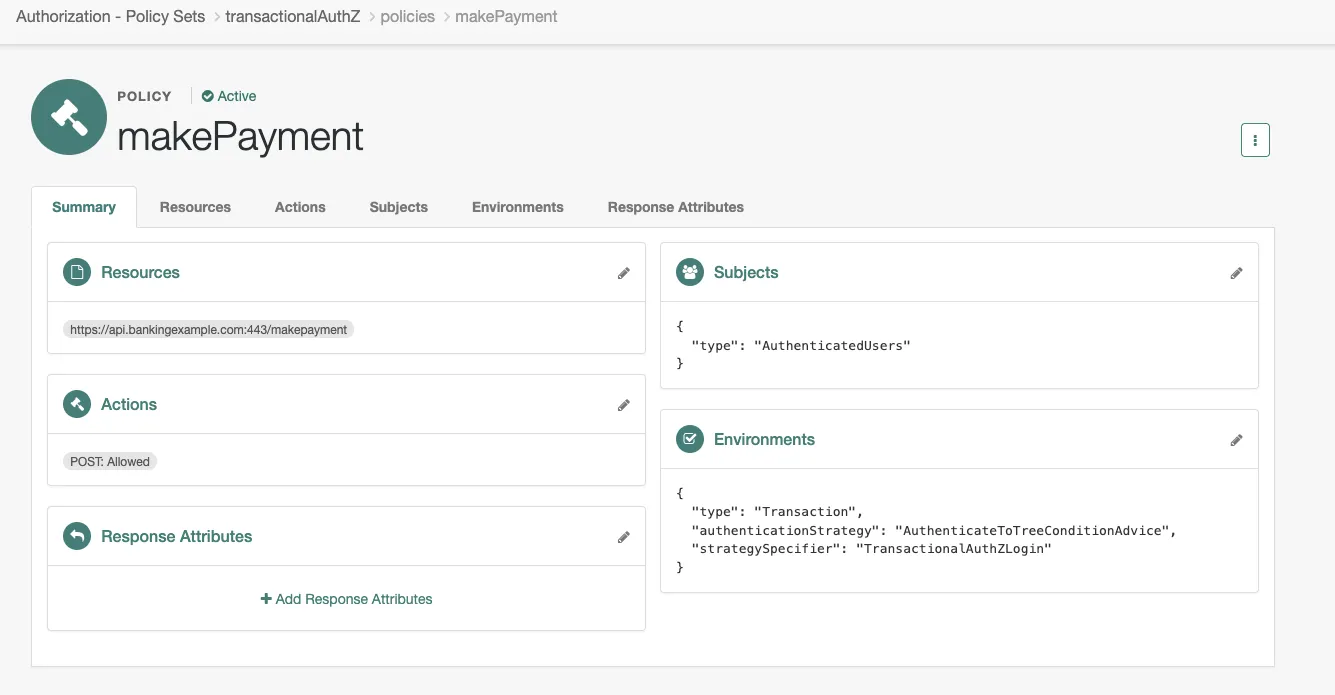
transactionalAuthZPolicy Set will appear. - Clicking into it will show the
makePaymentpolicy as shown below where:- The resource is defined as
https://api.bankingexample.com:443/makepayment - The allowed action is
HTTP POST. - The subject is set to
AuthenticatedUsers - The Transaction Environments condition targets the
TransactionalAuthZLoginjourney.
- The resource is defined as
Create the Test Users and Apply Privileges
-
From the P1AIC Platform UI, Expand Identities > Click Manage > New Alpha realm — user > Create a user with the following:
- Username: policy_user
- Firstname: Policy
- Lastname: User
- Email Address: policy_user@example.com
- Password:
!!_SeCu4E@Pa55w04D$
-
Repeat Step 1 but this time for the policy admin user:
- Username: policy_admin
- Firstname: Policy
- Lastname: Admin
- Email Address: policy_admin@example.com
- Password:
!!_Adm1nSeCu4E@Pa55w04D$
-
From the Access Management Native Console, navigate to Identities > Groups tab > Add Group > Set the Group ID to
policy_admin> Create. -
Add the
policy_adminuser as a member and hit Save. -
From the Privileges tab, enable
Entitlement Rest Accessand hit Save Changes.
Execute the Script
Now that we have all the configuration in place, let’s bring it to life with the script.
- Download the script from here
- Modify the AM_URL to match your environment
- Execute the script to demonstrate the flow
The output will look this like:
./transactional_authZ_DS.sh
Getting cookie name
CookieName is: XXXX
*********************
Creating end-user SSO token for user: policy_user
End-user SSO token is: ZER7HY8OL...
*********************
Creating policy-admin SSO token for user: policy_admin
Policy-admin SSO Token is: o0jzAU....
*********************
Calling transactional policy: transactionalAuthZ
Transaction Condition Advice Id is: 195b8505-3dba-4bbc-a71a-7debed2c2596
*********************
Calling ../authenticate endpoint with Transaction Condition Advice Id: 195b8505-3dba-4bbc-a71a-7debed2c2596 to get callbacks
*********************
Completing callbacks for submission
Completed callback payload:
{
"authId": "eyJ0eXAiOiJKV1QiLC....74",
"callbacks": [
....
*********************
Calling authenticate endpoint with advice and completed callbacks
{
"tokenId": "ZER7HY8O....IwMQ..*",
"successUrl": "/enduser/?realm=/alpha",
"realm": "/alpha"
}
*********************
Finally, calling policy endpoint post transactional AuthZ with Transactional Conditional Advice Id of: 195b8505-3dba-4bbc-a71a-7debed2c2596
[
{
"resource": "https://api.bankingexample.com:443/makepayment",
"actions": {
"POST": true
},
"attributes": {},
"advices": {},
"ttl": 0
}
]
*********************
Conclusion
Transactional Authorization (TAuthZ) is a powerful capability within PingOne Advanced Identity Cloud (P1AIC) and PingAM, enabling organisations to enforce strong, step-up authentication precisely at the moments where risk is highest. Whether approving a financial transaction, confirming a high-value action, or validating a user’s intent, TAuthZ offers a reliable way to introduce friction only when it truly matters.
This blog illustrates how to execute a complete Transactional Authorization flow entirely over REST. By walking through user authentication, admin token retrieval, policy evaluation, TxId handling, step-up journey execution, and final policy re-evaluation, we showed how an application or custom gateway can interact directly with the PDP — while still leveraging the full power and flexibility of PingAM’s decisioning capabilities.