Localizing the widget
The Advanced Identity Cloud/PingAM Login Widget uses variables with default values for all strings it displays when rendering the user interface.
Show variable names and default values
| Variable | Default text |
|---|---|
|
Invitation not valid |
|
This invitation can’t be used. Please contact your administrator or <a href='https://support.pingidentity.com/' target='_blank' rel='noopener noreferrer'>Ping Support</a> for help. |
|
Admin Invite Code |
|
We’ve sent a 6-digit code to your email. Enter it below to continue. |
|
That code isn’t correct or may have expired. Please try again. |
|
Didn’t get a code? |
|
Resend |
|
Accept Privacy Policy |
|
Select your region of residence to review the applicable privacy policy. |
|
Region of residence |
|
I agree to the Ping Identity <a target='_blank' rel='noopener noreferrer' href='https://www.pingidentity.com/en-us/docs/legal/privacy'>privacy policy</a>. |
|
Send Verification Code |
|
Welcome to PingOne Advanced Identity Cloud |
|
You’ve been invited to administer the |
|
tenant in PingOne Advanced Identity Cloud. |
|
Before you can begin, we need to verify your email address. Click the button below and we’ll send you a one-time verification code. |
|
Already have an account? <a href='?journey'>Sign in here!</a> |
|
Back to Sign In |
|
Back to Sign In |
|
CAPTCHA verification failed. Please try again. |
|
Close |
|
Character cannot repeat more than {max} times |
|
Character cannot repeat more than {max} times (case insensitive) |
|
Check your email |
|
Please choose a different username. |
|
Choose your device for identity verification. |
|
Confirm password |
|
Password does not meet the requirements. |
|
Value does not meet the requirements. |
|
Continue |
|
Continue with |
|
Or, copy and paste the URL below into your authentictor app. |
|
Copy URL |
|
Custom security question |
|
Device name |
|
At least {min} character(s) |
|
Download the app |
|
Don’t get locked out of your account! |
|
No account? <a href='?journey=Registration'>Register here!</a> |
|
Password must contain at least {minPasswordLength} character(s). |
|
Password must contain at least 1 capital letter, 1 number, and 1 special character. |
|
Enter verification code |
|
Exceeds maximum of {max} characters |
|
Cannot contain these character(s): {chars} |
|
Cannot contain these value(s): {fields} |
|
Forgot password? |
|
Forgot username? |
|
Set up the ForgeRock Authenticator |
|
To get started, you need to register your device using the ForgeRock Authenticator app. |
|
Get the app from the <a href='https://itunes.apple.com/app/forgerock-authenticator/id1038442926' target='_blank' rel='noopener noreferrer'>Apple App Store</a> or on <a href='https://play.google.com/store/apps/details?id=com.forgerock.authenticator' target='_blank' rel='noopener noreferrer'>Google Play Store</a> |
|
First name |
|
Value is required |
|
Loading … |
|
Sign in |
|
Sign in failed |
|
Sign in |
|
Sign in successful! |
|
Email address |
|
At least {num} number(s) |
|
At least {num} lowercase letter(s) |
|
At least {num} uppercase letter(s) |
|
At least {num} symbol(s) |
|
Username |
|
Name your device |
|
Next |
|
Next |
|
No more than {max} characters |
|
At least {min} character(s) |
|
On mobile? Open link in Authenticator. |
|
Optionally name your device |
|
Password |
|
Password cannot contain common passwords |
|
Password cannot contain common passwords or reversible text |
|
Password cannot contain common passwords or reversible text less than {min} characters |
|
Password requirements: |
|
Please check this value |
|
Please confirm |
|
Send me special offers and services |
|
Send me news and updates |
|
Provide custom security question |
|
Not working or need an alternative method? |
|
QR Code failed to render. Please notify your support administrator. You are welcome to use the alternative methods below. |
|
We are unable to render your QR Code. Please use one of the alternative methods below. |
|
Redirecting you to |
|
Register |
|
Register |
|
Registration successful! |
|
Value is required |
|
Register {name} |
|
Scan the QR code image below with the ForgeRock Authenticator app to register your device with your login. |
|
Security answer |
|
Security question(s) |
|
Provide security question(s) and answer(s): |
|
Set up 2-step verification |
|
Set up |
|
To protect your account, add a second authentication method. |
|
Starting April 2, 2024, you must sign in using 2-step verification. <a class='alert-link' href='https://backstage.forgerock.com/docs/idcloud/latest/product-information/migration-dependent-features/tenant-administrator-mandatory-2-step-verification-faq.html' target='_blank' rel='noopener noreferrer'>Learn more</a>. |
|
Should contain a number |
|
Should contain an uppercase letter |
|
Should contain a lowercase letter |
|
Should contain a symbol |
|
Show password |
|
Evaluating device information. |
|
Skip |
|
Skip for now |
|
Last name |
|
Submit |
|
Submit |
|
Success! |
|
Please accept our Terms & Conditions |
|
View full Terms & Conditions |
|
Please try again |
|
Two factor authentication |
|
Use this new device or Multi-Factor Authentication method to help verify your identity. |
|
Please use a valid email address. |
|
There was an error in the form submission. |
|
Unknown login failure has occurred. |
|
Unknown network request failure has occurred. |
|
URL: |
|
Use your device for identity verification. |
|
Use one of these codes to authenticate if you lose your device, which has been named: <em>{name}</em> |
|
Username |
|
Username requirements: |
|
Find the verification code using the authenticator app on your phone. |
|
Password |
|
Username |
|
Value requirements: |
|
Verify your identity |
|
Your device |
|
Your new device or MFA is enabled |
|
If you lose your device, or don’t have it with you, a recovery code is the only way to sign in to your account with 2-step verification enabled. It’s strongly recommended that you print and store these codes in a safe place. <b>Each code can only be used once</b>." |
You can use the content configuration element to specify custom values for these variables, or to localize text content.
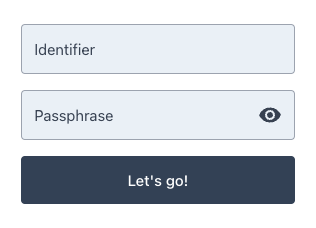
To localize the text the Advanced Identity Cloud/PingAM Login Widget displays, provide the localized strings in the content configuration element when you call configure(). If you don’t override the content strings, the widget uses the default en-us strings.
The content object is passed once during configure(). To select strings based on the user’s browser locale, build the content object first and then pass it to a single await configure() call:
content configurationimport { configure } from '@forgerock/login-widget';
const userLang = navigator.language || navigator.userLanguage;
const localizedContent = userLang === 'fr-CA'
? {
userName: 'Identifiant',
passwordCallback: 'Phrase secrète',
nextButton: 'Nous allez en route!',
}
: {
userName: 'Identifier',
passwordCallback: 'Passphrase',
nextButton: "Let's go!",
};
await configure({
serverConfig: {
wellknown: 'https://openam-forgerock-sdks.forgeblocks.com/am/oauth2/realms/root/realms/alpha/.well-known/openid-configuration',
},
content: localizedContent,
});
fr-CA