Securing the PingOne DaVinci Widget with the Backend-for-Frontend (BFF) Pattern
A walkthrough of how to embed the DaVinci widget in an SPA while keeping OAuth tokens and DaVinci API credentials safely on a Node.js BFF backend.

Web application architecture has gone through several major evolutions over the last 30 years - and I’m old enough to have lived through most of them. Thankfully, we’ve largely moved on from the era of server-rendered UI frameworks like Java Servlets, PHP, and ASP applications that rebuilt an entire page on every interaction. In their place, single page applications (SPAs) have become the dominant model for modern web experiences.
SPAs dramatically improve responsiveness and usability by moving much of the application control logic into the browser, where JavaScript can interact directly with backend APIs without requiring constant full-page refreshes. From a user experience perspective, the benefits are undeniable.
For identity architects and security practitioners, however, this shift introduced a new set of challenges. Traditional authentication and session-management patterns were designed around trusted server-side applications. As applications moved toward increasingly “pure” SPA architectures, those patterns became harder to apply safely and consistently.
In my opinion, the challenge of building a truly secure browser-only SPA remains largely unsolved. While modern OAuth and browser security standards have improved significantly, exposing sensitive OAuth tokens directly to browser code still creates risks that many teams underestimate. That’s why I continue to believe that a secure backend following the Backend-for-Frontend (BFF) pattern is a critical component of any security-sensitive SPA architecture.
In this article, we’ll walk through an approach for securing the PingOne DaVinci embedded widget using a BFF architecture that prevents sensitive OAuth tokens from ever being exposed to the browser client. The core idea is simple: keep the widget in the browser for the user experience, but keep the trust decisions, token handling, and application session establishment in the backend.
What is a widget anyway (and why would we use one?)
As a modern identity orchestration platform, DaVinci provides multiple integration models that allow applications to consume orchestration flows in the way that best matches their architecture and UX goals.
For modern web applications, embedded authentication experiences have become increasingly popular. Rather than redirecting users to a hosted login page, authentication journeys are rendered directly within the application itself, creating a more seamless user experience. While there are certainly security tradeoffs worth discussing, the approach is now common enough that identity platforms need to support it well.
DaVinci offers two primary approaches for embedded authentication experiences:
- Headless integration using APIs and SDKs. Applications can use DaVinci APIs and SDKs to implement the entire authentication experience directly in client-side code. This gives development teams maximum control over UI and UX behavior, but also requires them to own and maintain the interaction logic themselves.
- The embedded DaVinci widget. The pre-built DaVinci widget provides a faster and more flexible way to embed authentication flows directly into a web application while allowing DaVinci to handle the orchestration and flow-rendering logic. The result is a seamless embedded experience with significantly less implementation effort.
In this article, we’ll focus specifically on securing the embedded DaVinci widget integration itself rather than exploring every possible DaVinci deployment model. In particular, we’ll concentrate on two key security objectives. First, we’ll show how the widget can rely on a trusted backend service to securely initiate DaVinci flows without exposing sensitive DaVinci API credentials to browser-based JavaScript. Second, we’ll show how to complete the authentication process without returning OAuth tokens, DaVinci session tokens, or other sensitive handoff artifacts through the browser front channel.
To demonstrate the approach, we’ll use a deliberately simple reference architecture consisting of two components. The frontend application is implemented as a lightweight HTML and JavaScript SPA that runs entirely in the browser and hosts the embedded DaVinci widget. Supporting this is a minimal backend service implemented in Node.js using the Express framework. By keeping the architecture intentionally straightforward, the example focuses on the core security concepts without introducing unnecessary framework complexity.
Why this pattern is worth the extra work
With an embedded authentication widget, there is an unavoidable architectural tension. The browser needs to host the user experience, because that is the whole point of embedding the widget. But the browser is not where we want to handle API credentials, OAuth tokens, refresh tokens, or durable authentication state.
The pattern in this article draws a clean boundary. The widget still renders in the browser, but the BFF creates the authentication transaction, DaVinci binds the completed flow back to that transaction, and the tokens are delivered directly from DaVinci to the backend over a server-to-server callback. The browser is responsible for the interactive experience and for asking the BFF to finalize the local application session. It is not responsible for transporting token material.
That is why this pattern works well. It preserves the embedded login experience, keeps OAuth tokens out of frontend JavaScript, avoids exposing DaVinci API credentials, gives the BFF a server-side transaction to validate, and lets the BFF regenerate the application session only after it has verified signed token claims that match the transaction it originally created.
Full code for the sample implementation described below is available in GitHub.
Note: The code in this article is provided as a sample for educational purposes and is not intended for direct production use without review and adaptation for your specific environment.
Step 1: Securely obtaining a DaVinci SDK token
The first challenge when embedding the DaVinci widget into a browser-based SPA is securely obtaining the SDK token required to initiate a flow. Normally, generating this token requires a DaVinci API key - a highly sensitive credential that should never be exposed to browser JavaScript or embedded into frontend source code.
To avoid this, the browser never communicates directly with the DaVinci /sdktoken endpoint. Instead, the frontend calls a trusted backend endpoint (/dvtoken) implemented in our Express-based BFF service. The backend securely stores the DaVinci API key using environment variables and uses it to request a short-lived SDK token from the DaVinci orchestration API.
In this pattern, /dvtoken does one more important thing. Before requesting the SDK token, the BFF creates a short-lived authentication transaction. This transaction includes a transactionID, a cryptographically strong nonce, and two time windows: one for starting the DaVinci flow and one for completing the overall authentication transaction.
function createAuthTransaction() {
  const issuedAt = Date.now();

  return {
    transactionID: crypto.randomUUID(),
    nonce: crypto.randomBytes(32).toString('base64url'),
    issuedAt,
    startBy: issuedAt + AUTH_FLOW_START_TTL_MS,
    completeBy: issuedAt + AUTH_TRANSACTION_TTL_MS,
    status: 'pending',
  };
}
These two time windows are intentionally different. Starting the widget should happen quickly, so startBy can be short. Completing the journey could take longer, especially if the flow includes MFA, identity verification, or any other user interaction that takes time, so completeBy should be longer.
The BFF stores this transaction server-side and also stores a copy in the pre-auth Express session associated with the browser. It then passes selected values into the DaVinci flow as SDK token parameters:
body: JSON.stringify({
  policyId: WIDGET_POLICY_ID,
  parameters: {
    transactionID: authTransaction.transactionID,
    nonce: authTransaction.nonce,
    expiresAt: authTransaction.startBy
  }
})
The browser doesn’t need to know these values. They’re generated by the BFF and delivered directly to DaVinci as flow input parameters. The browser receives only the widget SDK token and the minimal configuration needed to render the widget.
return res.json({
	token: data.access_token,
	companyId: COMPANY_ID,
	policyId: WIDGET_POLICY_ID,
	apiRoot: API_ROOT
});
Step 2: Invoking the login flow with the widget
With the SDK token in hand, the frontend can initialize the DaVinci widget and invoke the login flow. The widget is configured to use runFlow, along with the apiRoot, companyId, policyId, and short-lived SDK token returned by the BFF. At this point, the browser has everything it needs to render and execute the embedded DaVinci experience, but still doesn’t have access to any long-lived credentials, OAuth tokens, or BFF transaction secrets.
const tokenRes = await fetch('/dvtoken', {
	method: 'POST',
	headers: { 'Content-Type': 'application/json' },
	body: JSON.stringify({})
});

const { token, companyId, policyId, apiRoot } = await tokenRes.json();

const props = {
	config: {
    	method: 'runFlow',
    	apiRoot: apiRoot,
    	accessToken: token,
    	companyId: companyId,
    	policyId: policyId
	},
	useModal: false,
	successCallback: async () => {
    	const result = await finalizeLogin();
    	showAuthenticatedState(result.user);
	}
};

davinci.skRenderScreen(UI.widget, props);
The important nuance is in the DaVinci flow design. Here’s an example of a flow, with details below:
 DaVinci flow overview showing the full authentication orchestration
The flow should validate that the BFF-supplied transaction context is present and fresh before continuing with authentication. At minimum, the flow should check that transactionID, nonce, and expiresAt are present, that expiresAt is numeric, and that the current time is not later than expiresAt. Our flow input schema validation takes care of the first three and we use a simple A<B function node for the fourth.
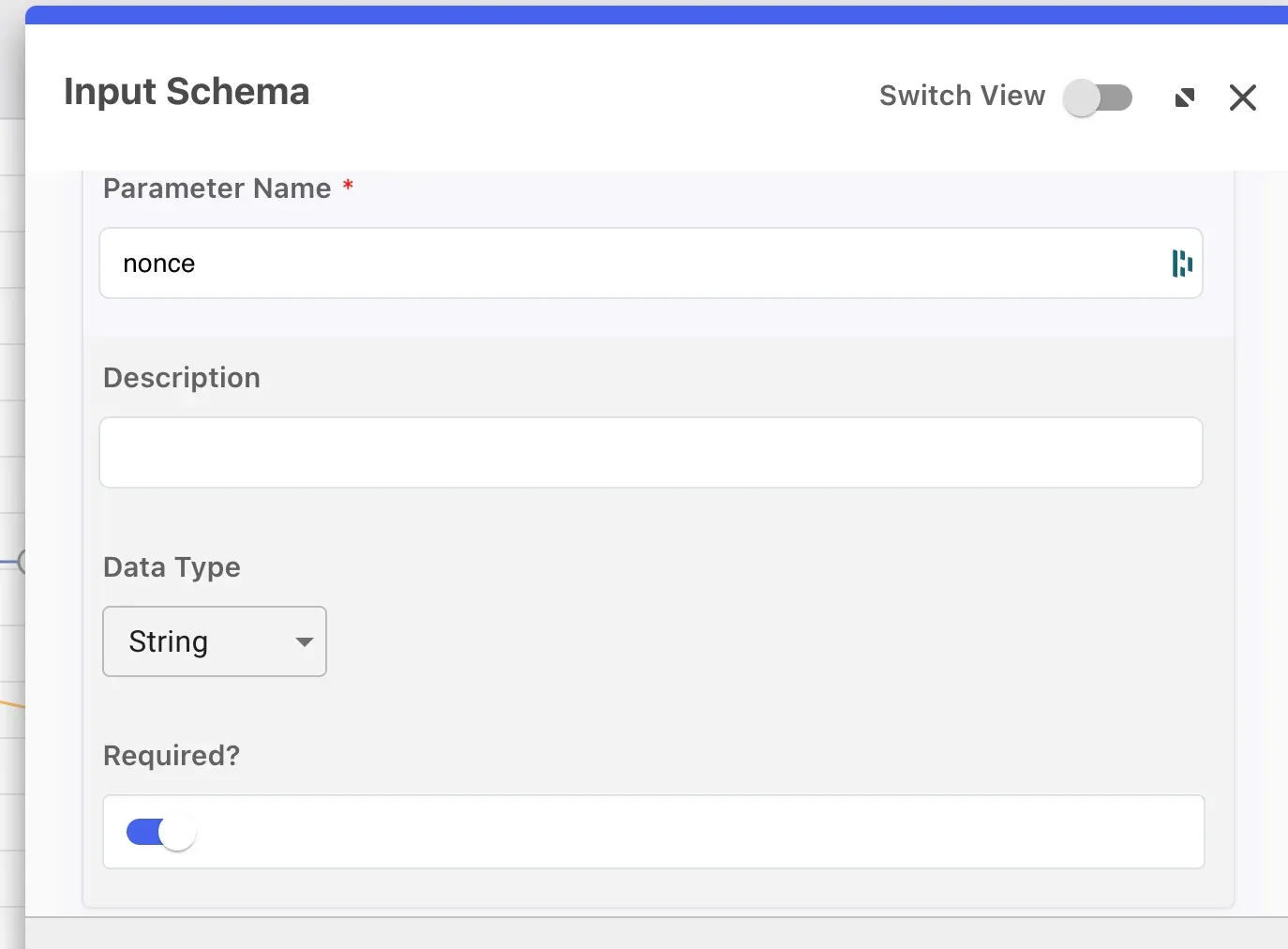 Flow input validation step 1 - checking transactionID, nonce, and expiresAt fields are present
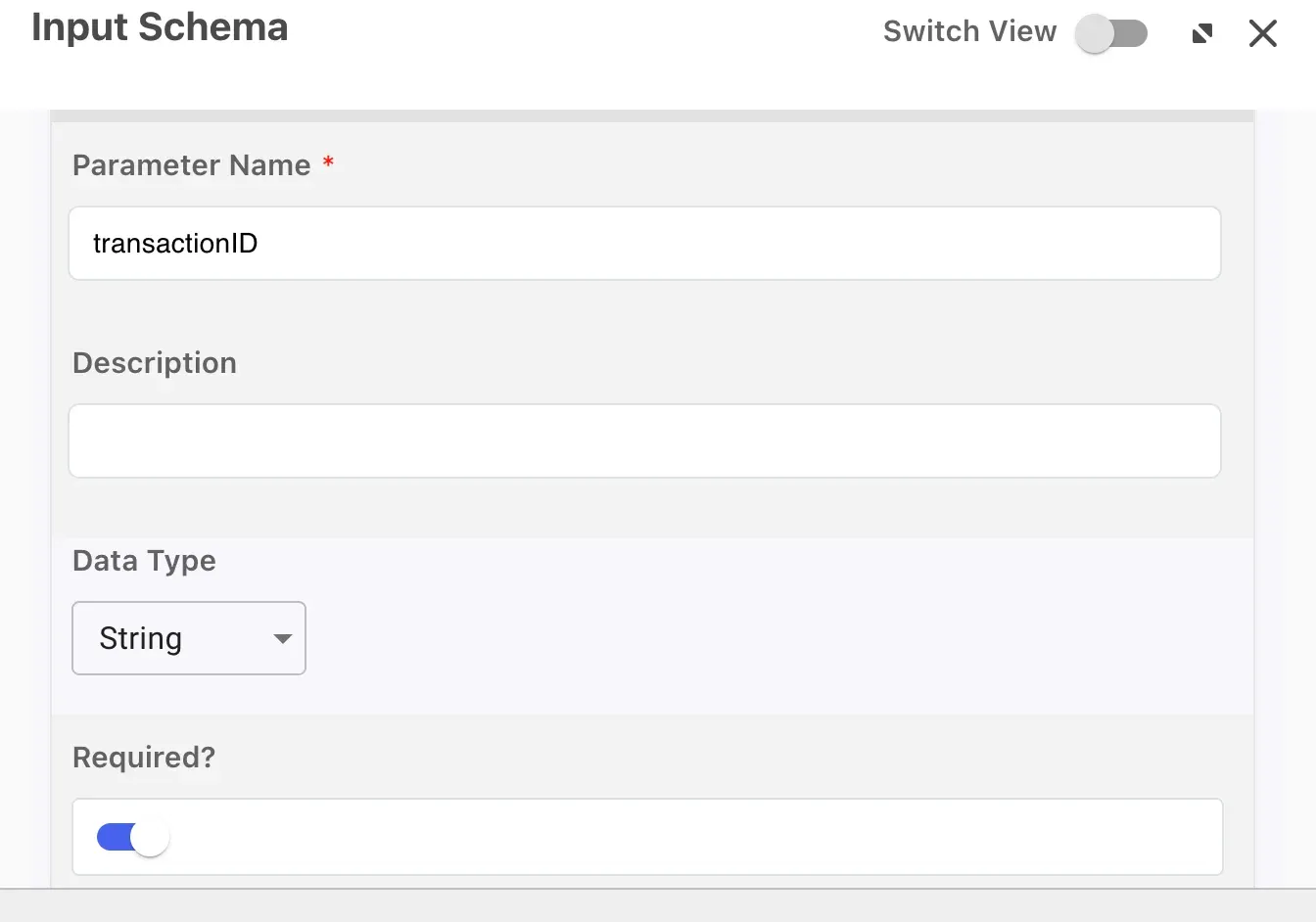 Flow input validation step 2 - schema validation configuration
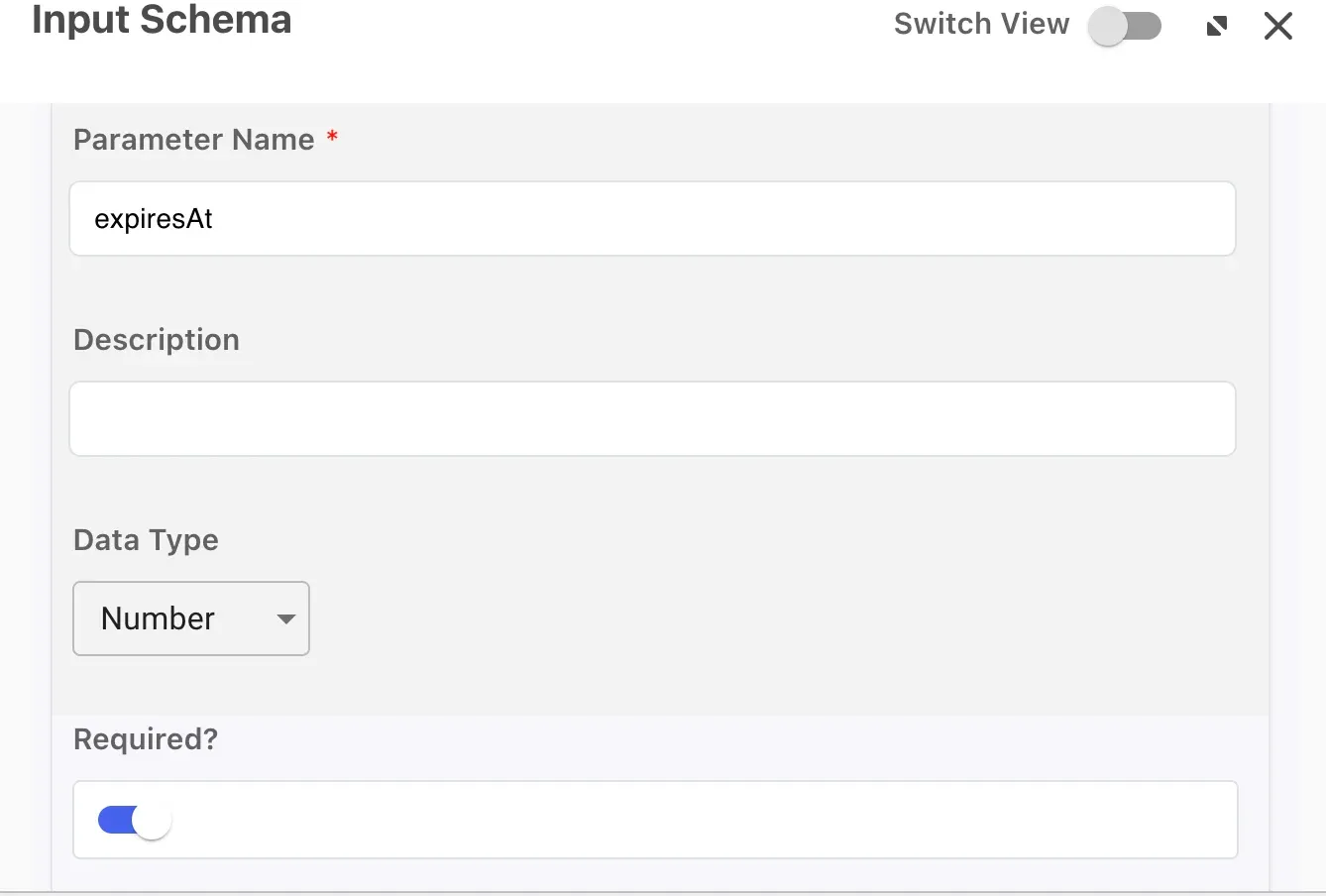 Flow input validation step 3 - additional schema validation
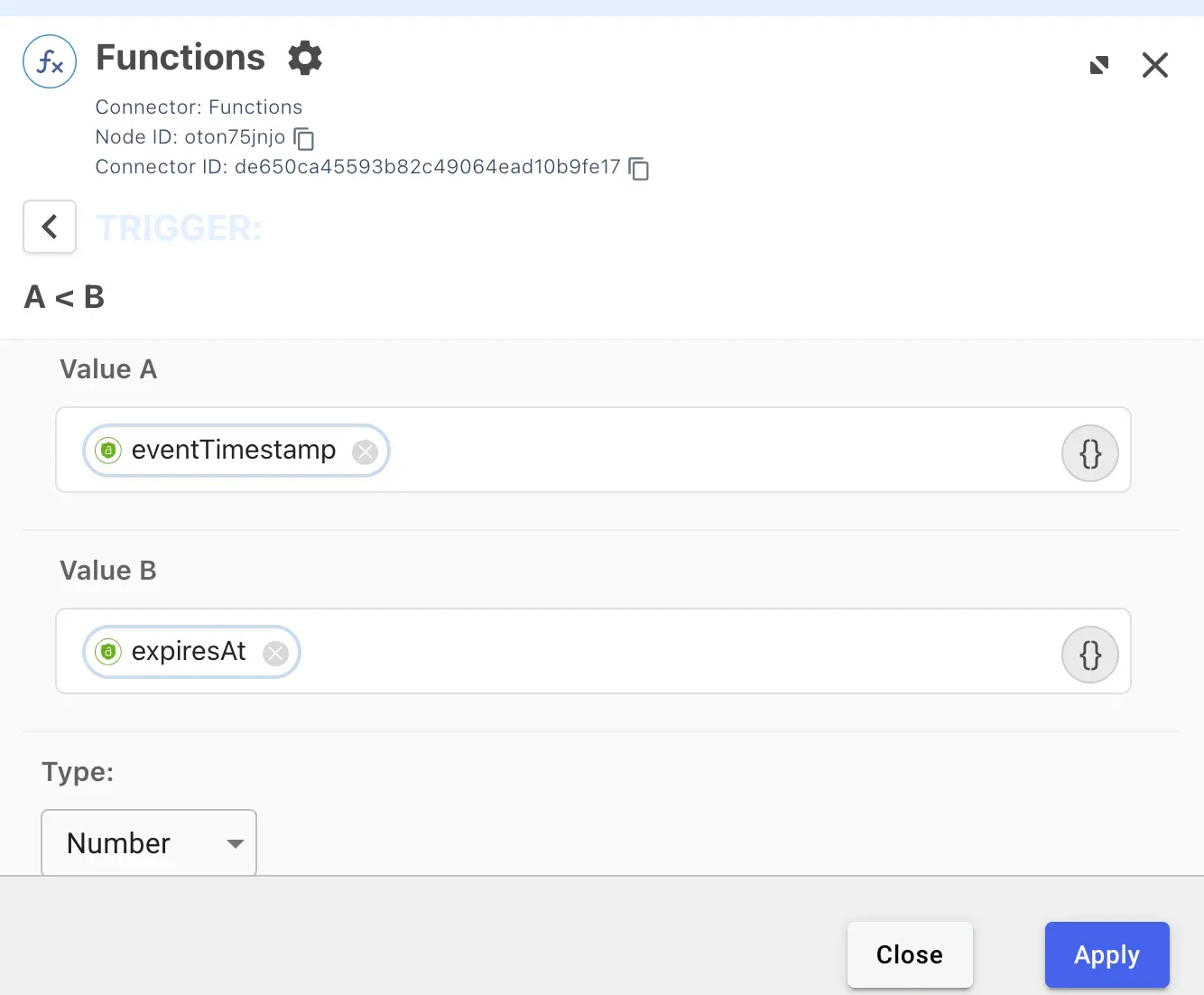 Flow input validation step 4 - A less than B expiry check
This validation doesn’t prove that the transaction is valid by itself. The BFF remains the source of truth because it created the transaction. But it gives the DaVinci flow a clean way to reject stale or malformed starts before asking the user to authenticate.
Step 3: Generating tokens without returning them to the browser
After the user completes the embedded journey, DaVinci needs to generate the OAuth tokens. The critical design rule is that those tokens must not be returned to the widget success callback. Instead, DaVinci should deliver them directly to the BFF using the HTTP Connector’s “Make REST API Call” capability. The key flow design choice here is to ensure that the “PingOne Authentication Return Success Response (Widget Flows)” node is not the final one in the flow.
To bind the generated token response to the BFF transaction, the ID token should include the BFF-generated nonce and transaction identifier. In the sample implementation, the custom transaction claim is bff_transaction_id.
These claims need to be in the ID token. The BFF verifies the signed ID token and uses the claims in that token as proof that the token response is bound to the transaction it originally created.
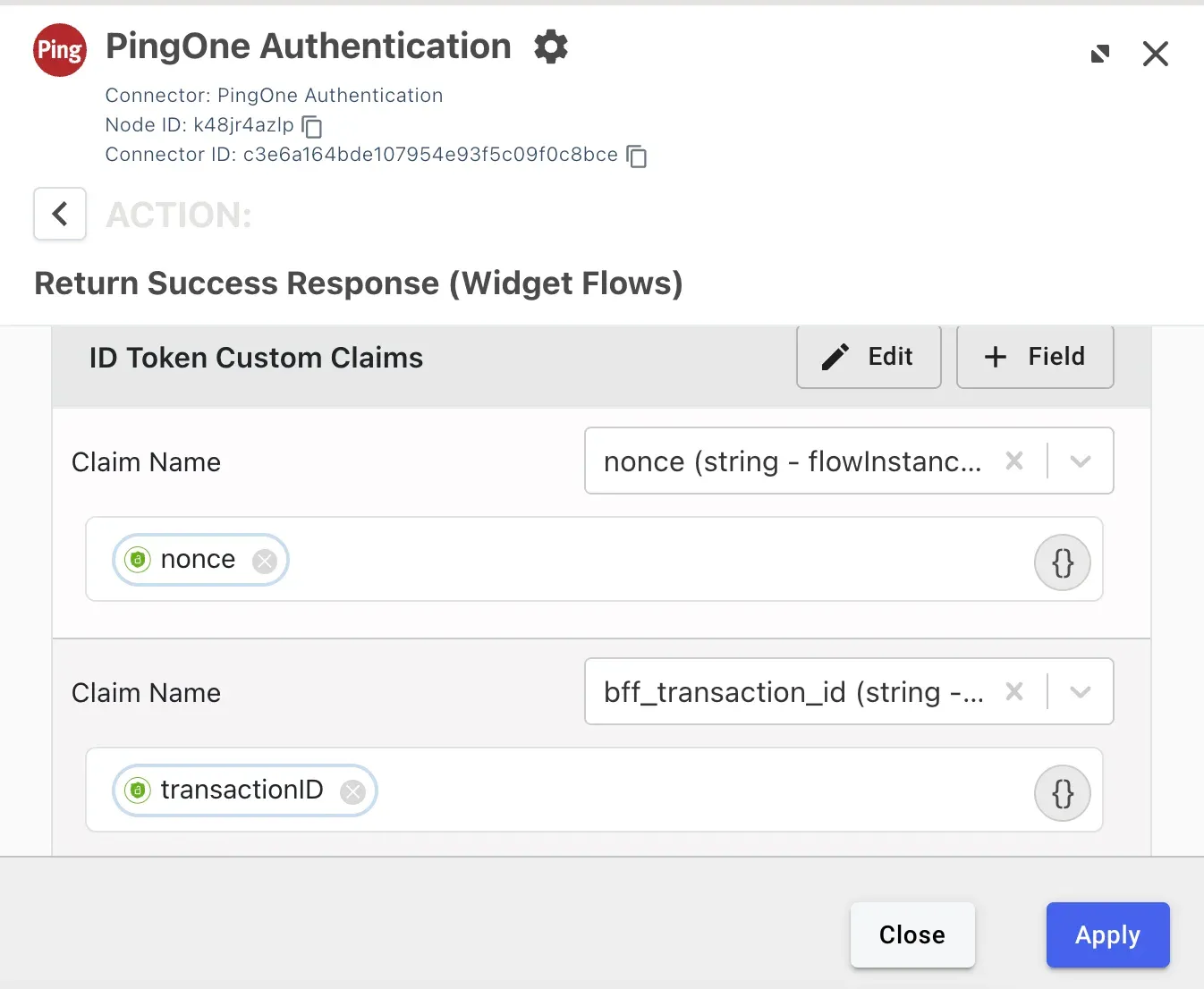 ID token custom claims configuration showing bff_transaction_id and nonce fields
Step 4: Delivering tokens to the BFF server-to-server
After DaVinci generates the token response, it calls the BFF directly. This is the key architectural boundary in the design. The browser is never responsible for carrying an authentication artifact from DaVinci to the backend.
The DaVinci HTTP connector calls /auth/davinci/complete with a shared callback secret and a JSON body containing the transaction binding values and token response:
POST /auth/davinci/complete
Content-Type: application/json
X-DaVinci-Callback-Secret: <shared callback secret>
{
"transactionID": "bff-generated-transaction-id",
"nonce": "bff-generated-nonce",
"completedAt": 1717000012345,
"interactionId": "optional-davinci-interaction-id",
"tokens": {
"access_token": "eyJ...",
"refresh_token": "optional-refresh-token",
"id_token": "eyJ...",
"token_type": "Bearer",
"expires_in": 3600
}
}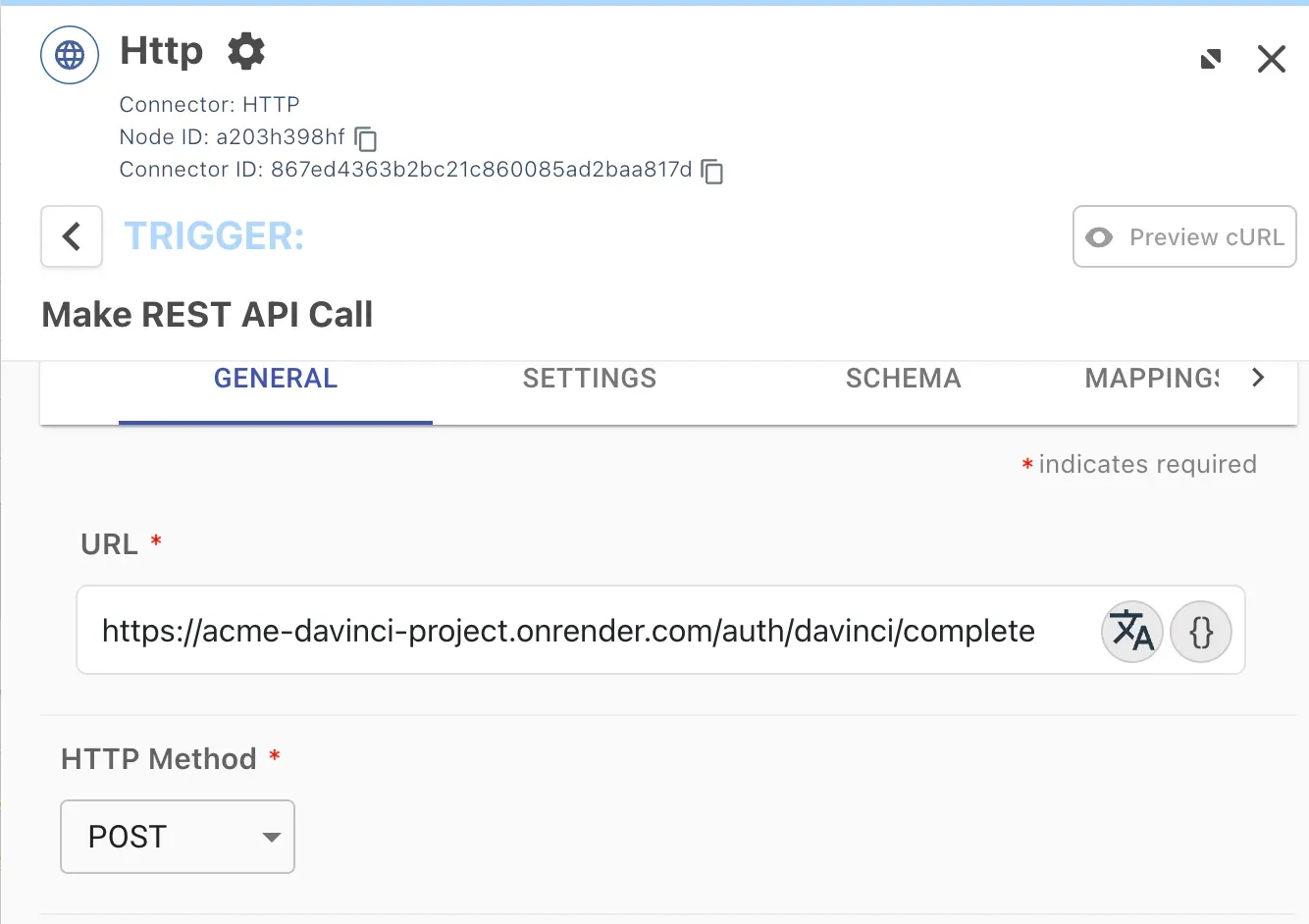 HTTP connector callback configuration step 1 - Make REST API Call setup
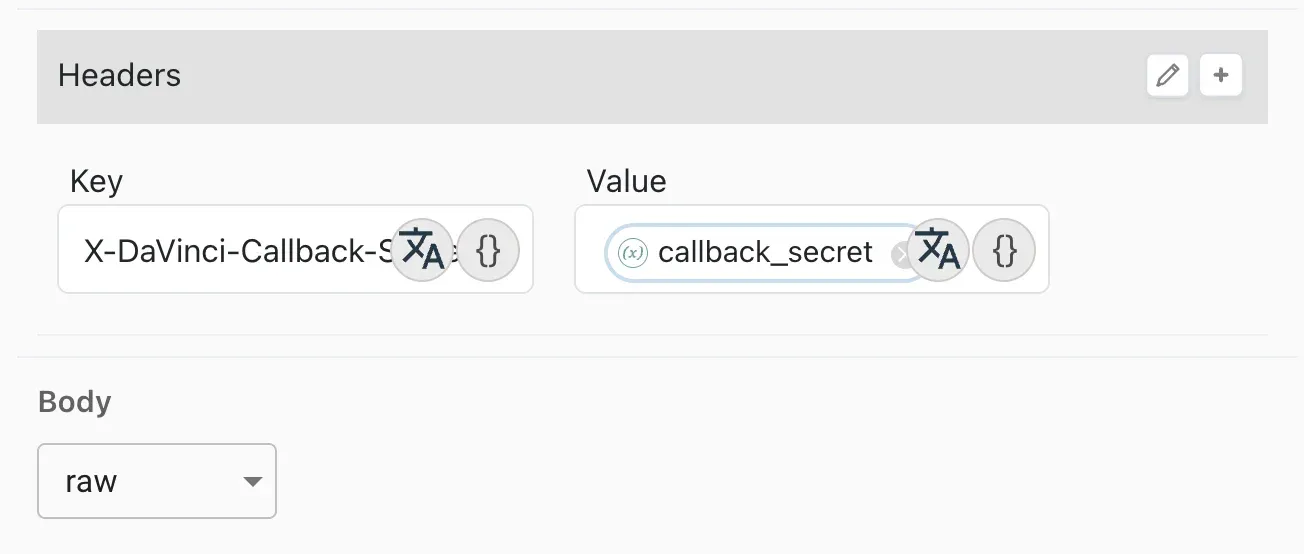 HTTP connector callback configuration step 2 - request body mapping
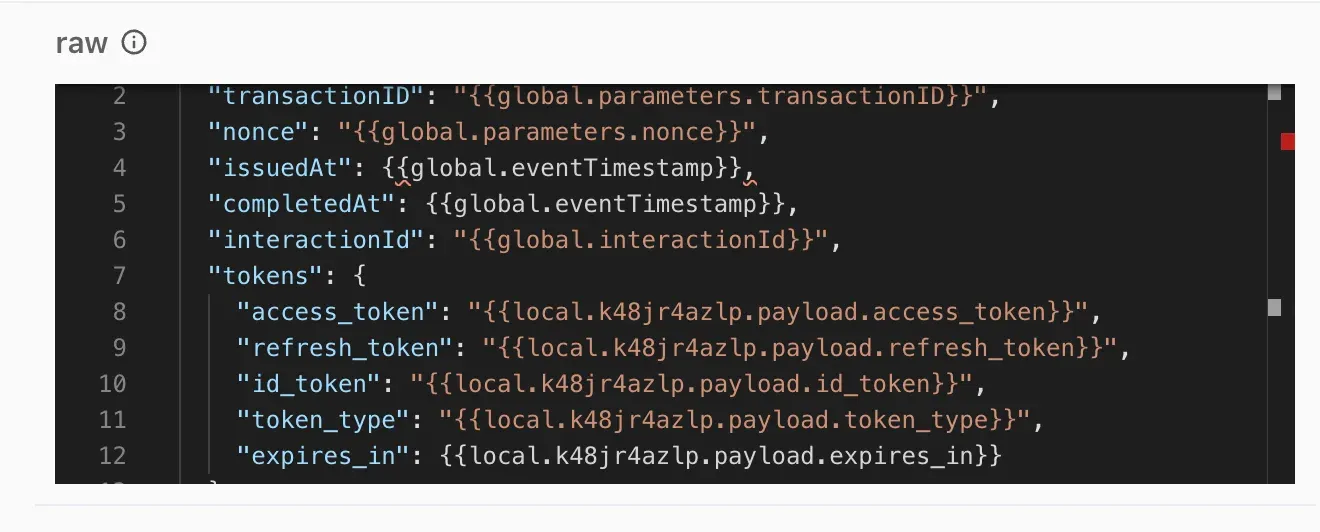 HTTP connector callback configuration step 3 - full connector setup
The BFF route is intentionally registered before the browser-origin middleware, because this request is not coming from the browser and will not have the same Origin and Fetch Metadata headers. Instead, the route is protected using the callback secret, token signature validation, and transaction binding checks.
app.post(
	'/auth/davinci/complete',
	callbackRateLimit,
	express.json({ limit: '20kb' }),
	requireDavinciCallbackSecret,
	async (req, res) => {
    	const { transactionID, nonce } = req.body || {};
    	const transaction = authTransactions.get(transactionID);

    	if (!transaction || transaction.status !== 'pending') {
        	return res.status(409).json({ error: 'Unknown or invalid transaction' });
    	}

    	if (!safeEqual(nonce, transaction.nonce)) {
        	return res.status(403).json({ error: 'Invalid transaction binding' });
    	}

    	const claims = await verifyIdToken(tokens.id_token);
    	const tokenTransactionID = getTransactionIDFromClaims(claims);

    	if (!safeEqual(tokenTransactionID, transactionID)) {
        	return res.status(403).json({ error: 'Invalid token transaction binding' });
    	}

    	if (!safeEqual(claims.nonce, transaction.nonce)) {
        	return res.status(403).json({ error: 'Invalid token nonce binding' });
    	}

    	transaction.status = 'tokens_delivered';
    	transaction.idTokenClaims = claims;
    	transaction.tokens = tokens;

    	return res.json({ received: true });
	}
);
The code above is intentionally abbreviated, but the validation order is important. The BFF first finds the pending transaction by transactionID, then checks the nonce supplied in the body, then verifies the signed ID token and checks that the signed claims contain the same transactionID and nonce. This gives us both a server-to-server delivery channel and a signed token-level binding to the transaction.
Step 5: Finalizing the BFF application session
The server-to-server callback cannot set the browser’s application session cookie because the browser is not involved in that request. That final step still needs to happen from the browser, but the browser doesn’t need to send any sensitive token material.
When the DaVinci widget completes successfully, the frontend calls /auth/finalize with an empty JSON body:
async function finalizeLogin() {
	const finalizeRes = await fetch('/auth/finalize', {
    	method: 'POST',
    	headers: { 'Content-Type': 'application/json' },
    	body: JSON.stringify({})
	});

	if (!finalizeRes.ok) {
    	throw new Error(`Finalize failed with HTTP ${finalizeRes.status}`);
	}

	return finalizeRes.json();
}
This route uses the pre-auth Express session cookie to find the pending transaction that was created when /dvtoken was called. It then checks that DaVinci has already delivered tokens for that transaction. If the token delivery is complete and all bindings match, the BFF regenerates the Express session and promotes it into an authenticated application session.
await regenerateSession(req);
req.session.authenticated = true;
req.session.user = user;
req.session.subject = transaction.subject;
req.session.access_token = tokens.access_token;
req.session.refresh_token = tokens.refresh_token;
req.session.id_token = tokens.id_token;
req.session.id_token_claims = idTokenClaims;
await saveSession(req);
This session regeneration step is important. The pre-auth session exists only to bind the browser to the pending authentication transaction. After authentication is complete, the BFF discards that pre-auth session identifier and creates a fresh authenticated session. This reduces session fixation risk and gives the application a clean transition from unauthenticated to authenticated state.
The browser receives only a normal application response and a secure application session cookie. It never sees the OAuth tokens, the DaVinci API key, or a DaVinci sessionToken.
Step 6: Hardening the browser-facing routes
The BFF also includes browser-origin checks for the routes that are intended to be called by the frontend. CORS is useful here, but it is important not to overstate what CORS does. CORS is enforced by browsers; it doesn’t authenticate arbitrary non-browser HTTP clients.
For that reason, the BFF uses origin checks as a browser-side protection layer, not as the only security control. The server-to-server DaVinci callback uses different protection because it is not a browser request.
For the browser session cookie, the implementation uses an application-scoped cookie with the HttpOnly, Secure, SameSite=Strict attributes:
const sessionCookieOptions = {
	httpOnly: true,
	secure: true,
	sameSite: 'strict',
	path: '/',
	maxAge: SESSION_TTL_MS
};
The cookie is named __Host-acme_session. The __Host- prefix gives the browser additional constraints: the cookie must be Secure, must use Path=/, and must not include a Domain attribute. This helps keep the session cookie tightly scoped to the application host.
This doesn’t eliminate bearer cookies. A BFF application still needs a browser cookie to represent the application session. The point is that the cookie is now an app-local session handle controlled by the BFF, not an OAuth token, refresh token, DaVinci session token, or DaVinci token reference.
Putting it all together
The full end-to-end flow now looks like this:
- The browser calls
/dvtoken. - The BFF creates
transactionID,nonce,startBy, andcompleteBy. - The BFF requests a DaVinci SDK token and passes the transaction context into the flow.
- The browser renders the embedded widget using the returned SDK token.
- DaVinci validates the transaction context and authenticates the user.
- DaVinci generates OAuth tokens and includes
nonceandbff_transaction_idin the ID token. - DaVinci calls
/auth/davinci/completeserver-to-server and delivers the tokens to the BFF. - The BFF validates the callback secret, pending transaction, body nonce, ID token signature, ID token audience, ID token issuer, ID token nonce, and ID token transaction claim.
- The widget success callback fires in the browser.
- The browser calls
/auth/finalizewith no token material. - The BFF validates the browser session binding and promotes the transaction into an authenticated application session.
- The browser receives only the application session cookie.
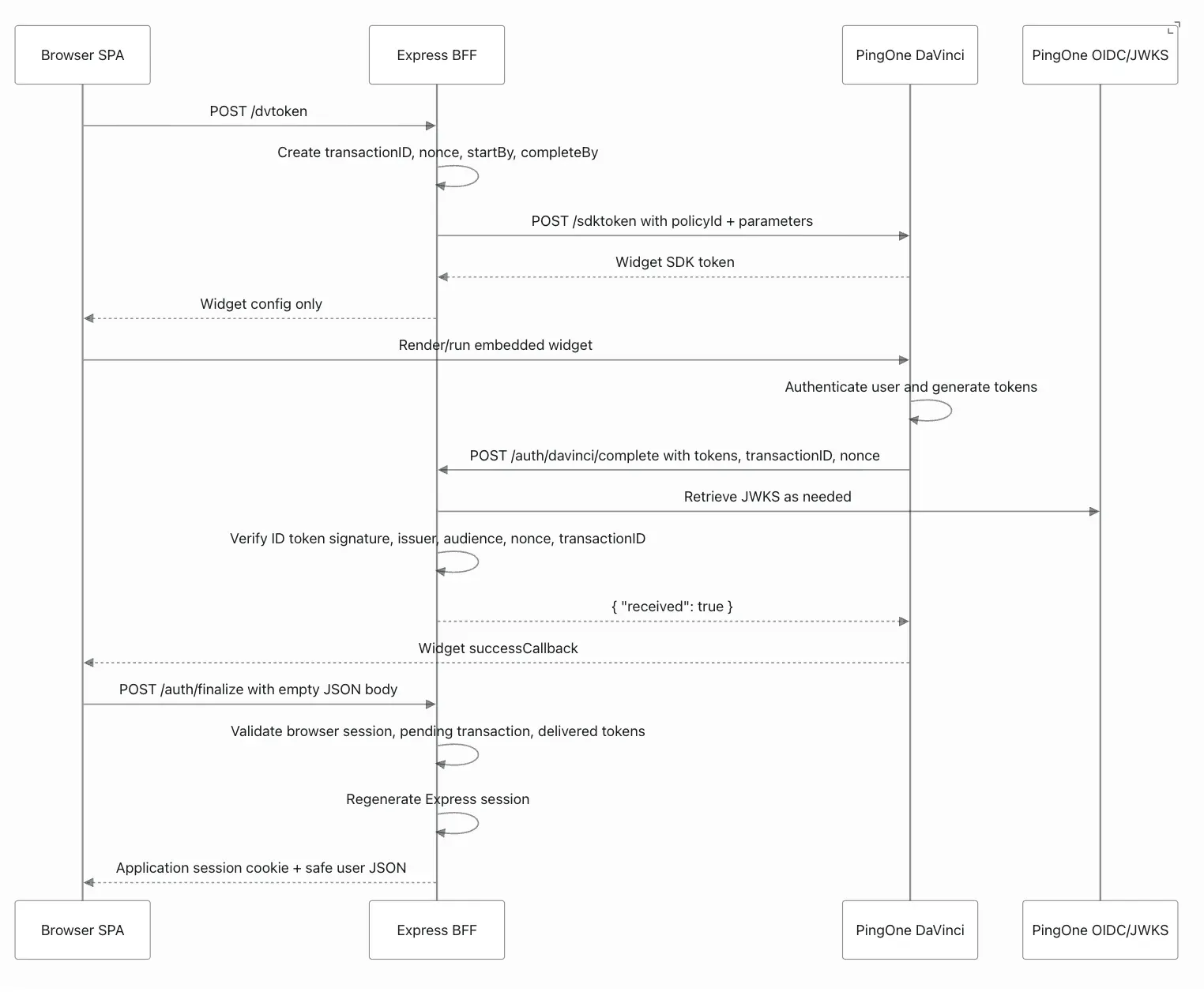 End-to-end flow diagram showing all 12 steps of the BFF authentication pattern
While there are a few moving parts, the responsibility boundaries are straightforward. The browser is responsible for rendering the embedded DaVinci widget and collecting the user’s interaction. DaVinci is responsible for executing the identity journey and generating tokens. The BFF is responsible for protecting credentials, validating token delivery, binding the transaction, and establishing the application session.
A few practical caveats
The sample implementation deliberately keeps the architecture simple, but there are a few production considerations worth calling out.
- The sample stores pending authentication transactions in an in-memory Map. That is fine for a single demo service, but production deployments should use Redis, a database, or another shared server-side store.
- The sample uses the default express-session store. That is not suitable for production scale. A production BFF should use a real session store.
- The DaVinci callback currently uses a shared static secret. A stronger version would use an HMAC signature over the request body and timestamp, mTLS, or another stronger server-to-server authentication mechanism where available.
- Origin and CORS checks are useful for browser-based protection, but they do not authenticate non-browser clients. The critical protection for token delivery is the combination of callback authentication, signed ID token validation, and BFF transaction binding.
Over to you
It would be great to hear how others are approaching this pattern in their own environments.
Are you already using a BFF-style architecture to protect OAuth tokens in SPA applications, or are your teams still comfortable managing tokens directly in the browser? When embedding authentication journeys with tools like the DaVinci widget, where do you draw the line between user experience convenience and token-handling risk? And have you found other patterns that preserve the seamless embedded login experience without exposing long-lived credentials or OAuth tokens to frontend code?
Drop a comment and join the discussion on the Ping Identity developer community with your thoughts, questions, or your own lessons learned from building secure modern web applications in the identity trenches.