Introducing PingOne Configuration Management: Build Once, Promote with Confidence
How we built a flexible, environment-aware way to move supported PingOne configuration from development through test and into production.

Today, we’re announcing PingOne configuration management, a native promotion experience for teams that want to configure in development, validate in test, and move approved changes into production with greater confidence.
When we set out to build this capability, we started with a simple principle: configuration promotion needs to reflect how real PingOne deployments work. It cannot assume that every environment is identical, that every change is all-or-nothing, or that teams are starting from a blank slate.
That led us to a few core design tenets:
- Promote one configuration or many. Teams should be able to promote a focused change, such as a single application, or select a larger set of related configurations for a broader release.
- Handle unique differences between environments. Values such as URLs, entity IDs, and credentials can vary by environment, so promotion needs a deliberate way to preserve those differences rather than overwrite them blindly.
- Help with dependencies. If a selected resource relies on another configuration, the promotion experience should surface those relationships so teams can decide what to include.
- Adoptable by existing PingOne deployments. Teams should be able to use the capability with environments they already have, without recreating their configuration or redesigning their deployment model.
PingOne configuration management provides a native way to promote supported configuration from one PingOne environment to another. It’s designed to make the promotion process more repeatable, visible, and controlled, whether you use the PingOne admin console or the PingOne APIs.
Why we built it
A typical PingOne deployment has multiple environments with a relationship such as development → test → production. Each environment can contain a similar set of configuration, but the resources are not necessarily identical and the delivery process needs to account for that.
Before this capability was available, teams that wanted to follow this development-to-test-to-production model generally had three choices:
- Use Terraform or another infrastructure-as-code provider.
- Build and maintain custom automation on top of PingOne APIs.
- Recreate the configuration manually in each environment.
Some of those approaches can be effective in the right context, but they also mean teams must assemble and maintain the promotion layer themselves. That can make it harder to keep environments aligned, preserve intentional differences, and understand the impact of a change before it reaches production.
We built PingOne configuration management to make that workflow native to PingOne: plan the change, resolve differences and dependencies, review the result, and then promote the configuration. It’s designed to help teams move from disconnected configuration steps to a controlled, repeatable release process regardless of their expertise with DevOps.
How configuration promotion works
The source environment is where the configuration has been created and tested. The target environment is where the configuration will be applied.
In the PingOne admin console, a promotion follows this workflow:
- Create promotion variables for values that must remain unique in the target environment.
- Select the target environment and start the promotion.
- Review the initial plan, which lists the supported promotable configuration available from the source environment.
- Select the resources you want to promote.
- Address resource mappings and dependencies.
- Review the final promotion plan, including the resulting changes, mappings, dependencies, variables, and warnings.
- Execute the promotion and review the result and audit information.
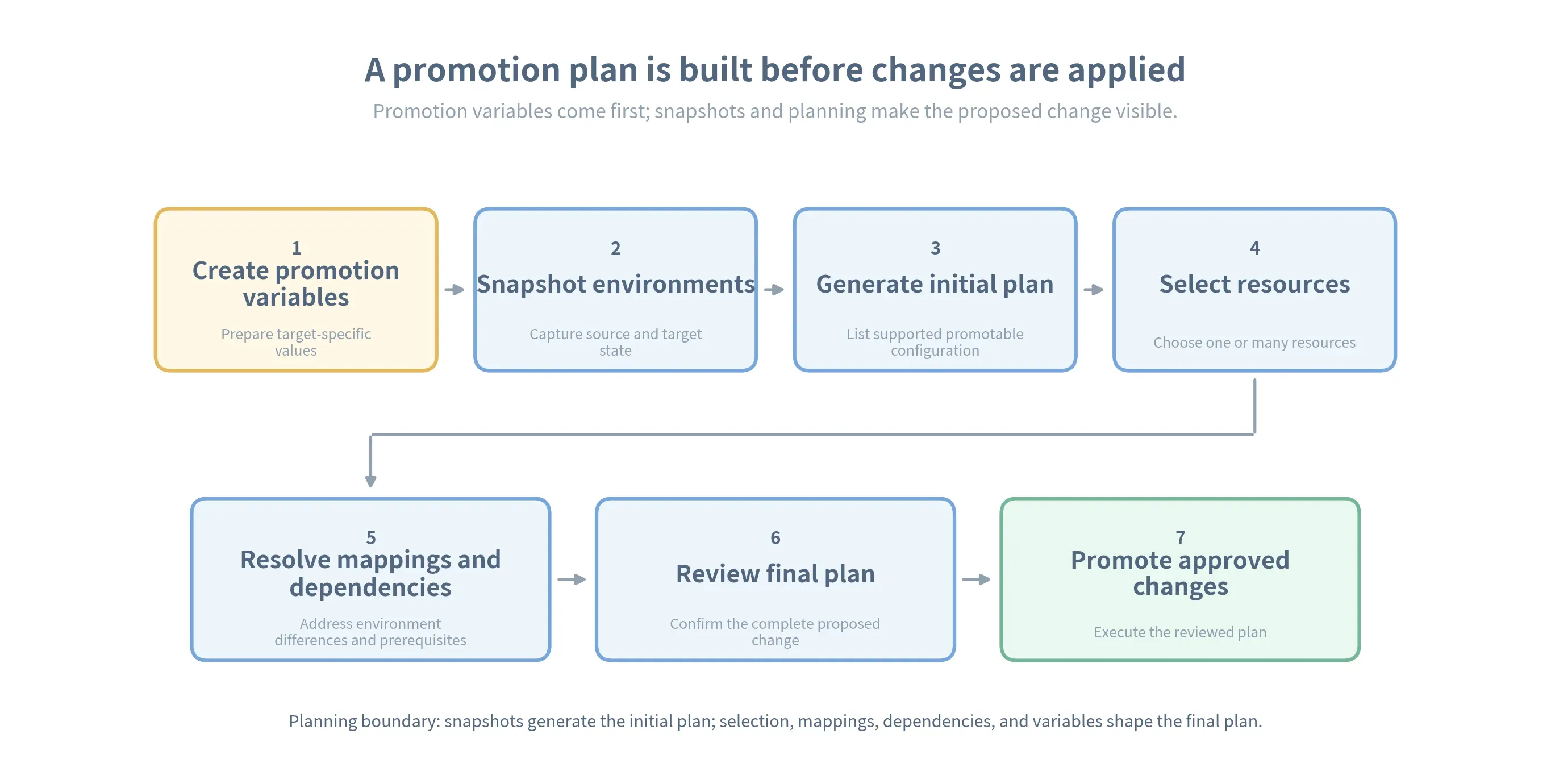 Promotion variables are created separately before snapshots and planning; the final plan is reviewed before execution.
Resource mappings
Mapping answers a critical question in a promotion: which resource in the source environment corresponds to which resource in the target environment? This matters when environments are already configured with multiple environments and resources before this feature was available.
During planning, PingOne may recommend a target resource as a potential match. If no reasonable match is found, the resource can be promoted as new. The administrator running the promotion makes the final decision and can override the recommendation by choosing a different target resource or by promoting the source resource as new.
Mappings are established when a resource is first promoted to a specific target environment, and PingOne can remember the selected relationship for subsequent promotions. Review mappings carefully: an incorrect mapping can update the wrong target resource, while promoting as new can create an unintended duplicate.
You can find more detail in Mapping in the PingOne configuration management documentation.
Dependencies are part of the configuration
One of the most important aspects of configuration promotion is understanding that a resource rarely stands alone.
For example, a DaVinci flow may rely on a form, a connector instance, a DaVinci variable, and a notification template. Promoting only the flow could produce an incomplete or unusable target configuration. PingOne uses resource relationships exposed through the PingOne API to identify dependencies that should be considered alongside the selected flow.
This means an administrator can start with the DaVinci flow they intend to move and then review the related resources in the promotion plan, rather than having to discover every dependency manually. If a dependency was overlooked, the plan can help surface it before execution.
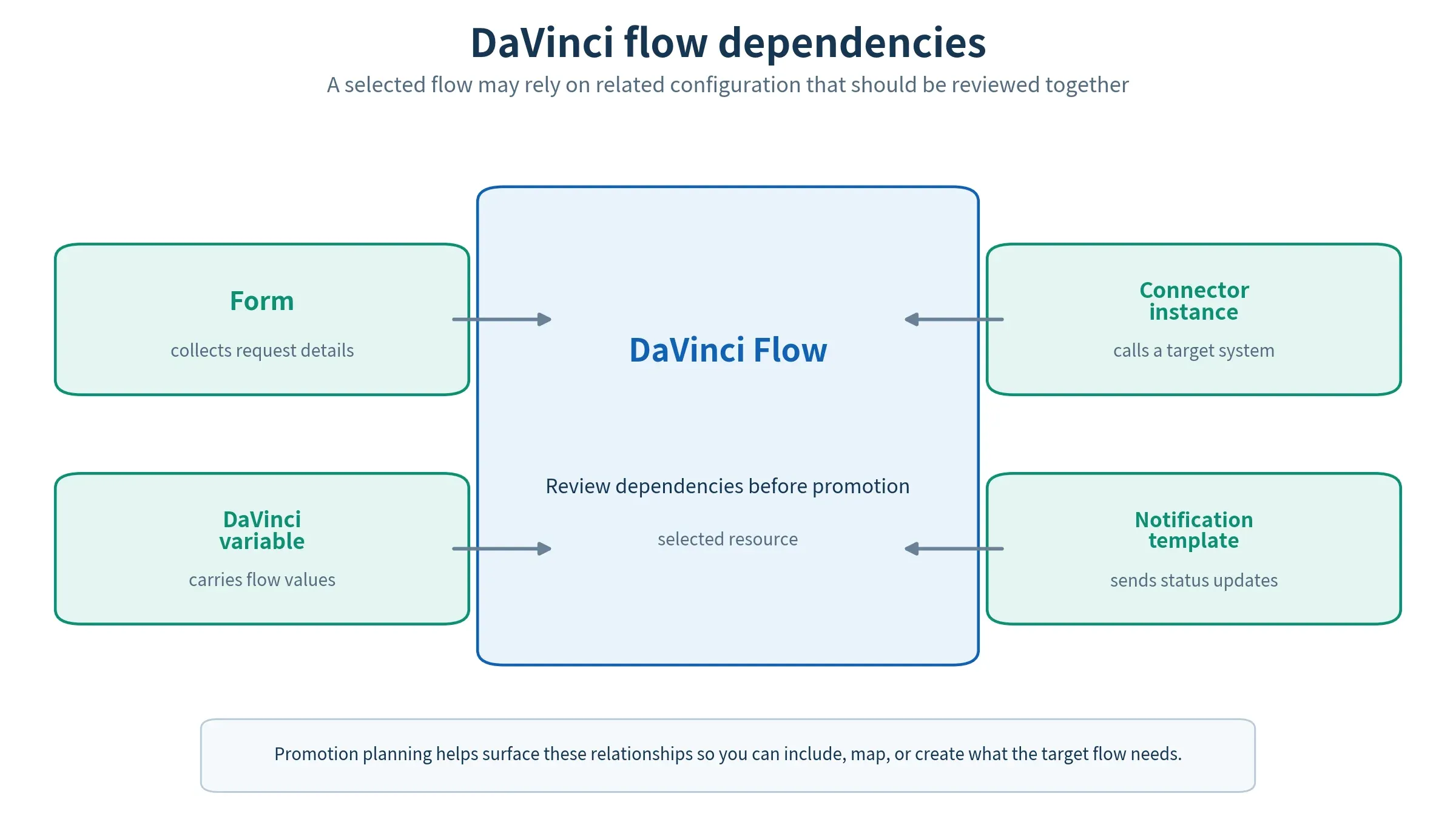 A DaVinci flow can rely on a form, connector instance, DaVinci variable, and notification template.
Environment-specific values with promotion variables
Configuration should be reusable across environments, but some values must remain environment-specific. Consider a DaVinci deployment that needs a different HR system endpoint in each environment. Before starting a promotion, define a promotion variable named HRIS_API_BASE_URL and use it to supply the value for the target environment. The variable is part of the promotion workflow, not a reference added directly to the DaVinci flow.
Development might use https://api-dev.example.com; test might use https://api-test.example.com; production might use https://api.example.com. These URLs are illustrative; the point is that the configuration model stays the same while the target value is supplied during promotion.
Promotion variables provide a controlled way to represent that difference. Create them before starting the promotion plan so the target-specific value is ready when you plan to execute a promotion.
Instead of editing the resource payload manually before every promotion, an administrator defines the variable once and supplies the appropriate value for the target environment. The rest of the configuration can remain consistent with what was tested in the source environment.
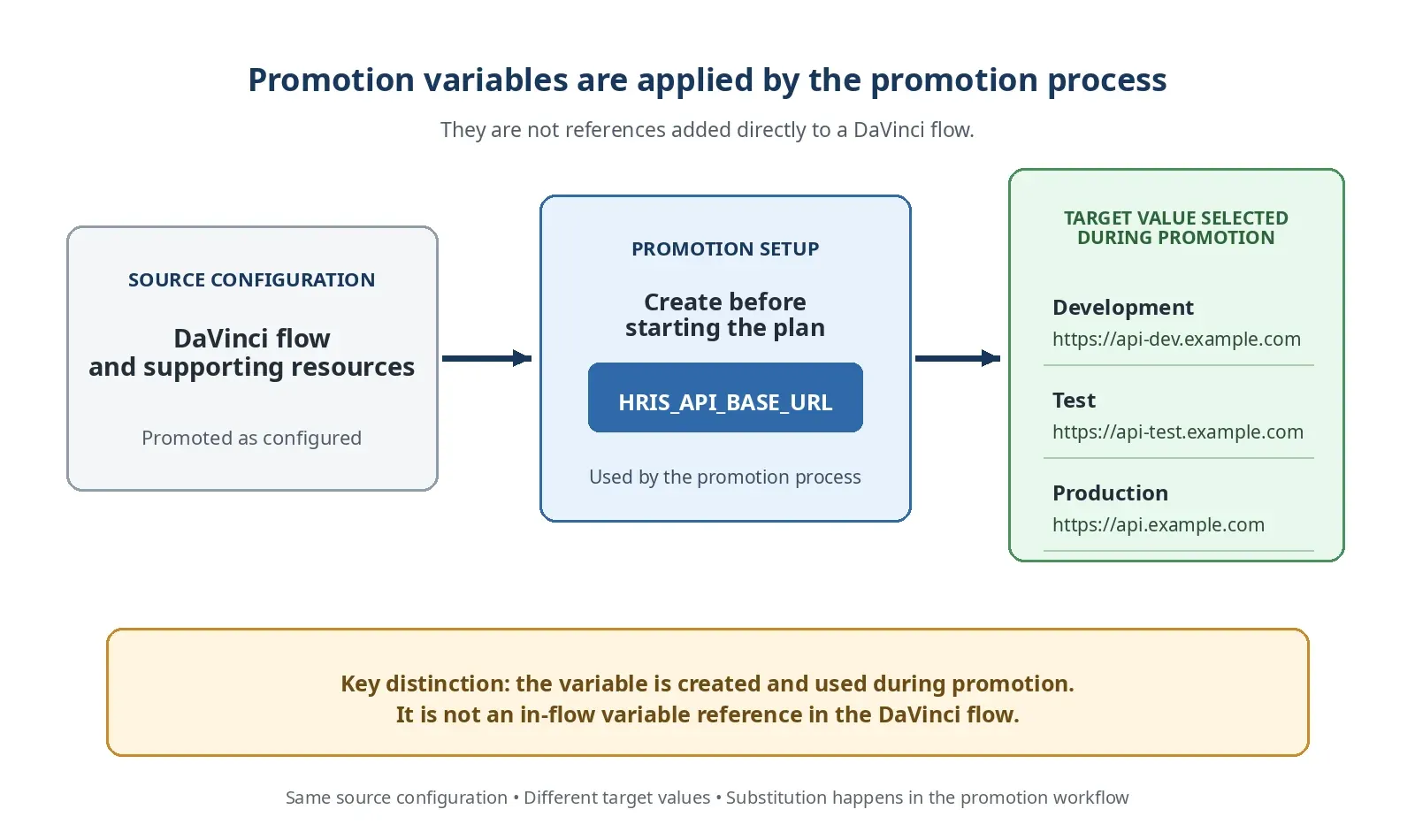 One promotion variable can resolve to different endpoint values in development, test, and production.
Recovery when a promotion does not go as planned
Even a carefully reviewed change can encounter an invalid value, an unsupported resource, or a difference between environments. Configuration management includes rollback support so that the most recent promotion can be reverted when the target environment needs to be restored to its previous state.
A practical operating model is:
- If the promotion fails, roll back first and investigate the reported error before retrying.
- If the promotion succeeds but the target environment is not in the expected state, roll back first, and identify the issue to correct it.
Rollback is not a substitute for validation, but it gives administrators a safer recovery path when a promotion produces an unexpected result.
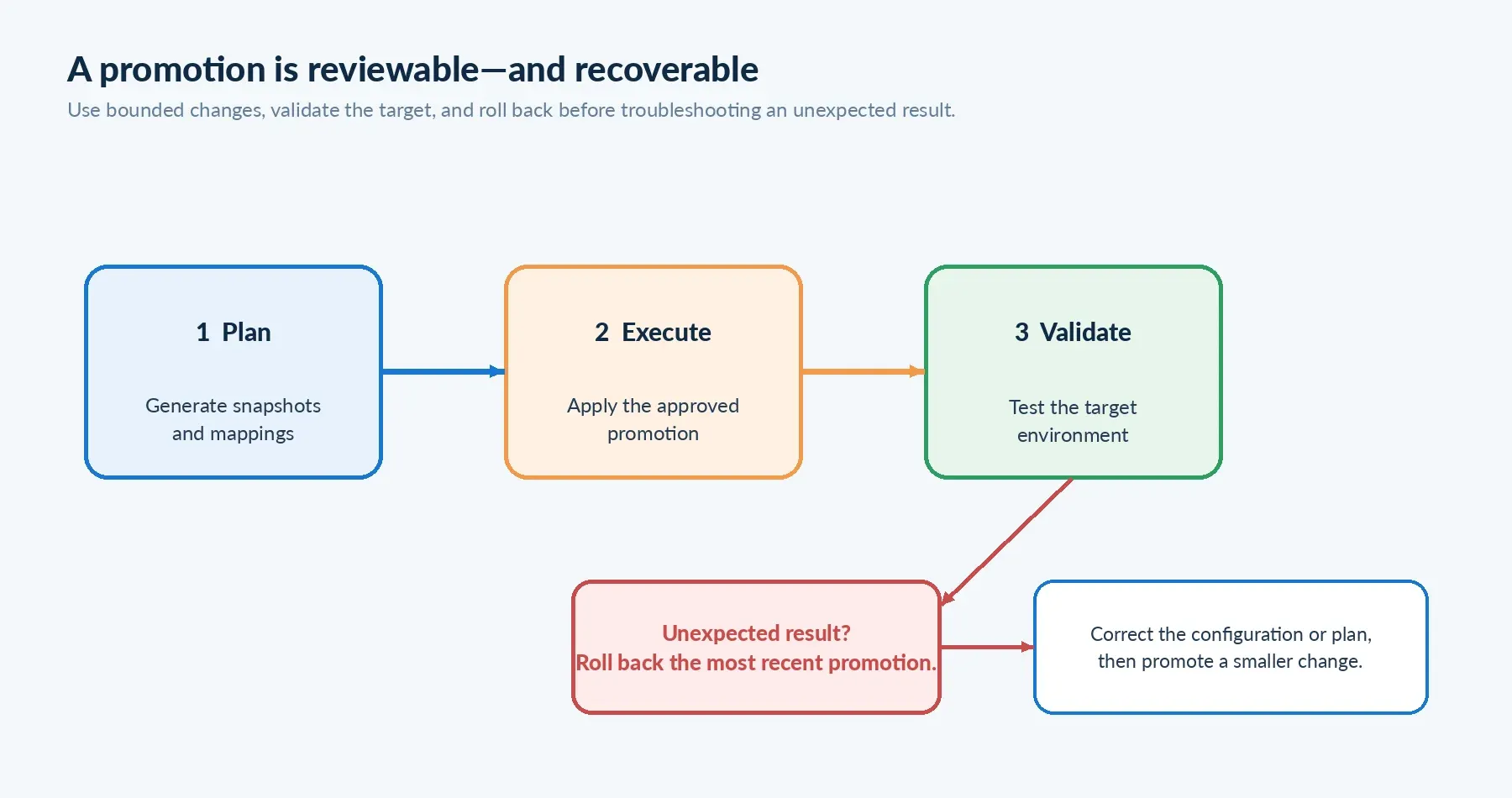 A bounded promotion workflow makes it easier to validate changes and recover before troubleshooting further.
Designing a promotion-friendly PingOne model
Configuration management works best when teams treat environment promotion as part of the design process.
A few practices help:
- Identify environment-specific values early and model them as promotion variables.
- Keep source and target environments aligned on the PingOne services and connected products they require.
- Promote small, easily testable groups of resources instead of making every change part of one large operation.
- Validate supported-resource coverage before building a deployment process around a resource.
- Keep runtime and user data out of the promotion model. User profiles, sessions, device data, and audit logs are not configuration resources to be promoted.
- Use the appropriate promotion permissions so the people who configure resources and the people who execute promotions can be governed separately.
Configuration management is not an export-and-restore mechanism for an entire tenant. It’s a controlled way to move supported configuration between environments while preserving the distinctions that matter between them. For more information, check out these promotion best practices.
Build a more repeatable identity delivery process
PingOne configuration management gives teams a native promotion workflow for the configuration behind their identity experiences. Snapshots provide visibility into source and target state. Dependency handling helps move related resources together. Promotion variables preserve environment-specific differences. Reviewable plans, audit information, and rollback support provide additional control around the change.
The broader benefit is operational: teams can spend less time recreating configuration by hand and more time validating the identity experience they intend to deliver.
To get started, refer to the PingOne configuration management documentation and the PingOne Configuration Management API documentation.
Do you have thoughts or questions on this article? Join the Ping Identity developer community to share feedback and discuss configuration management in PingOne.